Giving the blog somewhere to keep its pictures: moving static media to Cloudflare R2

I wanted to drop screenshots straight into posts without watching the repository get fatter every week. So the site got an object store — and I ended up thinking the whole hotlinking question through.
First, a reality check: Pages is not the bottleneck
Plenty of people add a CDN because they are "afraid of exceeding the quota". So I did the arithmetic first:
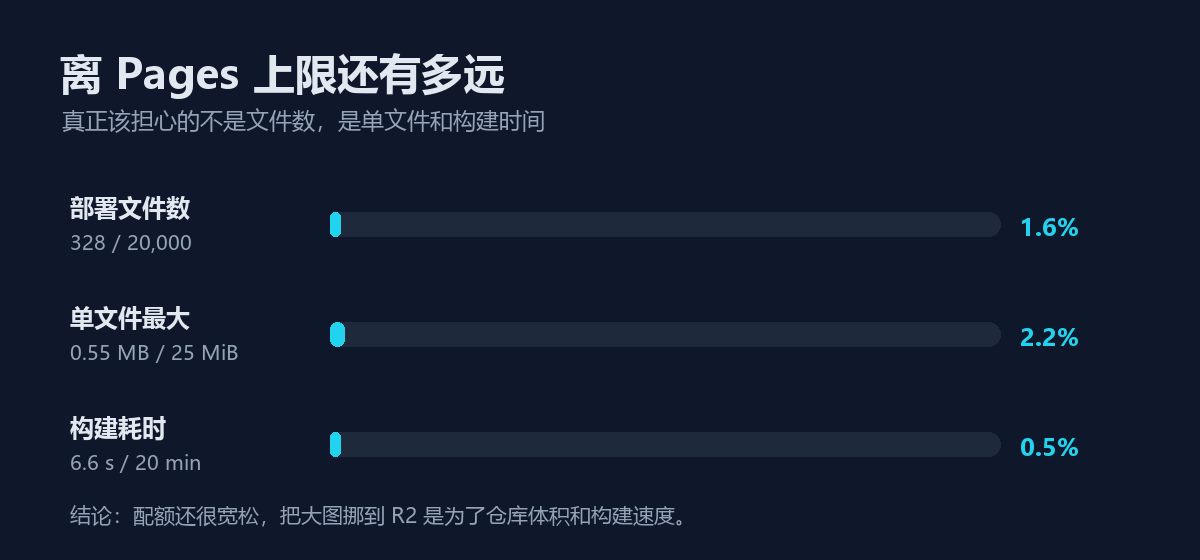
The conclusion is blunt: 1.6% of the file limit, 2.2% of the per-file limit, 0.5% of the build budget. There is roughly thirty times the headroom left.
What actually breaks first is something else:
- Repository size — binaries in git slow down clones, CI caches, and your disk.
- Build time — Docusaurus gets slower with lots of image assets, and Pages caps a build at 20 minutes.
- The 25 MiB per-file limit — only videos and uncompressed originals hit it, but when they do it is a hard failure.
So the honest reason is "repo and build", not "quota". That distinction matters: it means you only need to move the large files out, not the whole site.
The setup: public bucket plus custom domain, no Worker
There are three ways to attach object storage to a static site:
| Approach | Needs a server | Usable here |
|---|---|---|
| Private bucket + signed URLs | Yes (someone must sign) | ❌ breaks "static only" |
| Worker proxying | Yes | ❌ breaks "static only" |
| Public bucket + custom domain | No | ✅ |
I took the third. Objects live in an R2 bucket and are served directly from a dedicated cdn. subdomain — same Cloudflare account, certificate issued automatically, egress free.
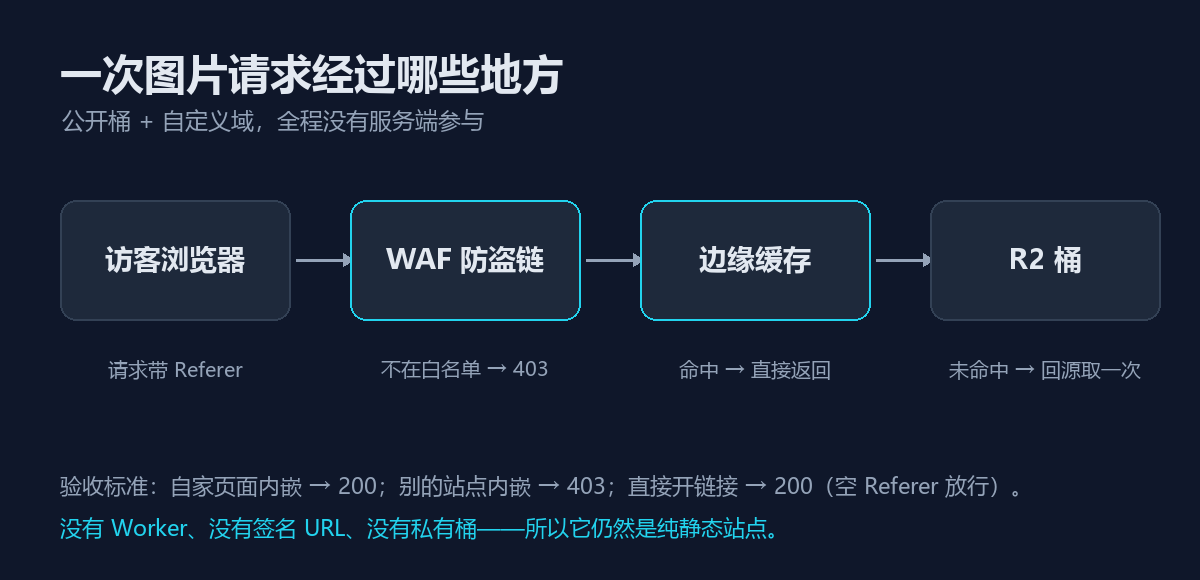
The important part: no server is involved. Requests are handled at Cloudflare's edge; a cache hit returns immediately, a miss fetches once from R2. The site still ships nothing but build output.
The filename is the version
Long cache lifetimes only work if "the same URL is always the same bytes". So the filename carries a content hash:
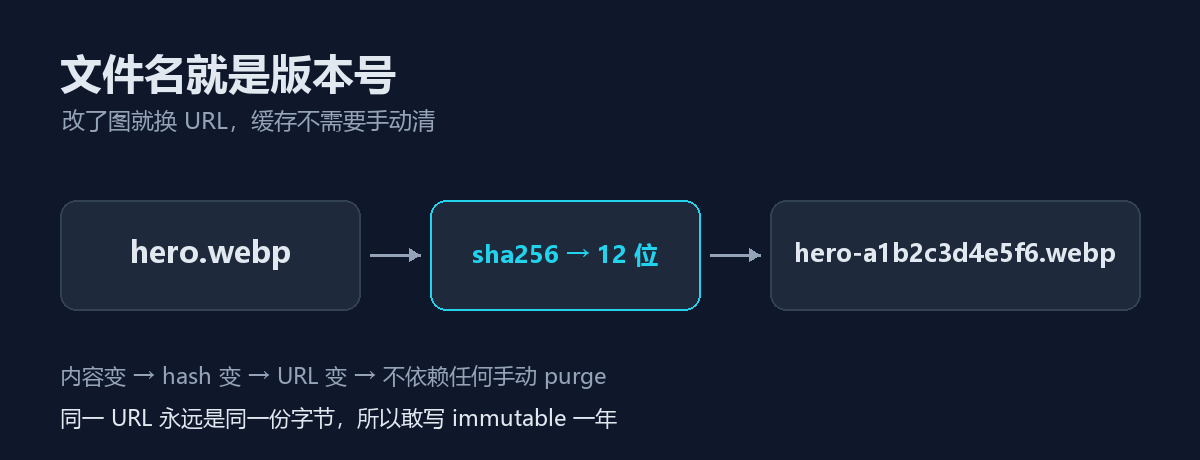
The upload script does very little: hash the file with SHA-256, take the first 12 characters, put them in the filename, set Content-Type and Cache-Control. Which makes this safe:
Cache-Control: public, max-age=31536000, immutable
The cost is explicit: changing an image means changing its URL. Overwriting an object to "update" a picture leaves the edge serving the old one — and that bug is genuinely painful to track down.
CORS does not stop hotlinking
This was the main takeaway, and the easiest thing to get wrong.
| Scenario | Restricted by CORS? |
|---|---|
Someone embeds your image with <img> | ❌ No, it renders fine |
Someone reads your image with fetch() | ✅ Yes |
| Your own lightbox reading pixels via canvas | ✅ Yes (cross-origin taints the canvas) |
In other words, CORS controls whether scripts may read the bytes — it has nothing to do with whether someone may display your image. Configuring CORS does not stop hotlinking, because <img> was never subject to it.
The only real defence is a Referer allowlist at the edge: accept references that come from this site's own domain, reject everything else.
There is a deliberate trade-off here — empty referers must be allowed. Opening an image URL directly, RSS readers, and privacy-focused browsers may all omit it, and blocking those would break legitimate visits.
A check like this stops people from casually borrowing your images; it will not stop anyone who deliberately crafts the request header, and it is not meant to. The point of a public bucket is to keep the cost bounded. Genuinely preventing it needs signed URLs, which needs a server — which exits this design entirely.
Ten minutes to configure, two hours to prove
The configuration was the easy part. Proving it actually worked was not.
Trap one: curl always returned 403. After a while I realised it was not the hotlink rule at all — the whole zone runs bot verification, even the main site returns 403 to curl. That 403 carries cf-mitigated: challenge, which looks like a WAF block but is not.
Trap two: a headless browser is also classified as a bot, so it lands on the challenge page too.
Trap three is the fun one: my first hotlink test attached the forged Referer to the challenge platform's own requests, so the challenge could never complete and the page stayed stuck — it looked like "successfully blocked" while proving nothing.
The correct sequence is two steps: load the URL normally to clear the challenge, then issue a second, separate request carrying the Referer under test. Only then is a 403 definitely attributable to the WAF.
Final results:
| Scenario | Result |
|---|---|
Embedded from our own site (Referer = site domain) | 200, image renders |
Foreign Referer | 403, no cf-mitigated header, cache-control: no-store |
Opening the URL directly (empty Referer) | 200 |
| Repeated requests | cf-cache-status: HIT |
| Object metadata | public, max-age=31536000, immutable |
Where things stand
- Bucket, custom domain, CORS, cache rule, and hotlink protection are all configured and tested
- The site has real images for the first time — the ones you are looking at
- Source files live in
media-src/and never enter git; only URLs do - Change an image, change the key. Never overwrite
One last honest note: if your site is a few megabytes with a handful of images, do not bother. Wait until the repository starts bloating and builds start slowing down — by then you will know exactly which problem you are solving.