Deploying Docusaurus to Cloudflare Pages: the full path from local to custom domain

This site is Docusaurus on Cloudflare Pages. Deploying it is not the hard part. The hard part is everything after: caching, response headers, 404s, bilingual sitemaps, absolute paths leaking into the bundle, and the two or three Cloudflare edge features that fight with your framework.
This post walks the whole path, and ends with a checklist you can run through line by line.
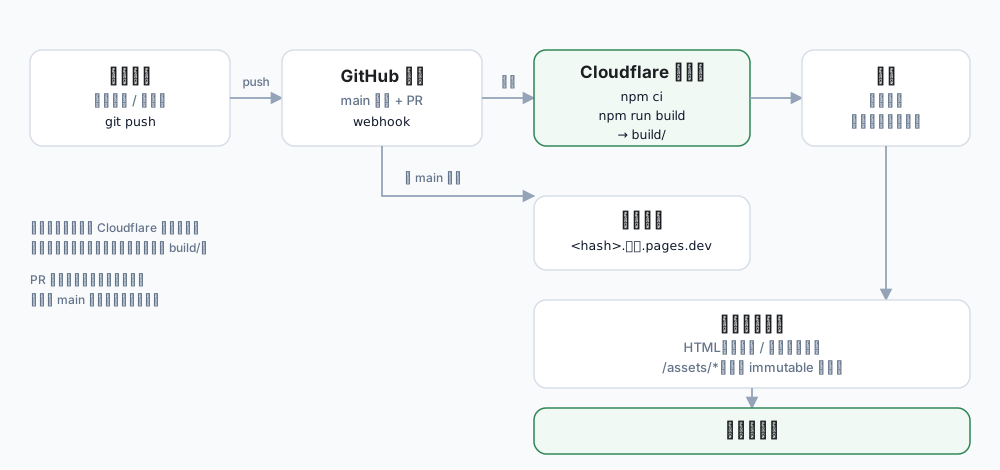
← swipe horizontally to see the full diagram →
The build runs on Cloudflare's machines. You need neither a server nor an upload of build/.
Why Pages
For a static site there are plenty of options: Vercel, Netlify, GitHub Pages, object storage plus a CDN. Pages won on practical grounds:
| Need | What Pages gives you |
|---|---|
| Free tier | 500 builds/month, 20,000 files, 25 MiB per file |
| Build & deploy | Connect a GitHub repo, push to build, atomic replacement |
| Rollback | Pick any past deployment and roll back in seconds |
| Previews | Every non-main branch gets its own preview URL |
| Domain & TLS | Automatic certificate issuance and renewal |
| Edge | Same stack as Cloudflare CDN, WAF and DNS |
That covers about 95% of what a static site needs.
1. Get it running locally first
No toolchain yet? This post assumes
node,npmandgitalready work in your terminal. If they do not, start with First steps on a new PC: installing Node.js, npm and Git on Windows — it goes from why PATH matters to a verified setup, then come back.
New project:
npx create-docusaurus@latest my-site classic
cd my-site
npm run start      # dev server with hot reload
npm run build      # production build
npm run serve      # preview the build output
Skip this step if you already have a project. The important part: make npm run build pass with zero errors locally. Debugging a failure on CI is far worse than debugging it on your own machine.
Docusaurus 3 requires Node ≥ 18; in practice, use 20 or newer.
2. Get three fields right in docusaurus.config.js
const config = {
  title: 'Connexion Collective',
  url: 'https://connexioncollective.com',  // no trailing slash
  baseUrl: '/',                            // root deployment means /
  trailingSlash: undefined,                // see below
  // ...
};
These three decide every generated URL:
| Field | What breaks if it is wrong |
|---|---|
url | sitemap, RSS, canonical, OG images all point at the wrong domain |
baseUrl | Assets 404: the page loads, CSS and JS do not |
trailingSlash | Links and generated directories disagree, producing duplicate URLs |
trailingSlash has three values:
undefined: follow the URL as written (default, least surprising)true: always/blog/post/false: always/blog/post
Changing it later rebuilds every URL on the site, so decide up front.
3. Repo and build command
Three things belong in the repo: package.json, package-lock.json, and source. build/ and node_modules/ go in .gitignore.
On CI, use npm ci rather than npm install:
npm ci          # exact lockfile install, reproducible
npm run build   # output lands in build/
The upside of npm ci is determinism: what you installed locally is what CI installs. The cost is that package-lock.json must match package.json, otherwise it fails — which is actually a feature, because it catches a stale lockfile before it reaches production.
Once the build passes, look at what actually lands in build/ — everything later in this post revolves around that directory:
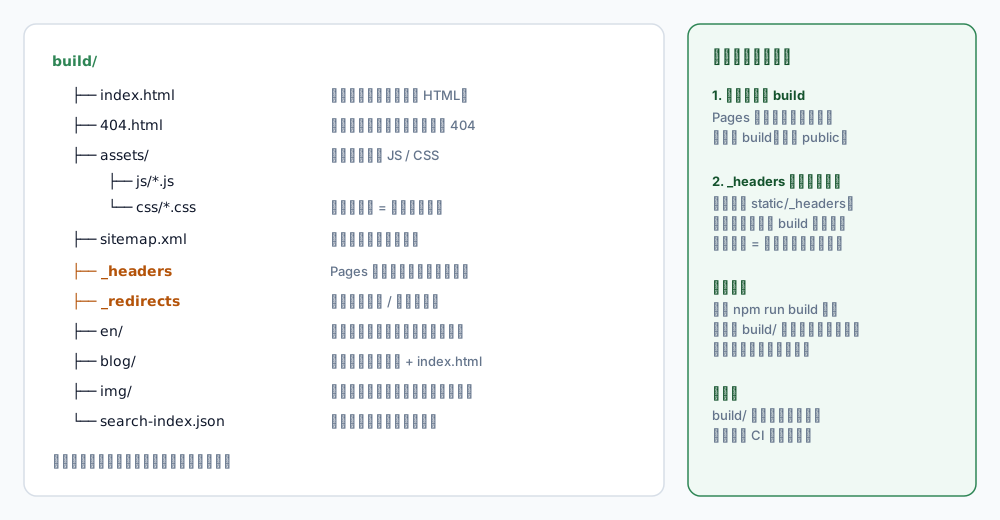
← swipe horizontally to see the full diagram →
The _headers file and 404.html in that tree are the main characters of the second half.
4. Create the Pages project
4.1 Connect the repo
Cloudflare Dashboard → Workers & Pages → Create → Pages → Connect to Git
→ pick the repo → pick the branch (main)
Three build settings:
| Field | Value |
|---|---|
| Framework preset | Docusaurus if present, otherwise None |
| Build command | npm run build |
| Build output directory | build |
The output directory is
build— notpublic, notdist. Get this wrong and the build succeeds while deploying an empty site.
4.2 Pin the Node version
Add an environment variable in the project settings:
NODE_VERSION = 20
Without it, the builder uses whatever default it has. When Docusaurus bumps its engine requirement, the build starts failing in ways that are hard to trace. This is the single most overlooked failure mode.
And: never put secrets here. The build needs Node and dependencies. A token in the build environment is a supply-chain backdoor.
4.3 First deploy
Push to main and the build starts. A few minutes later you get a xxx.pages.dev URL.
Click through the whole site on that temporary URL first, then attach the custom domain. That way, if something breaks later, you know whether it is a build problem or a domain problem.
5. Attach a custom domain
Project → Custom domains → Set up a custom domain
If the domain lives in the same Cloudflare account, the correct DNS record is created for you. Otherwise add a CNAME pointing at your-project.pages.dev.
| Item | Notes |
|---|---|
| Certificate | Issued and renewed automatically |
www | Add a redirect rule to the apex so you do not serve duplicate content |
| Propagation | Usually minutes; the certificate stays pending until DNS resolves |
After that, the pages.dev URL still works and is still public. If you do not want it indexed, block it in robots.txt or put Cloudflare Access in front of it.
6. Three things to configure after deploying
6.1 _headers: caching and security headers
Pages reads a _headers file at the root of the output directory. In a Docusaurus project, put it at static/_headers so the build copies it to build/.
/*
  X-Content-Type-Options: nosniff
  Referrer-Policy: strict-origin-when-cross-origin
  Permissions-Policy: geolocation=(), microphone=(), camera=()

/assets/*
  Cache-Control: public, max-age=31536000, immutable

/img/*
  Cache-Control: public, max-age=3600, must-revalidate
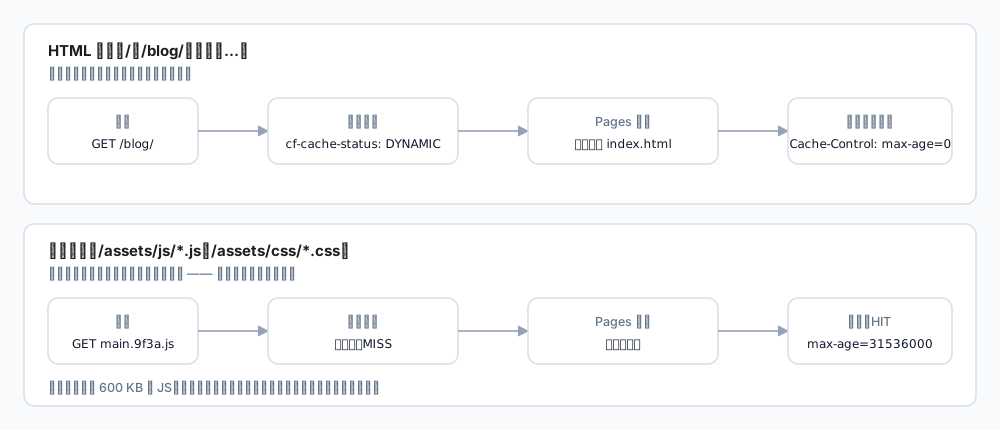
← swipe horizontally to see the full diagram →
HTML and hashed assets must be treated differently; that split is the whole point.
Why the split:
- HTML changes. Caching it for a year means visitors never see new posts.
/assets/*carries a content hash in the filename, so a change produces a new name — safe to markimmutable.
A common trap: if _headers sits in the wrong place (repo root instead of static/), Pages does not complain. It just silently does nothing. Verify by building locally and checking that build/_headers exists.
6.2 Security headers and CSP
Beyond the basics, a CSP has to match what the site actually loads. A real example:
Content-Security-Policy: default-src 'self'; script-src 'self' 'unsafe-inline' 'wasm-unsafe-eval' https://static.cloudflareinsights.com; style-src 'self' 'unsafe-inline'; img-src 'self' data: blob: https://cdn.example.com; connect-src 'self' https://cloudflareinsights.com; frame-src https://giscus.app; object-src 'none'; base-uri 'self'; form-action 'self'; frame-ancestors 'none'
| Directive | Why it is there |
|---|---|
'wasm-unsafe-eval' | Required if the page runs WASM (image compressors and the like); without it the module is blocked |
'unsafe-inline' (style) | Docusaurus ships inline styles; removing it breaks layout |
frame-ancestors 'none' | Anti-clickjacking, and stronger than X-Frame-Options |
object-src 'none' | Disables <object> / <embed>, historically a rich source of bugs |
frame-ancestorsonly works inside CSP; setting it anywhere else does nothing.
6.3 404 and sitemap
Docusaurus emits build/404.html, and Pages serves it for unknown paths while keeping status 404. That is correct behaviour.
But the sitemap may include /404 unless you exclude it:
sitemap: {
  ignorePatterns: ['/404', '/en/404'],   // exclude both locales
},
7. The eight pitfalls I actually hit
1. Absolute local paths end up in the bundle
Docusaurus serialises siteConfig into the client JS, and themes/plugins are absolute paths:
D:\Projects\my-website\node_modules\@easyops-cn\docusaurus-search-local
Harmless functionally, but it publishes your directory layout. Fix it in a postBuild hook:
// plugins/postBuildCleanup.cjs
function postBuild(context) {
  const siteDir = context.siteDir;
  const escaped = JSON.stringify(siteDir).slice(1, -1); // escaped backslashes on Windows

  for (const file of walk(context.outDir)) {
    if (!/\.(html|js|json)$/.test(file)) continue;
    let text = fs.readFileSync(file, 'utf8');
    text = text.split(escaped).join('/site');
    text = text.split(siteDir).join('/site');
    fs.writeFileSync(file, text);
  }
}
Verify by grepping build/ for your username or drive letter.
2. Cloudflare refuses prefetch and you get a pile of 503s
This one is genuinely confusing. The console shows a dozen 503s for /assets/js/*.js, yet the same URL returns 200 via curl.
The cause is Cloudflare Speed Brain, which intercepts every Sec-Purpose: prefetch request. The response says so:
cf-speculation-refused: prefetch refused: not eligible
Docusaurus's Link component uses an IntersectionObserver, so every link entering the viewport prefetches its route chunk — meaning every page load produces a dozen refused requests.
Two ways out:
- Turn Speed Brain off (zone → Speed → Optimization). Docusaurus chunk prefetch starts working again, and for an SPA that is the prefetch that actually matters.
- Disable prefetch in the front end: intercept the
window.docusaurusassignment and replaceprefetchwith a no-op.
I chose the first, because Speed Brain prefetches HTML documents while SPA navigation never requests a document. It was pure overhead plus console noise.
3. Checking production with curl gives you 403 and false conclusions
Cloudflare serves a challenge page (roughly 5 KB of HTML, status 403 or 503) to suspicious automated requests.
If you scrape the page with curl at that moment, you conclude "the page does not contain X" — while the content is fine and you were simply handed a challenge.
How to tell: check the response length and content-type; challenge pages are 5–6 KB and contain Just a moment. For real verification, use a browser — or accept that you cannot verify from this network right now.
4. Values in _headers do not match what arrives
You write X-Frame-Options: DENY, production shows SAMEORIGIN.
Cloudflare edge rules (Transform Rules, Managed Rules) override origin headers. _headers is a declaration; the edge has the final say.
Order of investigation: read the response headers, then the Cloudflare Rules, and only then suspect _headers.
5. Old Node version fails the build during install
The log shows Unsupported engine or a syntax error in a dependency. Set NODE_VERSION.
6. npm install versus npm ci
They differ in how strictly they treat the lockfile. If package-lock.json lags behind package.json, npm ci fails outright.
Habit: run npm ci && npm run build locally before pushing, matching CI.
7. Preview deployments quietly consume build quota
Every push to a non-main branch triggers a preview build. For a personal site this rarely matters, but with many branches it can approach the 500/month limit.
You can restrict previews to specific branches, or only build on pull requests.
8. Changing trailingSlash breaks existing links
The generated directory layout changes (/blog/post vs /blog/post/), so external links, bookmarks and search results all point at the old form.
If you must change it, add a fallback in _redirects:
/blog/:slug/ /blog/:slug 301
8. Go-live checklist
Run through this after the first successful deploy:
| Check | Expected |
|---|---|
| Home, post, doc pages | 200, styles intact |
| A nonexistent path | 404, with your custom page |
/sitemap.xml, /robots.txt | 200, correct domain inside |
| RSS / Atom | 200, valid feed |
| Search index | 200 (usually search-index.json) |
Cache headers on /assets/* | max-age=31536000, immutable |
| Cache headers on HTML | max-age=0 or no-cache |
| Security headers | CSP, nosniff, frame-ancestors present |
| Custom domain | Valid certificate, www redirects correctly |
| Mobile at 375px | No horizontal scroll, nav expands |
| Local paths in output | None (no drive letters, no usernames) |
9. Cost and limits
| Item | Free tier |
|---|---|
| Builds | 500/month |
| Files per site | 20,000 |
| Max file size | 25 MiB |
| Bandwidth | Unlimited (served by Cloudflare CDN) |
| Custom domain | Supported, automatic certificate |
A personal site will not come close. The only two things to watch are build count (many branches, frequent pushes) and file size (do not commit video).
Wrap-up
The whole thing compresses to five steps:
1. Local `npm run build` passes
2. Connect the repo: build command `npm run build`, output `build`
3. Set NODE_VERSION, attach the custom domain
4. Write `static/_headers` (cache + security)
5. Walk the checklist
The time sink is not "how do I deploy". It is how do I confirm the deployment is correct: does caching work, were the headers overridden, did anything leak into the output, what are those red entries in the console actually saying.
That part is what makes a static site solid.