<?xml version="1.0" encoding="utf-8"?><?xml-stylesheet type="text/xsl" href="atom.xsl"?>
<feed xmlns="http://www.w3.org/2005/Atom">
    <id>https://connexioncollective.com/en/blog</id>
    <title>Connexion Collective Blog</title>
    <updated>2026-10-28T07:10:00.000Z</updated>
    <generator>https://github.com/jpmonette/feed</generator>
    <link rel="alternate" href="https://connexioncollective.com/en/blog"/>
    <subtitle>Connexion Collective Blog</subtitle>
    <icon>https://connexioncollective.com/en/img/favicon.ico</icon>
    <entry>
        <title type="html"><![CDATA[First steps on a new PC: installing Node.js, npm and Git on Windows]]></title>
        <id>https://connexioncollective.com/en/blog/windows-dev-environment</id>
        <link href="https://connexioncollective.com/en/blog/windows-dev-environment"/>
        <updated>2026-10-28T07:10:00.000Z</updated>
        <summary type="html"><![CDATA[A freshly installed Windows has no npm and no git, so both commands fail immediately. This walks from why PATH matters to a working setup — install Node.js and Git, verify the environment, run your first project, with official download links and a table of common errors.]]></summary>
        <content type="html"><![CDATA[<p>A brand-new Windows machine, a fresh terminal, <code>npm -v</code>, and this happens:</p>
<div class="language-text codeBlockContainer_Ckt0 theme-code-block" style="--prism-color:#393A34;--prism-background-color:#f6f8fa"><div class="codeBlockContent_QJqH"><pre tabindex="0" class="prism-code language-text codeBlock_bY9V thin-scrollbar" style="color:#393A34;background-color:#f6f8fa"><code class="codeBlockLines_e6Vv"><div class="token-line" style="color:#393A34"><span class="token plain">'npm' is not recognized as an internal or external command,</span><br></div><div class="token-line" style="color:#393A34"><span class="token plain">operable program or batch file.</span><br></div></code></pre></div></div>
<p>Your command is fine. The machine is fine. <strong>Windows simply does not ship with Node.js, npm or Git.</strong></p>
<p>This post starts from why the command fails and ends with a verified environment. No prior knowledge assumed.</p>
<!-- -->
<h2 class="anchor anchorTargetStickyNavbar_Vzrq" id="1-why-commands-can-be-typed-at-all">1. Why commands can be typed at all<a href="https://connexioncollective.com/en/blog/windows-dev-environment#1-why-commands-can-be-typed-at-all" class="hash-link" aria-label="Direct link to 1. Why commands can be typed at all" title="Direct link to 1. Why commands can be typed at all" translate="no">​</a></h2>
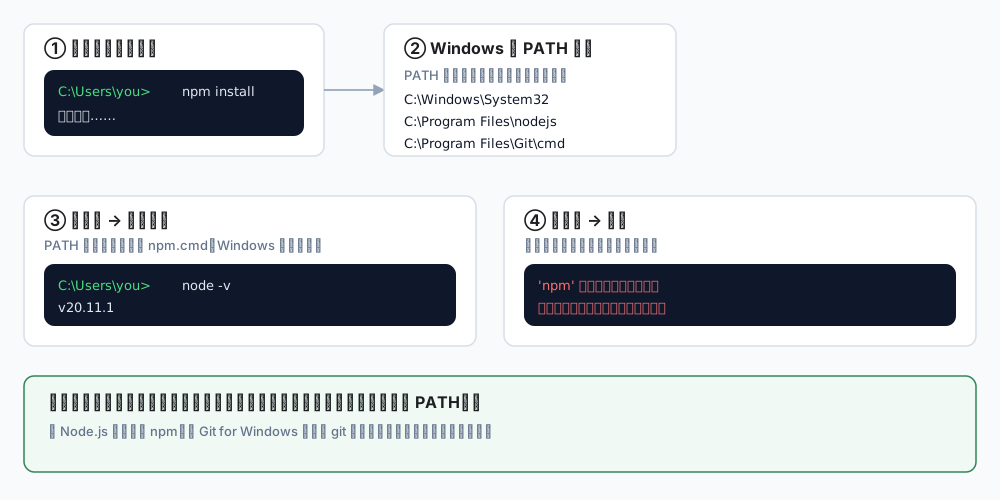
<p>When you type a word into a terminal, Windows walks through a list of directories called <strong>PATH</strong>, looking for a matching program:</p>
<div class="blog-diagram"><img src="https://connexioncollective.com/img/blog/windows-env/fig1-path.svg" alt="How command lookup works: you type npm, Windows searches the PATH directories, runs it if found, otherwise reports the command as not recognized" width="1000" height="500" loading="lazy"></div>
<p class="blog-diagram__hint">← swipe horizontally to see the full diagram →</p>
<p>So "command not found" has exactly two causes:</p>
<ol>
<li class=""><strong>The program is not installed</strong></li>
<li class=""><strong>It is installed, but its directory is not on PATH</strong></li>
</ol>
<p>The installers for Node.js and Git add themselves to PATH by default — as long as you do not untick that option.</p>
<blockquote>
<p>Background: what you type is usually a real file — <code>.exe</code>, <code>.cmd</code> or <code>.ps1</code>. <code>npm</code> is <code>npm.cmd</code>, and <code>git</code> is <code>git.exe</code>.</p>
</blockquote>
<h2 class="anchor anchorTargetStickyNavbar_Vzrq" id="2-what-to-install">2. What to install<a href="https://connexioncollective.com/en/blog/windows-dev-environment#2-what-to-install" class="hash-link" aria-label="Direct link to 2. What to install" title="Direct link to 2. What to install" translate="no">​</a></h2>
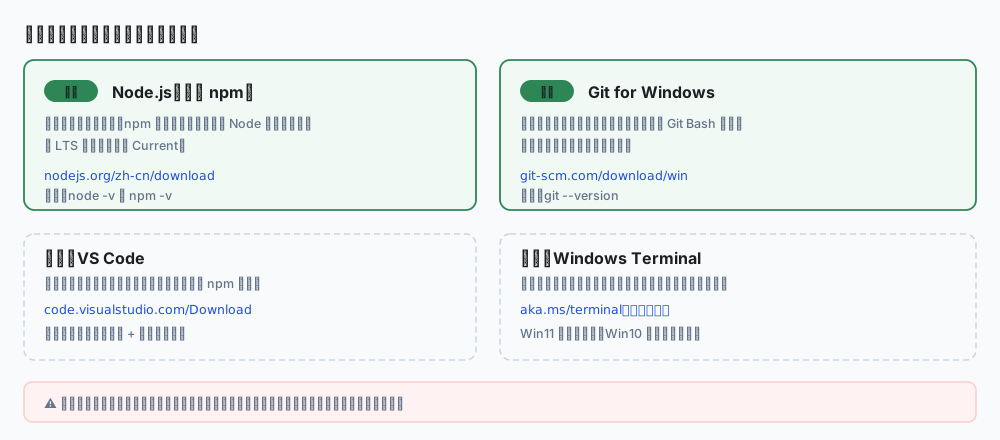
<p>Two are required, two are optional:</p>
<div class="blog-diagram"><img src="https://connexioncollective.com/img/blog/windows-env/fig2-checklist.svg" alt="Install list: Node.js and Git are required, VS Code and Windows Terminal optional, with official URLs" width="1000" height="440" loading="lazy"></div>
<p class="blog-diagram__hint">← swipe horizontally to see the full diagram →</p>
<table><thead><tr><th>Software</th><th>Purpose</th><th>Official download</th></tr></thead><tbody><tr><td><strong>Node.js (LTS)</strong></td><td>Runs the project, bundles npm</td><td><a href="https://nodejs.org/en/download" target="_blank" rel="noopener noreferrer" class="">nodejs.org/en/download</a></td></tr><tr><td><strong>Git for Windows</strong></td><td>Fetch code, commit changes</td><td><a href="https://git-scm.com/download/win" target="_blank" rel="noopener noreferrer" class="">git-scm.com/download/win</a></td></tr><tr><td>VS Code (optional)</td><td>Code editor</td><td><a href="https://code.visualstudio.com/Download" target="_blank" rel="noopener noreferrer" class="">code.visualstudio.com/Download</a></td></tr><tr><td>Windows Terminal (optional)</td><td>A better terminal</td><td><a href="https://aka.ms/terminal" target="_blank" rel="noopener noreferrer" class="">aka.ms/terminal</a></td></tr></tbody></table>
<p><strong>Two version channels:</strong></p>
<ul>
<li class=""><strong>LTS</strong>: long-term support, stable — pick this</li>
<li class=""><strong>Current</strong>: newest features, newest bugs — not for a first setup</li>
</ul>
<blockquote>
<p>⚠️ Download only from the official links above. Third-party "green builds" or "all-in-one packs" can be modified, and the risk is not worth it for commands that touch your accounts.</p>
</blockquote>
<h2 class="anchor anchorTargetStickyNavbar_Vzrq" id="3-install-nodejs">3. Install Node.js<a href="https://connexioncollective.com/en/blog/windows-dev-environment#3-install-nodejs" class="hash-link" aria-label="Direct link to 3. Install Node.js" title="Direct link to 3. Install Node.js" translate="no">​</a></h2>
<h3 class="anchor anchorTargetStickyNavbar_Vzrq" id="31-download">3.1 Download<a href="https://connexioncollective.com/en/blog/windows-dev-environment#31-download" class="hash-link" aria-label="Direct link to 3.1 Download" title="Direct link to 3.1 Download" translate="no">​</a></h3>
<p>Open <a href="https://nodejs.org/en/download" target="_blank" rel="noopener noreferrer" class="">nodejs.org/en/download</a>, pick the <strong>LTS</strong> column, download <strong>Windows Installer (.msi) 64-bit</strong>.</p>
<h3 class="anchor anchorTargetStickyNavbar_Vzrq" id="32-install">3.2 Install<a href="https://connexioncollective.com/en/blog/windows-dev-environment#32-install" class="hash-link" aria-label="Direct link to 3.2 Install" title="Direct link to 3.2 Install" translate="no">​</a></h3>
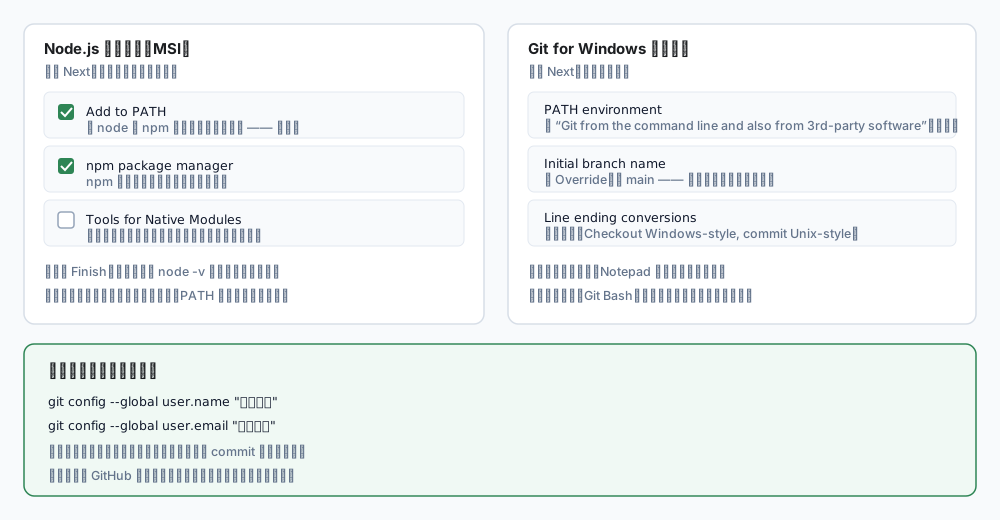
<p>Run the installer and click <code>Next</code> all the way through, pausing on one page:</p>
<div class="blog-diagram"><img src="https://connexioncollective.com/img/blog/windows-env/fig3-installers.svg" alt="The options that matter in the Node.js and Git installers: Add to PATH, npm, and the default branch main" width="1000" height="520" loading="lazy"></div>
<p class="blog-diagram__hint">← swipe horizontally to see the full diagram →</p>
<table><thead><tr><th>Option</th><th>Choice</th></tr></thead><tbody><tr><td><strong>Add to PATH</strong></td><td><strong>Keep it checked</strong> — this is the important one</td></tr><tr><td><strong>npm package manager</strong></td><td>Keep checked; npm comes with Node</td></tr><tr><td><strong>Tools for Native Modules</strong></td><td><strong>Leave unchecked</strong> — most front-end work never needs it, and it installs gigabytes of compilers</td></tr></tbody></table>
<p>Click <code>Finish</code>.</p>
<h3 class="anchor anchorTargetStickyNavbar_Vzrq" id="33-verify">3.3 Verify<a href="https://connexioncollective.com/en/blog/windows-dev-environment#33-verify" class="hash-link" aria-label="Direct link to 3.3 Verify" title="Direct link to 3.3 Verify" translate="no">​</a></h3>
<p><strong>Close the old terminal and open a new one</strong> (PATH is read when a terminal starts, so an old window will not see the change).</p>
<div class="language-powershell codeBlockContainer_Ckt0 theme-code-block" style="--prism-color:#393A34;--prism-background-color:#f6f8fa"><div class="codeBlockContent_QJqH"><pre tabindex="0" class="prism-code language-powershell codeBlock_bY9V thin-scrollbar" style="color:#393A34;background-color:#f6f8fa"><code class="codeBlockLines_e6Vv"><div class="token-line" style="color:#393A34"><span class="token plain">node -v</span><br></div></code></pre></div></div>
<p>Expected output, something like:</p>
<div class="language-text codeBlockContainer_Ckt0 theme-code-block" style="--prism-color:#393A34;--prism-background-color:#f6f8fa"><div class="codeBlockContent_QJqH"><pre tabindex="0" class="prism-code language-text codeBlock_bY9V thin-scrollbar" style="color:#393A34;background-color:#f6f8fa"><code class="codeBlockLines_e6Vv"><div class="token-line" style="color:#393A34"><span class="token plain">v20.11.1</span><br></div></code></pre></div></div>
<p>Then npm:</p>
<div class="language-powershell codeBlockContainer_Ckt0 theme-code-block" style="--prism-color:#393A34;--prism-background-color:#f6f8fa"><div class="codeBlockContent_QJqH"><pre tabindex="0" class="prism-code language-powershell codeBlock_bY9V thin-scrollbar" style="color:#393A34;background-color:#f6f8fa"><code class="codeBlockLines_e6Vv"><div class="token-line" style="color:#393A34"><span class="token plain">npm -v</span><br></div></code></pre></div></div>
<div class="language-text codeBlockContainer_Ckt0 theme-code-block" style="--prism-color:#393A34;--prism-background-color:#f6f8fa"><div class="codeBlockContent_QJqH"><pre tabindex="0" class="prism-code language-text codeBlock_bY9V thin-scrollbar" style="color:#393A34;background-color:#f6f8fa"><code class="codeBlockLines_e6Vv"><div class="token-line" style="color:#393A34"><span class="token plain">10.2.4</span><br></div></code></pre></div></div>
<p>Different numbers are fine. Any version output means it works.</p>
<h2 class="anchor anchorTargetStickyNavbar_Vzrq" id="4-install-git">4. Install Git<a href="https://connexioncollective.com/en/blog/windows-dev-environment#4-install-git" class="hash-link" aria-label="Direct link to 4. Install Git" title="Direct link to 4. Install Git" translate="no">​</a></h2>
<h3 class="anchor anchorTargetStickyNavbar_Vzrq" id="41-download">4.1 Download<a href="https://connexioncollective.com/en/blog/windows-dev-environment#41-download" class="hash-link" aria-label="Direct link to 4.1 Download" title="Direct link to 4.1 Download" translate="no">​</a></h3>
<p>Open <a href="https://git-scm.com/download/win" target="_blank" rel="noopener noreferrer" class="">git-scm.com/download/win</a> and download <strong>64-bit Git for Windows Setup</strong> (not the Portable build).</p>
<h3 class="anchor anchorTargetStickyNavbar_Vzrq" id="42-install">4.2 Install<a href="https://connexioncollective.com/en/blog/windows-dev-environment#42-install" class="hash-link" aria-label="Direct link to 4.2 Install" title="Direct link to 4.2 Install" translate="no">​</a></h3>
<p>Click <code>Next</code> through everything; only three pages are worth a look:</p>
<table><thead><tr><th>Page</th><th>Recommendation</th></tr></thead><tbody><tr><td><strong>Adjusting your PATH environment</strong></td><td>Keep the default: <em>Git from the command line and also from 3rd-party software</em></td></tr><tr><td><strong>Adjusting the name of the initial branch</strong></td><td>Choose <em>Override</em>, type <code>main</code></td></tr><tr><td><strong>Configuring the line ending conversions</strong></td><td>Keep the default (<em>Checkout Windows-style, commit Unix-style</em>)</td></tr></tbody></table>
<p>The editor page does not matter; you can change it later.</p>
<p>You also get <strong>Git Bash</strong>, a Unix-like terminal that is often friendlier for the commands in this series.</p>
<h3 class="anchor anchorTargetStickyNavbar_Vzrq" id="43-set-your-identity">4.3 Set your identity<a href="https://connexioncollective.com/en/blog/windows-dev-environment#43-set-your-identity" class="hash-link" aria-label="Direct link to 4.3 Set your identity" title="Direct link to 4.3 Set your identity" translate="no">​</a></h3>
<p>Git needs to know who authored a commit. Right after installing, run:</p>
<div class="language-bash codeBlockContainer_Ckt0 theme-code-block" style="--prism-color:#393A34;--prism-background-color:#f6f8fa"><div class="codeBlockContent_QJqH"><pre tabindex="0" class="prism-code language-bash codeBlock_bY9V thin-scrollbar" style="color:#393A34;background-color:#f6f8fa"><code class="codeBlockLines_e6Vv"><div class="token-line" style="color:#393A34"><span class="token plain">git config --global user.name "Your Name"</span><br></div><div class="token-line" style="color:#393A34"><span class="token plain">git config --global user.email "you@example.com"</span><br></div></code></pre></div></div>
<ul>
<li class="">Use the email tied to your GitHub account, otherwise commits will not count toward your contribution graph</li>
<li class="">This is a one-time setup</li>
</ul>
<p>Verify:</p>
<div class="language-bash codeBlockContainer_Ckt0 theme-code-block" style="--prism-color:#393A34;--prism-background-color:#f6f8fa"><div class="codeBlockContent_QJqH"><pre tabindex="0" class="prism-code language-bash codeBlock_bY9V thin-scrollbar" style="color:#393A34;background-color:#f6f8fa"><code class="codeBlockLines_e6Vv"><div class="token-line" style="color:#393A34"><span class="token plain">git config --global --list</span><br></div></code></pre></div></div>
<h2 class="anchor anchorTargetStickyNavbar_Vzrq" id="5-three-commands-to-confirm-the-environment">5. Three commands to confirm the environment<a href="https://connexioncollective.com/en/blog/windows-dev-environment#5-three-commands-to-confirm-the-environment" class="hash-link" aria-label="Direct link to 5. Three commands to confirm the environment" title="Direct link to 5. Three commands to confirm the environment" translate="no">​</a></h2>
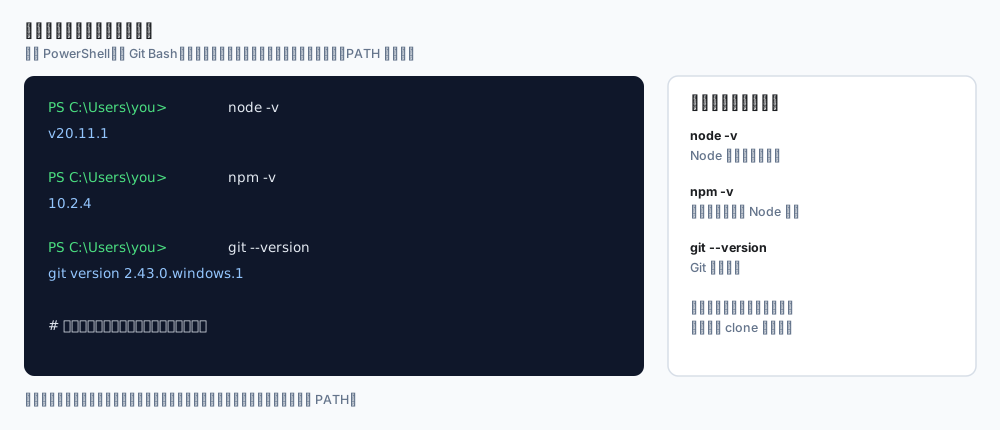
<div class="blog-diagram"><img src="https://connexioncollective.com/img/blog/windows-env/fig4-verify.svg" alt="Verifying the environment: node -v, npm -v and git --version with expected output" width="1000" height="430" loading="lazy"></div>
<p class="blog-diagram__hint">← swipe horizontally to see the full diagram →</p>
<div class="language-powershell codeBlockContainer_Ckt0 theme-code-block" style="--prism-color:#393A34;--prism-background-color:#f6f8fa"><div class="codeBlockContent_QJqH"><pre tabindex="0" class="prism-code language-powershell codeBlock_bY9V thin-scrollbar" style="color:#393A34;background-color:#f6f8fa"><code class="codeBlockLines_e6Vv"><div class="token-line" style="color:#393A34"><span class="token plain">node -v</span><br></div><div class="token-line" style="color:#393A34"><span class="token plain">npm -v</span><br></div><div class="token-line" style="color:#393A34"><span class="token plain">git --version</span><br></div></code></pre></div></div>
<p>If all three print a version, you are done.</p>
<p>To see where a program actually lives, use <code>where</code>:</p>
<div class="language-powershell codeBlockContainer_Ckt0 theme-code-block" style="--prism-color:#393A34;--prism-background-color:#f6f8fa"><div class="codeBlockContent_QJqH"><pre tabindex="0" class="prism-code language-powershell codeBlock_bY9V thin-scrollbar" style="color:#393A34;background-color:#f6f8fa"><code class="codeBlockLines_e6Vv"><div class="token-line" style="color:#393A34"><span class="token plain">where node</span><br></div><div class="token-line" style="color:#393A34"><span class="token plain">where npm</span><br></div><div class="token-line" style="color:#393A34"><span class="token plain">where git</span><br></div></code></pre></div></div>
<p>It prints the full path. <strong>If <code>where</code> finds nothing but the program is clearly installed</strong>, PATH is misconfigured — reinstalling with <code>Add to PATH</code> ticked is the quickest fix.</p>
<h2 class="anchor anchorTargetStickyNavbar_Vzrq" id="6-run-your-first-project">6. Run your first project<a href="https://connexioncollective.com/en/blog/windows-dev-environment#6-run-your-first-project" class="hash-link" aria-label="Direct link to 6. Run your first project" title="Direct link to 6. Run your first project" translate="no">​</a></h2>
<p>A working toolchain is not the same as a working project. Clone a public repository to practise:</p>
<div class="language-bash codeBlockContainer_Ckt0 theme-code-block" style="--prism-color:#393A34;--prism-background-color:#f6f8fa"><div class="codeBlockContent_QJqH"><pre tabindex="0" class="prism-code language-bash codeBlock_bY9V thin-scrollbar" style="color:#393A34;background-color:#f6f8fa"><code class="codeBlockLines_e6Vv"><div class="token-line" style="color:#393A34"><span class="token plain"># 1. Pick a folder for code</span><br></div><div class="token-line" style="color:#393A34"><span class="token plain">cd D:\Projects</span><br></div><div class="token-line" style="color:#393A34"><span class="token plain" style="display:inline-block"></span><br></div><div class="token-line" style="color:#393A34"><span class="token plain"># 2. Clone</span><br></div><div class="token-line" style="color:#393A34"><span class="token plain">git clone https://github.com/LxHanesser/Connexion-Collective.git</span><br></div><div class="token-line" style="color:#393A34"><span class="token plain" style="display:inline-block"></span><br></div><div class="token-line" style="color:#393A34"><span class="token plain"># 3. Enter it</span><br></div><div class="token-line" style="color:#393A34"><span class="token plain">cd Connexion-Collective</span><br></div><div class="token-line" style="color:#393A34"><span class="token plain" style="display:inline-block"></span><br></div><div class="token-line" style="color:#393A34"><span class="token plain"># 4. Install dependencies (use ci when a lockfile exists)</span><br></div><div class="token-line" style="color:#393A34"><span class="token plain">npm ci</span><br></div><div class="token-line" style="color:#393A34"><span class="token plain" style="display:inline-block"></span><br></div><div class="token-line" style="color:#393A34"><span class="token plain"># 5. Start the dev server</span><br></div><div class="token-line" style="color:#393A34"><span class="token plain">npm run start</span><br></div></code></pre></div></div>
<p>Open <code>http://localhost:3000</code> and the site should be running.</p>
<h3 class="anchor anchorTargetStickyNavbar_Vzrq" id="npm-ci-versus-npm-install"><code>npm ci</code> versus <code>npm install</code><a href="https://connexioncollective.com/en/blog/windows-dev-environment#npm-ci-versus-npm-install" class="hash-link" aria-label="Direct link to npm-ci-versus-npm-install" title="Direct link to npm-ci-versus-npm-install" translate="no">​</a></h3>
<table><thead><tr><th>Command</th><th>When</th></tr></thead><tbody><tr><td><code>npm install</code></td><td>Day-to-day work, adding or changing dependencies</td></tr><tr><td><code>npm ci</code></td><td><strong>Cloning someone else's project</strong>: installs exactly what <code>package-lock.json</code> says, faster and identical</td></tr></tbody></table>
<p>If you remember one rule: <strong>cloned project, use <code>npm ci</code></strong>.</p>
<h2 class="anchor anchorTargetStickyNavbar_Vzrq" id="7-the-second-error-everyone-hits-npmps1">7. The second error everyone hits: npm.ps1<a href="https://connexioncollective.com/en/blog/windows-dev-environment#7-the-second-error-everyone-hits-npmps1" class="hash-link" aria-label="Direct link to 7. The second error everyone hits: npm.ps1" title="Direct link to 7. The second error everyone hits: npm.ps1" translate="no">​</a></h2>
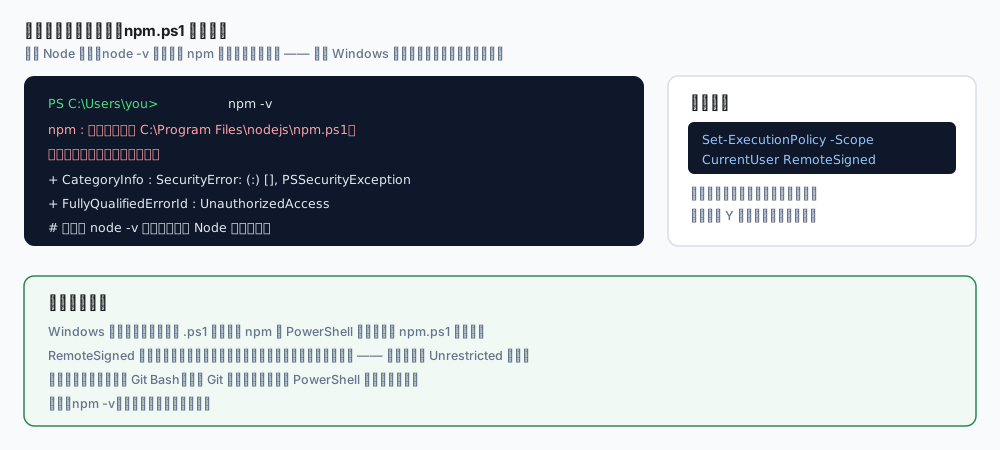
<p>Node is installed and <code>node -v</code> works, but <code>npm</code> throws a wall of red text:</p>
<div class="blog-diagram"><img src="https://connexioncollective.com/img/blog/windows-env/fig5-execution-policy.svg" alt="PowerShell refuses to load npm.ps1 because script execution is disabled, fixed with one Set-ExecutionPolicy command" width="1000" height="450" loading="lazy"></div>
<p class="blog-diagram__hint">← swipe horizontally to see the full diagram →</p>
<p>That is Windows <strong>script execution policy</strong>, not a broken Node install. One line fixes it:</p>
<div class="language-powershell codeBlockContainer_Ckt0 theme-code-block" style="--prism-color:#393A34;--prism-background-color:#f6f8fa"><div class="codeBlockContent_QJqH"><pre tabindex="0" class="prism-code language-powershell codeBlock_bY9V thin-scrollbar" style="color:#393A34;background-color:#f6f8fa"><code class="codeBlockLines_e6Vv"><div class="token-line" style="color:#393A34"><span class="token plain">Set-ExecutionPolicy -Scope CurrentUser RemoteSigned</span><br></div></code></pre></div></div>
<p>Press <code>Y</code>, then reopen the terminal.</p>
<table><thead><tr><th>Argument</th><th>Meaning</th></tr></thead><tbody><tr><td><code>-Scope CurrentUser</code></td><td>Affects only your user, not the machine</td></tr><tr><td><code>RemoteSigned</code></td><td>Local scripts run; downloaded scripts must be signed</td></tr></tbody></table>
<p>Much safer than setting <code>Unrestricted</code>.</p>
<p>If you would rather not change system settings, use <strong>Git Bash</strong> (installed with Git); it is not subject to this policy.</p>
<h2 class="anchor anchorTargetStickyNavbar_Vzrq" id="8-common-error-table">8. Common error table<a href="https://connexioncollective.com/en/blog/windows-dev-environment#8-common-error-table" class="hash-link" aria-label="Direct link to 8. Common error table" title="Direct link to 8. Common error table" translate="no">​</a></h2>
<table><thead><tr><th>Error</th><th>Cause</th><th>Fix</th></tr></thead><tbody><tr><td><code>'npm' is not recognized</code></td><td>Node missing, or not on PATH</td><td>Reinstall with <code>Add to PATH</code>; reopen the terminal</td></tr><tr><td><code>npm.ps1 cannot be loaded, running scripts is disabled</code></td><td>PowerShell policy</td><td><code>Set-ExecutionPolicy -Scope CurrentUser RemoteSigned</code></td></tr><tr><td><code>'git' is not recognized</code></td><td>Git missing, or PATH not set</td><td>Reinstall Git, keep the default PATH option</td></tr><tr><td><code>EPERM</code> / <code>EACCES</code></td><td>Permissions, files locked</td><td>Avoid system folders; pause antivirus scanning</td></tr><tr><td><code>Unsupported engine</code></td><td>Node too old</td><td>Install the latest LTS</td></tr><tr><td><code>fatal: not a git repository</code></td><td>Wrong directory</td><td><code>cd</code> into the project first</td></tr><tr><td><code>Host key verification failed</code></td><td>SSH used without keys</td><td>Clone over HTTPS instead</td></tr><tr><td>Garbled Chinese output</td><td>Terminal encoding</td><td>Use Windows Terminal, or <code>chcp 65001</code></td></tr><tr><td><code>npm ERR! network</code></td><td>Network or proxy</td><td>Check proxy and corporate restrictions</td></tr></tbody></table>
<h2 class="anchor anchorTargetStickyNavbar_Vzrq" id="9-final-checklist">9. Final checklist<a href="https://connexioncollective.com/en/blog/windows-dev-environment#9-final-checklist" class="hash-link" aria-label="Direct link to 9. Final checklist" title="Direct link to 9. Final checklist" translate="no">​</a></h2>
<table><thead><tr><th>Check</th><th>Command</th><th>Expected</th></tr></thead><tbody><tr><td>Node works</td><td><code>node -v</code></td><td><code>v20.x</code> or newer</td></tr><tr><td>npm works</td><td><code>npm -v</code></td><td>around <code>10.x</code></td></tr><tr><td>Git works</td><td><code>git --version</code></td><td><code>git version 2.x</code></td></tr><tr><td>Git identity set</td><td><code>git config --global user.name</code></td><td>your name</td></tr><tr><td>Can clone</td><td><code>git clone &lt;any public repo&gt;</code></td><td>no errors</td></tr><tr><td>Can install</td><td><code>npm ci</code></td><td>creates <code>node_modules/</code></td></tr><tr><td>Can run</td><td><code>npm run start</code></td><td>page opens in browser</td></tr></tbody></table>
<h2 class="anchor anchorTargetStickyNavbar_Vzrq" id="10-optional-multiple-node-versions">10. Optional: multiple Node versions<a href="https://connexioncollective.com/en/blog/windows-dev-environment#10-optional-multiple-node-versions" class="hash-link" aria-label="Direct link to 10. Optional: multiple Node versions" title="Direct link to 10. Optional: multiple Node versions" translate="no">​</a></h2>
<p>Some old projects need Node 16 while new ones want 20. <strong>nvm-windows</strong> handles that:</p>
<ul>
<li class="">Download: <a href="https://github.com/coreybutler/nvm-windows/releases" target="_blank" rel="noopener noreferrer" class="">github.com/coreybutler/nvm-windows/releases</a></li>
</ul>
<div class="language-bash codeBlockContainer_Ckt0 theme-code-block" style="--prism-color:#393A34;--prism-background-color:#f6f8fa"><div class="codeBlockContent_QJqH"><pre tabindex="0" class="prism-code language-bash codeBlock_bY9V thin-scrollbar" style="color:#393A34;background-color:#f6f8fa"><code class="codeBlockLines_e6Vv"><div class="token-line" style="color:#393A34"><span class="token plain">nvm install 20</span><br></div><div class="token-line" style="color:#393A34"><span class="token plain">nvm use 20</span><br></div><div class="token-line" style="color:#393A34"><span class="token plain">nvm list</span><br></div></code></pre></div></div>
<blockquote>
<p>⚠️ Uninstall any existing Node.js before installing nvm, otherwise both fight over PATH and versions get confusing.</p>
</blockquote>
<p>You do not need this on day one. Get a single version working first.</p>
<h2 class="anchor anchorTargetStickyNavbar_Vzrq" id="wrap-up">Wrap-up<a href="https://connexioncollective.com/en/blog/windows-dev-environment#wrap-up" class="hash-link" aria-label="Direct link to Wrap-up" title="Direct link to Wrap-up" translate="no">​</a></h2>
<p>The whole flow is five steps:</p>
<div class="language-text codeBlockContainer_Ckt0 theme-code-block" style="--prism-color:#393A34;--prism-background-color:#f6f8fa"><div class="codeBlockContent_QJqH"><pre tabindex="0" class="prism-code language-text codeBlock_bY9V thin-scrollbar" style="color:#393A34;background-color:#f6f8fa"><code class="codeBlockLines_e6Vv"><div class="token-line" style="color:#393A34"><span class="token plain">1. Install Node.js LTS (keep "Add to PATH")</span><br></div><div class="token-line" style="color:#393A34"><span class="token plain">2. Install Git for Windows (default branch: main)</span><br></div><div class="token-line" style="color:#393A34"><span class="token plain">3. Configure git user.name / user.email</span><br></div><div class="token-line" style="color:#393A34"><span class="token plain">4. Reopen the terminal, run node -v / npm -v / git --version</span><br></div><div class="token-line" style="color:#393A34"><span class="token plain">5. Clone a project, npm ci, npm run start</span><br></div></code></pre></div></div>
<p>Most of the time is not spent clicking Next. It is spent on <strong>the command still not being found after installing</strong>, or <strong>npm printing a wall of red</strong>. Nine times out of ten that comes down to three things: PATH not applied, terminal not restarted, script execution policy.</p>
<p>Remember those three and Windows will rarely block you again.</p>
<h2 class="anchor anchorTargetStickyNavbar_Vzrq" id="next-step">Next step<a href="https://connexioncollective.com/en/blog/windows-dev-environment#next-step" class="hash-link" aria-label="Direct link to Next step" title="Direct link to Next step" translate="no">​</a></h2>
<p>Once the toolchain works, continue with <a class="" href="https://connexioncollective.com/en/blog/docusaurus-cloudflare-pages">Deploying Docusaurus to Cloudflare Pages</a> — build settings, caching and security headers, and a go-live checklist that puts this environment to work.</p>]]></content>
        <author>
            <name>Connexion Collective</name>
            <uri>https://github.com/LxHanesser</uri>
        </author>
        <category label="Engineering" term="Engineering"/>
        <category label="Frontend" term="Frontend"/>
    </entry>
    <entry>
        <title type="html"><![CDATA[Deploying Docusaurus to Cloudflare Pages: the full path from local to custom domain]]></title>
        <id>https://connexioncollective.com/en/blog/docusaurus-cloudflare-pages</id>
        <link href="https://connexioncollective.com/en/blog/docusaurus-cloudflare-pages"/>
        <updated>2026-10-28T06:40:00.000Z</updated>
        <summary type="html"><![CDATA[Wiring Docusaurus into Cloudflare Pages end to end — build settings, custom domains, cache and security headers via _headers, a go-live checklist, and the eight pitfalls I actually hit (including a pile of 503s caused by Cloudflare refusing prefetch).]]></summary>
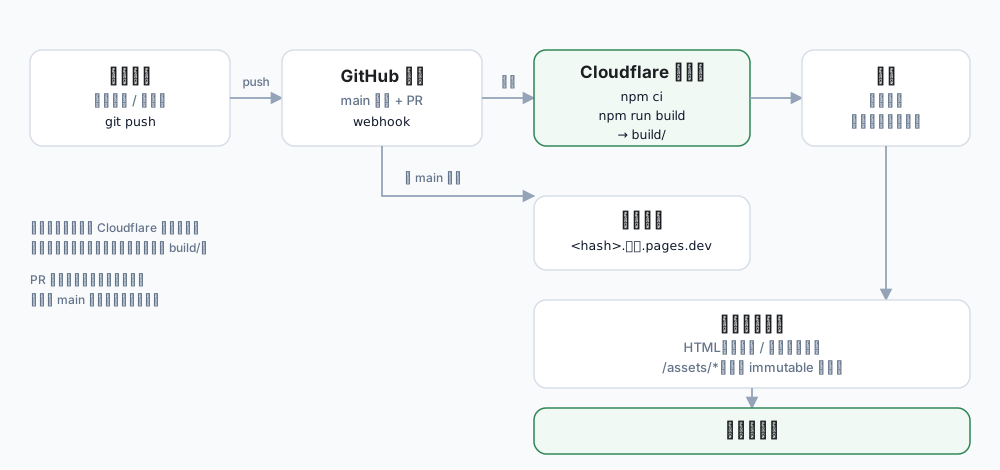
        <content type="html"><![CDATA[<p>This site is Docusaurus on Cloudflare Pages. Deploying it is not the hard part. The hard part is everything after: caching, response headers, 404s, bilingual sitemaps, absolute paths leaking into the bundle, and the two or three Cloudflare edge features that fight with your framework.</p>
<p>This post walks the whole path, and ends with a checklist you can run through line by line.</p>
<div class="blog-diagram"><img src="https://connexioncollective.com/img/blog/docusaurus-pages/fig1-deploy-flow.svg" alt="Deployment flow: local repo to GitHub to Cloudflare build to edge to visitor, with preview deployments for non-main branches" width="1000" height="470" loading="lazy"></div>
<p class="blog-diagram__hint">← swipe horizontally to see the full diagram →</p>
<p><em>The build runs on Cloudflare's machines. You need neither a server nor an upload of <code>build/</code>.</em></p>
<!-- -->
<h2 class="anchor anchorTargetStickyNavbar_Vzrq" id="why-pages">Why Pages<a href="https://connexioncollective.com/en/blog/docusaurus-cloudflare-pages#why-pages" class="hash-link" aria-label="Direct link to Why Pages" title="Direct link to Why Pages" translate="no">​</a></h2>
<p>For a static site there are plenty of options: Vercel, Netlify, GitHub Pages, object storage plus a CDN. Pages won on practical grounds:</p>
<table><thead><tr><th>Need</th><th>What Pages gives you</th></tr></thead><tbody><tr><td>Free tier</td><td>500 builds/month, 20,000 files, 25 MiB per file</td></tr><tr><td>Build &amp; deploy</td><td>Connect a GitHub repo, push to build, atomic replacement</td></tr><tr><td>Rollback</td><td>Pick any past deployment and roll back in seconds</td></tr><tr><td>Previews</td><td>Every non-main branch gets its own preview URL</td></tr><tr><td>Domain &amp; TLS</td><td>Automatic certificate issuance and renewal</td></tr><tr><td>Edge</td><td>Same stack as Cloudflare CDN, WAF and DNS</td></tr></tbody></table>
<p>That covers about 95% of what a static site needs.</p>
<h2 class="anchor anchorTargetStickyNavbar_Vzrq" id="1-get-it-running-locally-first">1. Get it running locally first<a href="https://connexioncollective.com/en/blog/docusaurus-cloudflare-pages#1-get-it-running-locally-first" class="hash-link" aria-label="Direct link to 1. Get it running locally first" title="Direct link to 1. Get it running locally first" translate="no">​</a></h2>
<blockquote>
<p><strong>No toolchain yet?</strong> This post assumes <code>node</code>, <code>npm</code> and <code>git</code> already work in your terminal.
If they do not, start with <a class="" href="https://connexioncollective.com/en/blog/windows-dev-environment">First steps on a new PC: installing Node.js, npm and Git on Windows</a> — it goes from why PATH matters to a verified setup, then come back.</p>
</blockquote>
<p>New project:</p>
<div class="language-bash codeBlockContainer_Ckt0 theme-code-block" style="--prism-color:#393A34;--prism-background-color:#f6f8fa"><div class="codeBlockContent_QJqH"><pre tabindex="0" class="prism-code language-bash codeBlock_bY9V thin-scrollbar" style="color:#393A34;background-color:#f6f8fa"><code class="codeBlockLines_e6Vv"><div class="token-line" style="color:#393A34"><span class="token plain">npx create-docusaurus@latest my-site classic</span><br></div><div class="token-line" style="color:#393A34"><span class="token plain">cd my-site</span><br></div><div class="token-line" style="color:#393A34"><span class="token plain">npm run start      # dev server with hot reload</span><br></div><div class="token-line" style="color:#393A34"><span class="token plain">npm run build      # production build</span><br></div><div class="token-line" style="color:#393A34"><span class="token plain">npm run serve      # preview the build output</span><br></div></code></pre></div></div>
<p>Skip this step if you already have a project. The important part: <strong>make <code>npm run build</code> pass with zero errors locally</strong>. Debugging a failure on CI is far worse than debugging it on your own machine.</p>
<p>Docusaurus 3 requires Node ≥ 18; in practice, use 20 or newer.</p>
<h2 class="anchor anchorTargetStickyNavbar_Vzrq" id="2-get-three-fields-right-in-docusaurusconfigjs">2. Get three fields right in <code>docusaurus.config.js</code><a href="https://connexioncollective.com/en/blog/docusaurus-cloudflare-pages#2-get-three-fields-right-in-docusaurusconfigjs" class="hash-link" aria-label="Direct link to 2-get-three-fields-right-in-docusaurusconfigjs" title="Direct link to 2-get-three-fields-right-in-docusaurusconfigjs" translate="no">​</a></h2>
<div class="language-js codeBlockContainer_Ckt0 theme-code-block" style="--prism-color:#393A34;--prism-background-color:#f6f8fa"><div class="codeBlockContent_QJqH"><pre tabindex="0" class="prism-code language-js codeBlock_bY9V thin-scrollbar" style="color:#393A34;background-color:#f6f8fa"><code class="codeBlockLines_e6Vv"><div class="token-line" style="color:#393A34"><span class="token keyword" style="color:#00009f">const</span><span class="token plain"> config </span><span class="token operator" style="color:#393A34">=</span><span class="token plain"> </span><span class="token punctuation" style="color:#393A34">{</span><span class="token plain"></span><br></div><div class="token-line" style="color:#393A34"><span class="token plain">  </span><span class="token literal-property property" style="color:#36acaa">title</span><span class="token operator" style="color:#393A34">:</span><span class="token plain"> </span><span class="token string" style="color:#e3116c">'Connexion Collective'</span><span class="token punctuation" style="color:#393A34">,</span><span class="token plain"></span><br></div><div class="token-line" style="color:#393A34"><span class="token plain">  </span><span class="token literal-property property" style="color:#36acaa">url</span><span class="token operator" style="color:#393A34">:</span><span class="token plain"> </span><span class="token string" style="color:#e3116c">'https://connexioncollective.com'</span><span class="token punctuation" style="color:#393A34">,</span><span class="token plain">  </span><span class="token comment" style="color:#999988;font-style:italic">// no trailing slash</span><span class="token plain"></span><br></div><div class="token-line" style="color:#393A34"><span class="token plain">  </span><span class="token literal-property property" style="color:#36acaa">baseUrl</span><span class="token operator" style="color:#393A34">:</span><span class="token plain"> </span><span class="token string" style="color:#e3116c">'/'</span><span class="token punctuation" style="color:#393A34">,</span><span class="token plain">                            </span><span class="token comment" style="color:#999988;font-style:italic">// root deployment means /</span><span class="token plain"></span><br></div><div class="token-line" style="color:#393A34"><span class="token plain">  </span><span class="token literal-property property" style="color:#36acaa">trailingSlash</span><span class="token operator" style="color:#393A34">:</span><span class="token plain"> </span><span class="token keyword nil" style="color:#00009f">undefined</span><span class="token punctuation" style="color:#393A34">,</span><span class="token plain">                </span><span class="token comment" style="color:#999988;font-style:italic">// see below</span><span class="token plain"></span><br></div><div class="token-line" style="color:#393A34"><span class="token plain">  </span><span class="token comment" style="color:#999988;font-style:italic">// ...</span><span class="token plain"></span><br></div><div class="token-line" style="color:#393A34"><span class="token plain"></span><span class="token punctuation" style="color:#393A34">}</span><span class="token punctuation" style="color:#393A34">;</span><br></div></code></pre></div></div>
<p>These three decide every generated URL:</p>
<table><thead><tr><th>Field</th><th>What breaks if it is wrong</th></tr></thead><tbody><tr><td><code>url</code></td><td>sitemap, RSS, canonical, OG images all point at the wrong domain</td></tr><tr><td><code>baseUrl</code></td><td>Assets 404: the page loads, CSS and JS do not</td></tr><tr><td><code>trailingSlash</code></td><td>Links and generated directories disagree, producing duplicate URLs</td></tr></tbody></table>
<p><code>trailingSlash</code> has three values:</p>
<ul>
<li class=""><code>undefined</code>: follow the URL as written (default, least surprising)</li>
<li class=""><code>true</code>: always <code>/blog/post/</code></li>
<li class=""><code>false</code>: always <code>/blog/post</code></li>
</ul>
<p><strong>Changing it later rebuilds every URL on the site</strong>, so decide up front.</p>
<h2 class="anchor anchorTargetStickyNavbar_Vzrq" id="3-repo-and-build-command">3. Repo and build command<a href="https://connexioncollective.com/en/blog/docusaurus-cloudflare-pages#3-repo-and-build-command" class="hash-link" aria-label="Direct link to 3. Repo and build command" title="Direct link to 3. Repo and build command" translate="no">​</a></h2>
<p>Three things belong in the repo: <code>package.json</code>, <code>package-lock.json</code>, and source. <code>build/</code> and <code>node_modules/</code> go in <code>.gitignore</code>.</p>
<p>On CI, use <code>npm ci</code> rather than <code>npm install</code>:</p>
<div class="language-bash codeBlockContainer_Ckt0 theme-code-block" style="--prism-color:#393A34;--prism-background-color:#f6f8fa"><div class="codeBlockContent_QJqH"><pre tabindex="0" class="prism-code language-bash codeBlock_bY9V thin-scrollbar" style="color:#393A34;background-color:#f6f8fa"><code class="codeBlockLines_e6Vv"><div class="token-line" style="color:#393A34"><span class="token plain">npm ci          # exact lockfile install, reproducible</span><br></div><div class="token-line" style="color:#393A34"><span class="token plain">npm run build   # output lands in build/</span><br></div></code></pre></div></div>
<p>The upside of <code>npm ci</code> is determinism: what you installed locally is what CI installs. The cost is that <code>package-lock.json</code> must match <code>package.json</code>, otherwise it fails — which is actually a feature, because it catches a stale lockfile before it reaches production.</p>
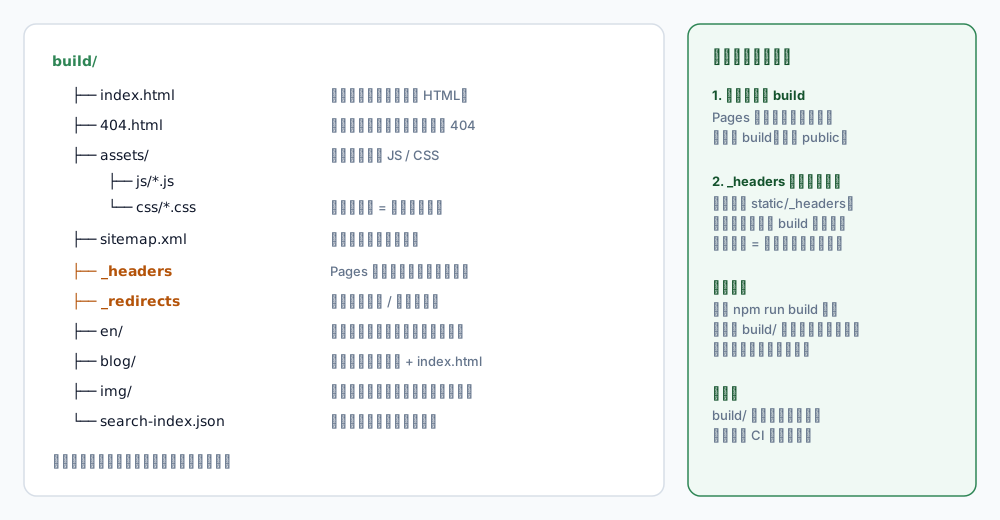
<p>Once the build passes, look at what actually lands in <code>build/</code> — everything later in this post revolves around that directory:</p>
<div class="blog-diagram"><img src="https://connexioncollective.com/img/blog/docusaurus-pages/fig2-build-output.svg" alt="The build directory: index.html, 404.html, hashed assets, sitemap, _headers" width="1000" height="520" loading="lazy"></div>
<p class="blog-diagram__hint">← swipe horizontally to see the full diagram →</p>
<p><em>The <code>_headers</code> file and <code>404.html</code> in that tree are the main characters of the second half.</em></p>
<h2 class="anchor anchorTargetStickyNavbar_Vzrq" id="4-create-the-pages-project">4. Create the Pages project<a href="https://connexioncollective.com/en/blog/docusaurus-cloudflare-pages#4-create-the-pages-project" class="hash-link" aria-label="Direct link to 4. Create the Pages project" title="Direct link to 4. Create the Pages project" translate="no">​</a></h2>
<h3 class="anchor anchorTargetStickyNavbar_Vzrq" id="41-connect-the-repo">4.1 Connect the repo<a href="https://connexioncollective.com/en/blog/docusaurus-cloudflare-pages#41-connect-the-repo" class="hash-link" aria-label="Direct link to 4.1 Connect the repo" title="Direct link to 4.1 Connect the repo" translate="no">​</a></h3>
<div class="language-text codeBlockContainer_Ckt0 theme-code-block" style="--prism-color:#393A34;--prism-background-color:#f6f8fa"><div class="codeBlockContent_QJqH"><pre tabindex="0" class="prism-code language-text codeBlock_bY9V thin-scrollbar" style="color:#393A34;background-color:#f6f8fa"><code class="codeBlockLines_e6Vv"><div class="token-line" style="color:#393A34"><span class="token plain">Cloudflare Dashboard → Workers &amp; Pages → Create → Pages → Connect to Git</span><br></div><div class="token-line" style="color:#393A34"><span class="token plain">→ pick the repo → pick the branch (main)</span><br></div></code></pre></div></div>
<p>Three build settings:</p>
<table><thead><tr><th>Field</th><th>Value</th></tr></thead><tbody><tr><td>Framework preset</td><td><code>Docusaurus</code> if present, otherwise <code>None</code></td></tr><tr><td>Build command</td><td><code>npm run build</code></td></tr><tr><td>Build output directory</td><td><code>build</code></td></tr></tbody></table>
<blockquote>
<p>The output directory is <strong><code>build</code></strong> — not <code>public</code>, not <code>dist</code>. Get this wrong and the build succeeds while deploying an empty site.</p>
</blockquote>
<h3 class="anchor anchorTargetStickyNavbar_Vzrq" id="42-pin-the-node-version">4.2 Pin the Node version<a href="https://connexioncollective.com/en/blog/docusaurus-cloudflare-pages#42-pin-the-node-version" class="hash-link" aria-label="Direct link to 4.2 Pin the Node version" title="Direct link to 4.2 Pin the Node version" translate="no">​</a></h3>
<p>Add an environment variable in the project settings:</p>
<div class="language-text codeBlockContainer_Ckt0 theme-code-block" style="--prism-color:#393A34;--prism-background-color:#f6f8fa"><div class="codeBlockContent_QJqH"><pre tabindex="0" class="prism-code language-text codeBlock_bY9V thin-scrollbar" style="color:#393A34;background-color:#f6f8fa"><code class="codeBlockLines_e6Vv"><div class="token-line" style="color:#393A34"><span class="token plain">NODE_VERSION = 20</span><br></div></code></pre></div></div>
<p>Without it, the builder uses whatever default it has. When Docusaurus bumps its engine requirement, the build starts failing in ways that are hard to trace. This is the single most overlooked failure mode.</p>
<p>And: <strong>never put secrets here</strong>. The build needs Node and dependencies. A token in the build environment is a supply-chain backdoor.</p>
<h3 class="anchor anchorTargetStickyNavbar_Vzrq" id="43-first-deploy">4.3 First deploy<a href="https://connexioncollective.com/en/blog/docusaurus-cloudflare-pages#43-first-deploy" class="hash-link" aria-label="Direct link to 4.3 First deploy" title="Direct link to 4.3 First deploy" translate="no">​</a></h3>
<p>Push to <code>main</code> and the build starts. A few minutes later you get a <code>xxx.pages.dev</code> URL.</p>
<p>Click through the whole site <strong>on that temporary URL first</strong>, then attach the custom domain. That way, if something breaks later, you know whether it is a build problem or a domain problem.</p>
<h2 class="anchor anchorTargetStickyNavbar_Vzrq" id="5-attach-a-custom-domain">5. Attach a custom domain<a href="https://connexioncollective.com/en/blog/docusaurus-cloudflare-pages#5-attach-a-custom-domain" class="hash-link" aria-label="Direct link to 5. Attach a custom domain" title="Direct link to 5. Attach a custom domain" translate="no">​</a></h2>
<div class="language-text codeBlockContainer_Ckt0 theme-code-block" style="--prism-color:#393A34;--prism-background-color:#f6f8fa"><div class="codeBlockContent_QJqH"><pre tabindex="0" class="prism-code language-text codeBlock_bY9V thin-scrollbar" style="color:#393A34;background-color:#f6f8fa"><code class="codeBlockLines_e6Vv"><div class="token-line" style="color:#393A34"><span class="token plain">Project → Custom domains → Set up a custom domain</span><br></div></code></pre></div></div>
<p>If the domain lives in the same Cloudflare account, the correct DNS record is created for you. Otherwise add a CNAME pointing at <code>your-project.pages.dev</code>.</p>
<table><thead><tr><th>Item</th><th>Notes</th></tr></thead><tbody><tr><td>Certificate</td><td>Issued and renewed automatically</td></tr><tr><td><code>www</code></td><td>Add a redirect rule to the apex so you do not serve duplicate content</td></tr><tr><td>Propagation</td><td>Usually minutes; the certificate stays pending until DNS resolves</td></tr></tbody></table>
<p>After that, the <code>pages.dev</code> URL still works and is still public. If you do not want it indexed, block it in <code>robots.txt</code> or put Cloudflare Access in front of it.</p>
<h2 class="anchor anchorTargetStickyNavbar_Vzrq" id="6-three-things-to-configure-after-deploying">6. Three things to configure after deploying<a href="https://connexioncollective.com/en/blog/docusaurus-cloudflare-pages#6-three-things-to-configure-after-deploying" class="hash-link" aria-label="Direct link to 6. Three things to configure after deploying" title="Direct link to 6. Three things to configure after deploying" translate="no">​</a></h2>
<h3 class="anchor anchorTargetStickyNavbar_Vzrq" id="61-_headers-caching-and-security-headers">6.1 <code>_headers</code>: caching and security headers<a href="https://connexioncollective.com/en/blog/docusaurus-cloudflare-pages#61-_headers-caching-and-security-headers" class="hash-link" aria-label="Direct link to 61-_headers-caching-and-security-headers" title="Direct link to 61-_headers-caching-and-security-headers" translate="no">​</a></h3>
<p>Pages reads a <code>_headers</code> file at the root of the output directory. In a Docusaurus project, put it at <code>static/_headers</code> so the build copies it to <code>build/</code>.</p>
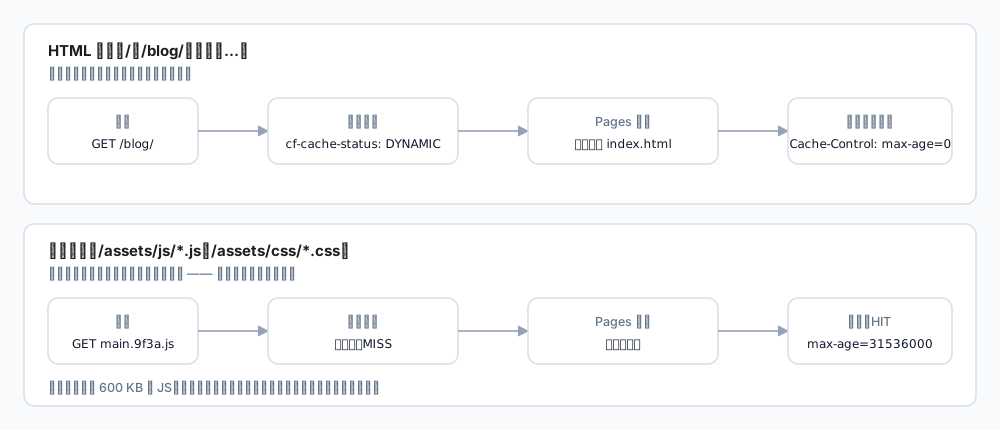
<div class="language-text codeBlockContainer_Ckt0 theme-code-block" style="--prism-color:#393A34;--prism-background-color:#f6f8fa"><div class="codeBlockContent_QJqH"><pre tabindex="0" class="prism-code language-text codeBlock_bY9V thin-scrollbar" style="color:#393A34;background-color:#f6f8fa"><code class="codeBlockLines_e6Vv"><div class="token-line" style="color:#393A34"><span class="token plain">/*</span><br></div><div class="token-line" style="color:#393A34"><span class="token plain">  X-Content-Type-Options: nosniff</span><br></div><div class="token-line" style="color:#393A34"><span class="token plain">  Referrer-Policy: strict-origin-when-cross-origin</span><br></div><div class="token-line" style="color:#393A34"><span class="token plain">  Permissions-Policy: geolocation=(), microphone=(), camera=()</span><br></div><div class="token-line" style="color:#393A34"><span class="token plain" style="display:inline-block"></span><br></div><div class="token-line" style="color:#393A34"><span class="token plain">/assets/*</span><br></div><div class="token-line" style="color:#393A34"><span class="token plain">  Cache-Control: public, max-age=31536000, immutable</span><br></div><div class="token-line" style="color:#393A34"><span class="token plain" style="display:inline-block"></span><br></div><div class="token-line" style="color:#393A34"><span class="token plain">/img/*</span><br></div><div class="token-line" style="color:#393A34"><span class="token plain">  Cache-Control: public, max-age=3600, must-revalidate</span><br></div></code></pre></div></div>
<div class="blog-diagram"><img src="https://connexioncollective.com/img/blog/docusaurus-pages/fig3-cache.svg" alt="Cache strategy: HTML revalidates on every request while hashed assets are cached for a year" width="1000" height="430" loading="lazy"></div>
<p class="blog-diagram__hint">← swipe horizontally to see the full diagram →</p>
<p><em>HTML and hashed assets must be treated differently; that split is the whole point.</em></p>
<p>Why the split:</p>
<ul>
<li class=""><strong>HTML</strong> changes. Caching it for a year means visitors never see new posts.</li>
<li class=""><strong><code>/assets/*</code></strong> carries a content hash in the filename, so a change produces a new name — safe to mark <code>immutable</code>.</li>
</ul>
<p>A common trap: if <code>_headers</code> sits in the wrong place (repo root instead of <code>static/</code>), Pages <strong>does not complain</strong>. It just silently does nothing. Verify by building locally and checking that <code>build/_headers</code> exists.</p>
<h3 class="anchor anchorTargetStickyNavbar_Vzrq" id="62-security-headers-and-csp">6.2 Security headers and CSP<a href="https://connexioncollective.com/en/blog/docusaurus-cloudflare-pages#62-security-headers-and-csp" class="hash-link" aria-label="Direct link to 6.2 Security headers and CSP" title="Direct link to 6.2 Security headers and CSP" translate="no">​</a></h3>
<p>Beyond the basics, a CSP has to match what the site actually loads. A real example:</p>
<div class="language-text codeBlockContainer_Ckt0 theme-code-block" style="--prism-color:#393A34;--prism-background-color:#f6f8fa"><div class="codeBlockContent_QJqH"><pre tabindex="0" class="prism-code language-text codeBlock_bY9V thin-scrollbar" style="color:#393A34;background-color:#f6f8fa"><code class="codeBlockLines_e6Vv"><div class="token-line" style="color:#393A34"><span class="token plain">Content-Security-Policy: default-src 'self'; script-src 'self' 'unsafe-inline' 'wasm-unsafe-eval' https://static.cloudflareinsights.com; style-src 'self' 'unsafe-inline'; img-src 'self' data: blob: https://cdn.example.com; connect-src 'self' https://cloudflareinsights.com; frame-src https://giscus.app; object-src 'none'; base-uri 'self'; form-action 'self'; frame-ancestors 'none'</span><br></div></code></pre></div></div>
<table><thead><tr><th>Directive</th><th>Why it is there</th></tr></thead><tbody><tr><td><code>'wasm-unsafe-eval'</code></td><td>Required if the page runs WASM (image compressors and the like); without it the module is blocked</td></tr><tr><td><code>'unsafe-inline'</code> (style)</td><td>Docusaurus ships inline styles; removing it breaks layout</td></tr><tr><td><code>frame-ancestors 'none'</code></td><td>Anti-clickjacking, and stronger than <code>X-Frame-Options</code></td></tr><tr><td><code>object-src 'none'</code></td><td>Disables <code>&lt;object&gt;</code> / <code>&lt;embed&gt;</code>, historically a rich source of bugs</td></tr></tbody></table>
<blockquote>
<p><code>frame-ancestors</code> only works inside CSP; setting it anywhere else does nothing.</p>
</blockquote>
<h3 class="anchor anchorTargetStickyNavbar_Vzrq" id="63-404-and-sitemap">6.3 404 and sitemap<a href="https://connexioncollective.com/en/blog/docusaurus-cloudflare-pages#63-404-and-sitemap" class="hash-link" aria-label="Direct link to 6.3 404 and sitemap" title="Direct link to 6.3 404 and sitemap" translate="no">​</a></h3>
<p>Docusaurus emits <code>build/404.html</code>, and Pages serves it for unknown paths while keeping status 404. That is correct behaviour.</p>
<p>But the sitemap may include <code>/404</code> unless you exclude it:</p>
<div class="language-js codeBlockContainer_Ckt0 theme-code-block" style="--prism-color:#393A34;--prism-background-color:#f6f8fa"><div class="codeBlockContent_QJqH"><pre tabindex="0" class="prism-code language-js codeBlock_bY9V thin-scrollbar" style="color:#393A34;background-color:#f6f8fa"><code class="codeBlockLines_e6Vv"><div class="token-line" style="color:#393A34"><span class="token literal-property property" style="color:#36acaa">sitemap</span><span class="token operator" style="color:#393A34">:</span><span class="token plain"> </span><span class="token punctuation" style="color:#393A34">{</span><span class="token plain"></span><br></div><div class="token-line" style="color:#393A34"><span class="token plain">  </span><span class="token literal-property property" style="color:#36acaa">ignorePatterns</span><span class="token operator" style="color:#393A34">:</span><span class="token plain"> </span><span class="token punctuation" style="color:#393A34">[</span><span class="token string" style="color:#e3116c">'/404'</span><span class="token punctuation" style="color:#393A34">,</span><span class="token plain"> </span><span class="token string" style="color:#e3116c">'/en/404'</span><span class="token punctuation" style="color:#393A34">]</span><span class="token punctuation" style="color:#393A34">,</span><span class="token plain">   </span><span class="token comment" style="color:#999988;font-style:italic">// exclude both locales</span><span class="token plain"></span><br></div><div class="token-line" style="color:#393A34"><span class="token plain"></span><span class="token punctuation" style="color:#393A34">}</span><span class="token punctuation" style="color:#393A34">,</span><br></div></code></pre></div></div>
<h2 class="anchor anchorTargetStickyNavbar_Vzrq" id="7-the-eight-pitfalls-i-actually-hit">7. The eight pitfalls I actually hit<a href="https://connexioncollective.com/en/blog/docusaurus-cloudflare-pages#7-the-eight-pitfalls-i-actually-hit" class="hash-link" aria-label="Direct link to 7. The eight pitfalls I actually hit" title="Direct link to 7. The eight pitfalls I actually hit" translate="no">​</a></h2>
<h3 class="anchor anchorTargetStickyNavbar_Vzrq" id="1-absolute-local-paths-end-up-in-the-bundle">1. Absolute local paths end up in the bundle<a href="https://connexioncollective.com/en/blog/docusaurus-cloudflare-pages#1-absolute-local-paths-end-up-in-the-bundle" class="hash-link" aria-label="Direct link to 1. Absolute local paths end up in the bundle" title="Direct link to 1. Absolute local paths end up in the bundle" translate="no">​</a></h3>
<p>Docusaurus serialises <code>siteConfig</code> into the client JS, and <code>themes</code>/<code>plugins</code> are <strong>absolute paths</strong>:</p>
<div class="language-text codeBlockContainer_Ckt0 theme-code-block" style="--prism-color:#393A34;--prism-background-color:#f6f8fa"><div class="codeBlockContent_QJqH"><pre tabindex="0" class="prism-code language-text codeBlock_bY9V thin-scrollbar" style="color:#393A34;background-color:#f6f8fa"><code class="codeBlockLines_e6Vv"><div class="token-line" style="color:#393A34"><span class="token plain">D:\Projects\my-website\node_modules\@easyops-cn\docusaurus-search-local</span><br></div></code></pre></div></div>
<p>Harmless functionally, but it publishes your directory layout. Fix it in a <code>postBuild</code> hook:</p>
<div class="language-js codeBlockContainer_Ckt0 theme-code-block" style="--prism-color:#393A34;--prism-background-color:#f6f8fa"><div class="codeBlockContent_QJqH"><pre tabindex="0" class="prism-code language-js codeBlock_bY9V thin-scrollbar" style="color:#393A34;background-color:#f6f8fa"><code class="codeBlockLines_e6Vv"><div class="token-line" style="color:#393A34"><span class="token comment" style="color:#999988;font-style:italic">// plugins/postBuildCleanup.cjs</span><span class="token plain"></span><br></div><div class="token-line" style="color:#393A34"><span class="token plain"></span><span class="token keyword" style="color:#00009f">function</span><span class="token plain"> </span><span class="token function" style="color:#d73a49">postBuild</span><span class="token punctuation" style="color:#393A34">(</span><span class="token parameter">context</span><span class="token punctuation" style="color:#393A34">)</span><span class="token plain"> </span><span class="token punctuation" style="color:#393A34">{</span><span class="token plain"></span><br></div><div class="token-line" style="color:#393A34"><span class="token plain">  </span><span class="token keyword" style="color:#00009f">const</span><span class="token plain"> siteDir </span><span class="token operator" style="color:#393A34">=</span><span class="token plain"> context</span><span class="token punctuation" style="color:#393A34">.</span><span class="token property-access">siteDir</span><span class="token punctuation" style="color:#393A34">;</span><span class="token plain"></span><br></div><div class="token-line" style="color:#393A34"><span class="token plain">  </span><span class="token keyword" style="color:#00009f">const</span><span class="token plain"> escaped </span><span class="token operator" style="color:#393A34">=</span><span class="token plain"> </span><span class="token known-class-name class-name">JSON</span><span class="token punctuation" style="color:#393A34">.</span><span class="token method function property-access" style="color:#d73a49">stringify</span><span class="token punctuation" style="color:#393A34">(</span><span class="token plain">siteDir</span><span class="token punctuation" style="color:#393A34">)</span><span class="token punctuation" style="color:#393A34">.</span><span class="token method function property-access" style="color:#d73a49">slice</span><span class="token punctuation" style="color:#393A34">(</span><span class="token number" style="color:#36acaa">1</span><span class="token punctuation" style="color:#393A34">,</span><span class="token plain"> </span><span class="token operator" style="color:#393A34">-</span><span class="token number" style="color:#36acaa">1</span><span class="token punctuation" style="color:#393A34">)</span><span class="token punctuation" style="color:#393A34">;</span><span class="token plain"> </span><span class="token comment" style="color:#999988;font-style:italic">// escaped backslashes on Windows</span><span class="token plain"></span><br></div><div class="token-line" style="color:#393A34"><span class="token plain" style="display:inline-block"></span><br></div><div class="token-line" style="color:#393A34"><span class="token plain">  </span><span class="token keyword control-flow" style="color:#00009f">for</span><span class="token plain"> </span><span class="token punctuation" style="color:#393A34">(</span><span class="token keyword" style="color:#00009f">const</span><span class="token plain"> file </span><span class="token keyword" style="color:#00009f">of</span><span class="token plain"> </span><span class="token function" style="color:#d73a49">walk</span><span class="token punctuation" style="color:#393A34">(</span><span class="token plain">context</span><span class="token punctuation" style="color:#393A34">.</span><span class="token property-access">outDir</span><span class="token punctuation" style="color:#393A34">)</span><span class="token punctuation" style="color:#393A34">)</span><span class="token plain"> </span><span class="token punctuation" style="color:#393A34">{</span><span class="token plain"></span><br></div><div class="token-line" style="color:#393A34"><span class="token plain">    </span><span class="token keyword control-flow" style="color:#00009f">if</span><span class="token plain"> </span><span class="token punctuation" style="color:#393A34">(</span><span class="token operator" style="color:#393A34">!</span><span class="token regex regex-delimiter" style="color:#36acaa">/</span><span class="token regex regex-source language-regex special-escape escape" style="color:#36acaa">\.</span><span class="token regex regex-source language-regex group punctuation" style="color:#393A34">(</span><span class="token regex regex-source language-regex" style="color:#36acaa">html</span><span class="token regex regex-source language-regex alternation keyword" style="color:#00009f">|</span><span class="token regex regex-source language-regex" style="color:#36acaa">js</span><span class="token regex regex-source language-regex alternation keyword" style="color:#00009f">|</span><span class="token regex regex-source language-regex" style="color:#36acaa">json</span><span class="token regex regex-source language-regex group punctuation" style="color:#393A34">)</span><span class="token regex regex-source language-regex anchor function" style="color:#d73a49">$</span><span class="token regex regex-delimiter" style="color:#36acaa">/</span><span class="token punctuation" style="color:#393A34">.</span><span class="token method function property-access" style="color:#d73a49">test</span><span class="token punctuation" style="color:#393A34">(</span><span class="token plain">file</span><span class="token punctuation" style="color:#393A34">)</span><span class="token punctuation" style="color:#393A34">)</span><span class="token plain"> </span><span class="token keyword control-flow" style="color:#00009f">continue</span><span class="token punctuation" style="color:#393A34">;</span><span class="token plain"></span><br></div><div class="token-line" style="color:#393A34"><span class="token plain">    </span><span class="token keyword" style="color:#00009f">let</span><span class="token plain"> text </span><span class="token operator" style="color:#393A34">=</span><span class="token plain"> fs</span><span class="token punctuation" style="color:#393A34">.</span><span class="token method function property-access" style="color:#d73a49">readFileSync</span><span class="token punctuation" style="color:#393A34">(</span><span class="token plain">file</span><span class="token punctuation" style="color:#393A34">,</span><span class="token plain"> </span><span class="token string" style="color:#e3116c">'utf8'</span><span class="token punctuation" style="color:#393A34">)</span><span class="token punctuation" style="color:#393A34">;</span><span class="token plain"></span><br></div><div class="token-line" style="color:#393A34"><span class="token plain">    text </span><span class="token operator" style="color:#393A34">=</span><span class="token plain"> text</span><span class="token punctuation" style="color:#393A34">.</span><span class="token method function property-access" style="color:#d73a49">split</span><span class="token punctuation" style="color:#393A34">(</span><span class="token plain">escaped</span><span class="token punctuation" style="color:#393A34">)</span><span class="token punctuation" style="color:#393A34">.</span><span class="token method function property-access" style="color:#d73a49">join</span><span class="token punctuation" style="color:#393A34">(</span><span class="token string" style="color:#e3116c">'/site'</span><span class="token punctuation" style="color:#393A34">)</span><span class="token punctuation" style="color:#393A34">;</span><span class="token plain"></span><br></div><div class="token-line" style="color:#393A34"><span class="token plain">    text </span><span class="token operator" style="color:#393A34">=</span><span class="token plain"> text</span><span class="token punctuation" style="color:#393A34">.</span><span class="token method function property-access" style="color:#d73a49">split</span><span class="token punctuation" style="color:#393A34">(</span><span class="token plain">siteDir</span><span class="token punctuation" style="color:#393A34">)</span><span class="token punctuation" style="color:#393A34">.</span><span class="token method function property-access" style="color:#d73a49">join</span><span class="token punctuation" style="color:#393A34">(</span><span class="token string" style="color:#e3116c">'/site'</span><span class="token punctuation" style="color:#393A34">)</span><span class="token punctuation" style="color:#393A34">;</span><span class="token plain"></span><br></div><div class="token-line" style="color:#393A34"><span class="token plain">    fs</span><span class="token punctuation" style="color:#393A34">.</span><span class="token method function property-access" style="color:#d73a49">writeFileSync</span><span class="token punctuation" style="color:#393A34">(</span><span class="token plain">file</span><span class="token punctuation" style="color:#393A34">,</span><span class="token plain"> text</span><span class="token punctuation" style="color:#393A34">)</span><span class="token punctuation" style="color:#393A34">;</span><span class="token plain"></span><br></div><div class="token-line" style="color:#393A34"><span class="token plain">  </span><span class="token punctuation" style="color:#393A34">}</span><span class="token plain"></span><br></div><div class="token-line" style="color:#393A34"><span class="token plain"></span><span class="token punctuation" style="color:#393A34">}</span><br></div></code></pre></div></div>
<p>Verify by grepping <code>build/</code> for your username or drive letter.</p>
<h3 class="anchor anchorTargetStickyNavbar_Vzrq" id="2-cloudflare-refuses-prefetch-and-you-get-a-pile-of-503s">2. Cloudflare refuses prefetch and you get a pile of 503s<a href="https://connexioncollective.com/en/blog/docusaurus-cloudflare-pages#2-cloudflare-refuses-prefetch-and-you-get-a-pile-of-503s" class="hash-link" aria-label="Direct link to 2. Cloudflare refuses prefetch and you get a pile of 503s" title="Direct link to 2. Cloudflare refuses prefetch and you get a pile of 503s" translate="no">​</a></h3>
<p>This one is genuinely confusing. The console shows a dozen <code>503</code>s for <code>/assets/js/*.js</code>, yet the same URL returns 200 via curl.</p>
<p>The cause is Cloudflare <strong>Speed Brain</strong>, which intercepts every <code>Sec-Purpose: prefetch</code> request. The response says so:</p>
<div class="language-text codeBlockContainer_Ckt0 theme-code-block" style="--prism-color:#393A34;--prism-background-color:#f6f8fa"><div class="codeBlockContent_QJqH"><pre tabindex="0" class="prism-code language-text codeBlock_bY9V thin-scrollbar" style="color:#393A34;background-color:#f6f8fa"><code class="codeBlockLines_e6Vv"><div class="token-line" style="color:#393A34"><span class="token plain">cf-speculation-refused: prefetch refused: not eligible</span><br></div></code></pre></div></div>
<p>Docusaurus's <code>Link</code> component uses an IntersectionObserver, so every link entering the viewport prefetches its route chunk — meaning every page load produces a dozen refused requests.</p>
<p>Two ways out:</p>
<ol>
<li class=""><strong>Turn Speed Brain off</strong> (zone → Speed → Optimization). Docusaurus chunk prefetch starts working again, and for an SPA that is the prefetch that actually matters.</li>
<li class=""><strong>Disable prefetch in the front end</strong>: intercept the <code>window.docusaurus</code> assignment and replace <code>prefetch</code> with a no-op.</li>
</ol>
<p>I chose the first, because Speed Brain prefetches <strong>HTML documents</strong> while SPA navigation never requests a document. It was pure overhead plus console noise.</p>
<h3 class="anchor anchorTargetStickyNavbar_Vzrq" id="3-checking-production-with-curl-gives-you-403-and-false-conclusions">3. Checking production with curl gives you 403 and false conclusions<a href="https://connexioncollective.com/en/blog/docusaurus-cloudflare-pages#3-checking-production-with-curl-gives-you-403-and-false-conclusions" class="hash-link" aria-label="Direct link to 3. Checking production with curl gives you 403 and false conclusions" title="Direct link to 3. Checking production with curl gives you 403 and false conclusions" translate="no">​</a></h3>
<p>Cloudflare serves a challenge page (roughly 5 KB of HTML, status 403 or 503) to suspicious automated requests.</p>
<p>If you scrape the page with curl at that moment, you conclude "the page does not contain X" — while the content is fine and you were simply handed a challenge.</p>
<p>How to tell: check the response length and <code>content-type</code>; challenge pages are 5–6 KB and contain <code>Just a moment</code>. For real verification, use a browser — or accept that you cannot verify from this network right now.</p>
<h3 class="anchor anchorTargetStickyNavbar_Vzrq" id="4-values-in-_headers-do-not-match-what-arrives">4. Values in <code>_headers</code> do not match what arrives<a href="https://connexioncollective.com/en/blog/docusaurus-cloudflare-pages#4-values-in-_headers-do-not-match-what-arrives" class="hash-link" aria-label="Direct link to 4-values-in-_headers-do-not-match-what-arrives" title="Direct link to 4-values-in-_headers-do-not-match-what-arrives" translate="no">​</a></h3>
<p>You write <code>X-Frame-Options: DENY</code>, production shows <code>SAMEORIGIN</code>.</p>
<p>Cloudflare edge rules (Transform Rules, Managed Rules) override origin headers. <code>_headers</code> is a declaration; the edge has the final say.</p>
<p>Order of investigation: read the response headers, then the Cloudflare Rules, and only then suspect <code>_headers</code>.</p>
<h3 class="anchor anchorTargetStickyNavbar_Vzrq" id="5-old-node-version-fails-the-build-during-install">5. Old Node version fails the build during install<a href="https://connexioncollective.com/en/blog/docusaurus-cloudflare-pages#5-old-node-version-fails-the-build-during-install" class="hash-link" aria-label="Direct link to 5. Old Node version fails the build during install" title="Direct link to 5. Old Node version fails the build during install" translate="no">​</a></h3>
<p>The log shows <code>Unsupported engine</code> or a syntax error in a dependency. Set <code>NODE_VERSION</code>.</p>
<h3 class="anchor anchorTargetStickyNavbar_Vzrq" id="6-npm-install-versus-npm-ci">6. <code>npm install</code> versus <code>npm ci</code><a href="https://connexioncollective.com/en/blog/docusaurus-cloudflare-pages#6-npm-install-versus-npm-ci" class="hash-link" aria-label="Direct link to 6-npm-install-versus-npm-ci" title="Direct link to 6-npm-install-versus-npm-ci" translate="no">​</a></h3>
<p>They differ in how strictly they treat the lockfile. If <code>package-lock.json</code> lags behind <code>package.json</code>, <code>npm ci</code> fails outright.</p>
<p>Habit: run <code>npm ci &amp;&amp; npm run build</code> locally before pushing, matching CI.</p>
<h3 class="anchor anchorTargetStickyNavbar_Vzrq" id="7-preview-deployments-quietly-consume-build-quota">7. Preview deployments quietly consume build quota<a href="https://connexioncollective.com/en/blog/docusaurus-cloudflare-pages#7-preview-deployments-quietly-consume-build-quota" class="hash-link" aria-label="Direct link to 7. Preview deployments quietly consume build quota" title="Direct link to 7. Preview deployments quietly consume build quota" translate="no">​</a></h3>
<p>Every push to a non-main branch triggers a preview build. For a personal site this rarely matters, but with many branches it can approach the 500/month limit.</p>
<p>You can restrict previews to specific branches, or only build on pull requests.</p>
<h3 class="anchor anchorTargetStickyNavbar_Vzrq" id="8-changing-trailingslash-breaks-existing-links">8. Changing <code>trailingSlash</code> breaks existing links<a href="https://connexioncollective.com/en/blog/docusaurus-cloudflare-pages#8-changing-trailingslash-breaks-existing-links" class="hash-link" aria-label="Direct link to 8-changing-trailingslash-breaks-existing-links" title="Direct link to 8-changing-trailingslash-breaks-existing-links" translate="no">​</a></h3>
<p>The generated directory layout changes (<code>/blog/post</code> vs <code>/blog/post/</code>), so external links, bookmarks and search results all point at the old form.</p>
<p>If you must change it, add a fallback in <code>_redirects</code>:</p>
<div class="language-text codeBlockContainer_Ckt0 theme-code-block" style="--prism-color:#393A34;--prism-background-color:#f6f8fa"><div class="codeBlockContent_QJqH"><pre tabindex="0" class="prism-code language-text codeBlock_bY9V thin-scrollbar" style="color:#393A34;background-color:#f6f8fa"><code class="codeBlockLines_e6Vv"><div class="token-line" style="color:#393A34"><span class="token plain">/blog/:slug/  /blog/:slug  301</span><br></div></code></pre></div></div>
<h2 class="anchor anchorTargetStickyNavbar_Vzrq" id="8-go-live-checklist">8. Go-live checklist<a href="https://connexioncollective.com/en/blog/docusaurus-cloudflare-pages#8-go-live-checklist" class="hash-link" aria-label="Direct link to 8. Go-live checklist" title="Direct link to 8. Go-live checklist" translate="no">​</a></h2>
<p>Run through this after the first successful deploy:</p>
<table><thead><tr><th>Check</th><th>Expected</th></tr></thead><tbody><tr><td>Home, post, doc pages</td><td>200, styles intact</td></tr><tr><td>A nonexistent path</td><td>404, with your custom page</td></tr><tr><td><code>/sitemap.xml</code>, <code>/robots.txt</code></td><td>200, correct domain inside</td></tr><tr><td>RSS / Atom</td><td>200, valid feed</td></tr><tr><td>Search index</td><td>200 (usually <code>search-index.json</code>)</td></tr><tr><td>Cache headers on <code>/assets/*</code></td><td><code>max-age=31536000, immutable</code></td></tr><tr><td>Cache headers on HTML</td><td><code>max-age=0</code> or <code>no-cache</code></td></tr><tr><td>Security headers</td><td>CSP, <code>nosniff</code>, <code>frame-ancestors</code> present</td></tr><tr><td>Custom domain</td><td>Valid certificate, <code>www</code> redirects correctly</td></tr><tr><td>Mobile at 375px</td><td>No horizontal scroll, nav expands</td></tr><tr><td>Local paths in output</td><td>None (no drive letters, no usernames)</td></tr></tbody></table>
<h2 class="anchor anchorTargetStickyNavbar_Vzrq" id="9-cost-and-limits">9. Cost and limits<a href="https://connexioncollective.com/en/blog/docusaurus-cloudflare-pages#9-cost-and-limits" class="hash-link" aria-label="Direct link to 9. Cost and limits" title="Direct link to 9. Cost and limits" translate="no">​</a></h2>
<table><thead><tr><th>Item</th><th>Free tier</th></tr></thead><tbody><tr><td>Builds</td><td>500/month</td></tr><tr><td>Files per site</td><td>20,000</td></tr><tr><td>Max file size</td><td>25 MiB</td></tr><tr><td>Bandwidth</td><td>Unlimited (served by Cloudflare CDN)</td></tr><tr><td>Custom domain</td><td>Supported, automatic certificate</td></tr></tbody></table>
<p>A personal site will not come close. The only two things to watch are <strong>build count</strong> (many branches, frequent pushes) and <strong>file size</strong> (do not commit video).</p>
<h2 class="anchor anchorTargetStickyNavbar_Vzrq" id="wrap-up">Wrap-up<a href="https://connexioncollective.com/en/blog/docusaurus-cloudflare-pages#wrap-up" class="hash-link" aria-label="Direct link to Wrap-up" title="Direct link to Wrap-up" translate="no">​</a></h2>
<p>The whole thing compresses to five steps:</p>
<div class="language-text codeBlockContainer_Ckt0 theme-code-block" style="--prism-color:#393A34;--prism-background-color:#f6f8fa"><div class="codeBlockContent_QJqH"><pre tabindex="0" class="prism-code language-text codeBlock_bY9V thin-scrollbar" style="color:#393A34;background-color:#f6f8fa"><code class="codeBlockLines_e6Vv"><div class="token-line" style="color:#393A34"><span class="token plain">1. Local `npm run build` passes</span><br></div><div class="token-line" style="color:#393A34"><span class="token plain">2. Connect the repo: build command `npm run build`, output `build`</span><br></div><div class="token-line" style="color:#393A34"><span class="token plain">3. Set NODE_VERSION, attach the custom domain</span><br></div><div class="token-line" style="color:#393A34"><span class="token plain">4. Write `static/_headers` (cache + security)</span><br></div><div class="token-line" style="color:#393A34"><span class="token plain">5. Walk the checklist</span><br></div></code></pre></div></div>
<p>The time sink is not "how do I deploy". It is <strong>how do I confirm the deployment is correct</strong>: does caching work, were the headers overridden, did anything leak into the output, what are those red entries in the console actually saying.</p>
<p>That part is what makes a static site <em>solid</em>.</p>]]></content>
        <author>
            <name>Connexion Collective</name>
            <uri>https://github.com/LxHanesser</uri>
        </author>
        <category label="Engineering" term="Engineering"/>
        <category label="Frontend" term="Frontend"/>
    </entry>
    <entry>
        <title type="html"><![CDATA[Real page numbers for the blog]]></title>
        <id>https://connexioncollective.com/en/blog/blog-pagination</id>
        <link href="https://connexioncollective.com/en/blog/blog-pagination"/>
        <updated>2026-10-27T05:20:00.000Z</updated>
        <summary type="html"><![CDATA[The default pagination is a single “older entries” link, and the post footer only lists titles. Adding numbers and dates meant fighting field semantics, a default export, and writing a 30-line build-time plugin.]]></summary>
        <content type="html"><![CDATA[<p>With seventeen posts, two default pagination spots started to feel thin:</p>
<ul>
<li class="">The list page offers one “older entries” link — no page count, no sense of position</li>
<li class="">Prev/next links at the bottom of a post show titles only, no dates, no place in the timeline</li>
</ul>
<!-- -->
<h2 class="anchor anchorTargetStickyNavbar_Vzrq" id="list-page-numbers-are-easy-current-page-is-not">List page: numbers are easy, “current page” is not<a href="https://connexioncollective.com/en/blog/blog-pagination#list-page-numbers-are-easy-current-page-is-not" class="hash-link" aria-label="Direct link to List page: numbers are easy, “current page” is not" title="Direct link to List page: numbers are easy, “current page” is not" translate="no">​</a></h2>
<p>The paginator receives metadata that includes <code>totalPages</code>, so drawing the numbers is trivial.</p>
<p>The awkward part is <strong>working out the current page</strong>. My first attempt used <code>metadata.page + 1</code>, which produced:</p>
<ul>
<li class="">Page 1 rendering as “Page 2 of 2”</li>
<li class="">Page 2 rendering as “Page 3 of 2”</li>
</ul>
<p>So the field is 1-based, not 0-based as I assumed. Rather than guess, derive it from the URL:</p>
<div class="language-js codeBlockContainer_Ckt0 theme-code-block" style="--prism-color:#393A34;--prism-background-color:#f6f8fa"><div class="codeBlockContent_QJqH"><pre tabindex="0" class="prism-code language-js codeBlock_bY9V thin-scrollbar" style="color:#393A34;background-color:#f6f8fa"><code class="codeBlockLines_e6Vv"><div class="token-line" style="color:#393A34"><span class="token keyword" style="color:#00009f">const</span><span class="token plain"> match </span><span class="token operator" style="color:#393A34">=</span><span class="token plain"> pathname</span><span class="token punctuation" style="color:#393A34">.</span><span class="token method function property-access" style="color:#d73a49">match</span><span class="token punctuation" style="color:#393A34">(</span><span class="token regex regex-delimiter" style="color:#36acaa">/</span><span class="token regex regex-source language-regex escape" style="color:#36acaa">\/</span><span class="token regex regex-source language-regex" style="color:#36acaa">page</span><span class="token regex regex-source language-regex escape" style="color:#36acaa">\/</span><span class="token regex regex-source language-regex group punctuation" style="color:#393A34">(</span><span class="token regex regex-source language-regex char-set class-name" style="color:#36acaa">\d</span><span class="token regex regex-source language-regex quantifier number" style="color:#36acaa">+</span><span class="token regex regex-source language-regex group punctuation" style="color:#393A34">)</span><span class="token regex regex-source language-regex escape" style="color:#36acaa">\/</span><span class="token regex regex-source language-regex quantifier number" style="color:#36acaa">?</span><span class="token regex regex-source language-regex anchor function" style="color:#d73a49">$</span><span class="token regex regex-delimiter" style="color:#36acaa">/</span><span class="token punctuation" style="color:#393A34">)</span><span class="token punctuation" style="color:#393A34">;</span><span class="token plain"></span><br></div><div class="token-line" style="color:#393A34"><span class="token plain"></span><span class="token keyword" style="color:#00009f">const</span><span class="token plain"> current </span><span class="token operator" style="color:#393A34">=</span><span class="token plain"> match </span><span class="token operator" style="color:#393A34">?</span><span class="token plain"> </span><span class="token known-class-name class-name">Number</span><span class="token punctuation" style="color:#393A34">(</span><span class="token plain">match</span><span class="token punctuation" style="color:#393A34">[</span><span class="token number" style="color:#36acaa">1</span><span class="token punctuation" style="color:#393A34">]</span><span class="token punctuation" style="color:#393A34">)</span><span class="token plain"> </span><span class="token operator" style="color:#393A34">:</span><span class="token plain"> </span><span class="token number" style="color:#36acaa">1</span><span class="token punctuation" style="color:#393A34">;</span><br></div></code></pre></div></div>
<p><code>/blog/page/2</code> → 2, <code>/blog</code> → 1, and <code>/en/blog/page/2</code> works the same way.</p>
<p>The base path is derived too, from <code>nextPage</code> / <code>previousPage</code>, so neither language prefix has to be hard-coded:</p>
<div class="language-js codeBlockContainer_Ckt0 theme-code-block" style="--prism-color:#393A34;--prism-background-color:#f6f8fa"><div class="codeBlockContent_QJqH"><pre tabindex="0" class="prism-code language-js codeBlock_bY9V thin-scrollbar" style="color:#393A34;background-color:#f6f8fa"><code class="codeBlockLines_e6Vv"><div class="token-line" style="color:#393A34"><span class="token keyword" style="color:#00009f">const</span><span class="token plain"> base </span><span class="token operator" style="color:#393A34">=</span><span class="token plain"> sample</span><span class="token punctuation" style="color:#393A34">.</span><span class="token method function property-access" style="color:#d73a49">replace</span><span class="token punctuation" style="color:#393A34">(</span><span class="token regex regex-delimiter" style="color:#36acaa">/</span><span class="token regex regex-source language-regex escape" style="color:#36acaa">\/</span><span class="token regex regex-source language-regex" style="color:#36acaa">page</span><span class="token regex regex-source language-regex escape" style="color:#36acaa">\/</span><span class="token regex regex-source language-regex char-set class-name" style="color:#36acaa">\d</span><span class="token regex regex-source language-regex quantifier number" style="color:#36acaa">+</span><span class="token regex regex-source language-regex escape" style="color:#36acaa">\/</span><span class="token regex regex-source language-regex quantifier number" style="color:#36acaa">?</span><span class="token regex regex-source language-regex anchor function" style="color:#d73a49">$</span><span class="token regex regex-delimiter" style="color:#36acaa">/</span><span class="token punctuation" style="color:#393A34">,</span><span class="token plain"> </span><span class="token string" style="color:#e3116c">''</span><span class="token punctuation" style="color:#393A34">)</span><span class="token punctuation" style="color:#393A34">;</span><br></div></code></pre></div></div>
<h2 class="anchor anchorTargetStickyNavbar_Vzrq" id="post-page-it-needs-an-index-of-every-post">Post page: it needs an index of every post<a href="https://connexioncollective.com/en/blog/blog-pagination#post-page-it-needs-an-index-of-every-post" class="hash-link" aria-label="Direct link to Post page: it needs an index of every post" title="Direct link to Post page: it needs an index of every post" translate="no">​</a></h2>
<p>The prev/next props only carry <code>{permalink, title}</code>. Dates and a “Post N of M” position require knowing about all posts.</p>
<p><code>useBlogMetadata()</code> does not work on post pages — it reads route data that is not there and throws.</p>
<p>The solution was a <strong>30-line build-time plugin</strong>:</p>
<div class="language-js codeBlockContainer_Ckt0 theme-code-block" style="--prism-color:#393A34;--prism-background-color:#f6f8fa"><div class="codeBlockContent_QJqH"><pre tabindex="0" class="prism-code language-js codeBlock_bY9V thin-scrollbar" style="color:#393A34;background-color:#f6f8fa"><code class="codeBlockLines_e6Vv"><div class="token-line" style="color:#393A34"><span class="token comment" style="color:#999988;font-style:italic">// plugins/blogPostIndex.cjs</span><span class="token plain"></span><br></div><div class="token-line" style="color:#393A34"><span class="token plain"></span><span class="token keyword" style="color:#00009f">async</span><span class="token plain"> </span><span class="token function" style="color:#d73a49">loadContent</span><span class="token punctuation" style="color:#393A34">(</span><span class="token punctuation" style="color:#393A34">)</span><span class="token plain"> </span><span class="token punctuation" style="color:#393A34">{</span><span class="token plain"></span><br></div><div class="token-line" style="color:#393A34"><span class="token plain">  </span><span class="token comment" style="color:#999988;font-style:italic">// read blog/*.md frontmatter → slug / title / date, sorted newest first</span><span class="token plain"></span><br></div><div class="token-line" style="color:#393A34"><span class="token plain">  </span><span class="token keyword control-flow" style="color:#00009f">return</span><span class="token plain"> </span><span class="token punctuation" style="color:#393A34">{</span><span class="token plain">posts</span><span class="token punctuation" style="color:#393A34">}</span><span class="token punctuation" style="color:#393A34">;</span><span class="token plain"></span><br></div><div class="token-line" style="color:#393A34"><span class="token plain"></span><span class="token punctuation" style="color:#393A34">}</span><span class="token punctuation" style="color:#393A34">,</span><span class="token plain"></span><br></div><div class="token-line" style="color:#393A34"><span class="token plain"></span><span class="token keyword" style="color:#00009f">async</span><span class="token plain"> </span><span class="token function" style="color:#d73a49">contentLoaded</span><span class="token punctuation" style="color:#393A34">(</span><span class="token parameter punctuation" style="color:#393A34">{</span><span class="token parameter">content</span><span class="token parameter punctuation" style="color:#393A34">,</span><span class="token parameter"> actions</span><span class="token parameter punctuation" style="color:#393A34">}</span><span class="token punctuation" style="color:#393A34">)</span><span class="token plain"> </span><span class="token punctuation" style="color:#393A34">{</span><span class="token plain"></span><br></div><div class="token-line" style="color:#393A34"><span class="token plain">  actions</span><span class="token punctuation" style="color:#393A34">.</span><span class="token method function property-access" style="color:#d73a49">setGlobalData</span><span class="token punctuation" style="color:#393A34">(</span><span class="token plain">content</span><span class="token punctuation" style="color:#393A34">)</span><span class="token punctuation" style="color:#393A34">;</span><span class="token plain"></span><br></div><div class="token-line" style="color:#393A34"><span class="token plain"></span><span class="token punctuation" style="color:#393A34">}</span><br></div></code></pre></div></div>
<p>The client reads it with <code>usePluginData('blog-post-index')</code>. The payload is 2.8 KB and costs no runtime request.</p>
<h3 class="anchor anchorTargetStickyNavbar_Vzrq" id="two-api-details">Two API details<a href="https://connexioncollective.com/en/blog/blog-pagination#two-api-details" class="hash-link" aria-label="Direct link to Two API details" title="Direct link to Two API details" translate="no">​</a></h3>
<ol>
<li class=""><code>@docusaurus/useGlobalData</code> is a <strong>default export</strong>. Writing <code>import {useGlobalData}</code> does not fail at build time — it explodes during rendering with <code>useGlobalData is not a function</code>, which is exactly the SSG failure I hit.</li>
<li class="">Data written by <code>setGlobalData</code> is keyed by <code>globalData[pluginName][pluginId]</code>, so <code>usePluginData('blog-post-index')</code> is the reliable accessor.</li>
</ol>
<h2 class="anchor anchorTargetStickyNavbar_Vzrq" id="matching-the-two-languages">Matching the two languages<a href="https://connexioncollective.com/en/blog/blog-pagination#matching-the-two-languages" class="hash-link" aria-label="Direct link to Matching the two languages" title="Direct link to Matching the two languages" translate="no">​</a></h2>
<p>The index stores slugs while pages expose permalinks. The relationship is simple: <code>/blog/&lt;slug&gt;</code> in Chinese, <code>/en/blog/&lt;slug&gt;</code> in English — <strong>the last segment is identical</strong>.</p>
<div class="language-js codeBlockContainer_Ckt0 theme-code-block" style="--prism-color:#393A34;--prism-background-color:#f6f8fa"><div class="codeBlockContent_QJqH"><pre tabindex="0" class="prism-code language-js codeBlock_bY9V thin-scrollbar" style="color:#393A34;background-color:#f6f8fa"><code class="codeBlockLines_e6Vv"><div class="token-line" style="color:#393A34"><span class="token keyword" style="color:#00009f">const</span><span class="token plain"> </span><span class="token function-variable function" style="color:#d73a49">slugOf</span><span class="token plain"> </span><span class="token operator" style="color:#393A34">=</span><span class="token plain"> </span><span class="token punctuation" style="color:#393A34">(</span><span class="token parameter">permalink</span><span class="token punctuation" style="color:#393A34">)</span><span class="token plain"> </span><span class="token arrow operator" style="color:#393A34">=&gt;</span><span class="token plain"> </span><span class="token known-class-name class-name">String</span><span class="token punctuation" style="color:#393A34">(</span><span class="token plain">permalink</span><span class="token punctuation" style="color:#393A34">)</span><span class="token punctuation" style="color:#393A34">.</span><span class="token method function property-access" style="color:#d73a49">split</span><span class="token punctuation" style="color:#393A34">(</span><span class="token string" style="color:#e3116c">'/'</span><span class="token punctuation" style="color:#393A34">)</span><span class="token punctuation" style="color:#393A34">.</span><span class="token method function property-access" style="color:#d73a49">filter</span><span class="token punctuation" style="color:#393A34">(</span><span class="token known-class-name class-name">Boolean</span><span class="token punctuation" style="color:#393A34">)</span><span class="token punctuation" style="color:#393A34">.</span><span class="token method function property-access" style="color:#d73a49">pop</span><span class="token punctuation" style="color:#393A34">(</span><span class="token punctuation" style="color:#393A34">)</span><span class="token punctuation" style="color:#393A34">;</span><br></div></code></pre></div></div>
<p>Matching on that gives “第 N / M 篇” on the Chinese page and <code>Post N of M</code> on the English one, with the same position in both.</p>
<h2 class="anchor anchorTargetStickyNavbar_Vzrq" id="visuals">Visuals<a href="https://connexioncollective.com/en/blog/blog-pagination#visuals" class="hash-link" aria-label="Direct link to Visuals" title="Direct link to Visuals" translate="no">​</a></h2>
<ul>
<li class="">Prev/next became cards: direction label, title, date</li>
<li class="">Two columns on desktop, stacked on phones</li>
<li class=""><code>align-items: stretch</code> keeps them equal height (both measured 132px)</li>
<li class="">Page buttons are 44px on phones; arrows grey out at the ends</li>
</ul>
<h2 class="anchor anchorTargetStickyNavbar_Vzrq" id="verification">Verification<a href="https://connexioncollective.com/en/blog/blog-pagination#verification" class="hash-link" aria-label="Direct link to Verification" title="Direct link to Verification" translate="no">​</a></h2>
<table><thead><tr><th>Check</th><th>Result</th></tr></thead><tbody><tr><td>List page 1</td><td>Page 1 highlighted, “Page 1 of 2”</td></tr><tr><td>List page 2</td><td>Page 2 highlighted, 5 posts</td></tr><tr><td>Post page</td><td>“第 N / M 篇”</td></tr><tr><td>English page</td><td><code>Post 2 of 17</code></td></tr><tr><td>375px</td><td>No horizontal overflow, 44px buttons</td></tr></tbody></table>
<h2 class="anchor anchorTargetStickyNavbar_Vzrq" id="takeaway">Takeaway<a href="https://connexioncollective.com/en/blog/blog-pagination#takeaway" class="hash-link" aria-label="Direct link to Takeaway" title="Direct link to Takeaway" translate="no">​</a></h2>
<p>When the built-in paginator lacks information, there are two levers: change the data source (a build-time plugin) or change the rendering (override the component). This used both — the plugin supplies data, the component redraws the UI.</p>
<p>While in there I also removed the “Edit this page” / “Edit this post” links from docs and blog pages. That entry point is for authors; visitors clicking it only reach GitHub’s editor.</p>]]></content>
        <author>
            <name>Connexion Collective</name>
            <uri>https://github.com/LxHanesser</uri>
        </author>
        <category label="Engineering" term="Engineering"/>
        <category label="Frontend" term="Frontend"/>
    </entry>
    <entry>
        <title type="html"><![CDATA[Why the mobile menu hid “Blog” and “Tools”]]></title>
        <id>https://connexioncollective.com/en/blog/mobile-menu-secondary-column</id>
        <link href="https://connexioncollective.com/en/blog/mobile-menu-secondary-column"/>
        <updated>2026-10-27T03:10:00.000Z</updated>
        <summary type="html"><![CDATA[On a phone, opening the hamburger inside the docs section showed only the docs navigation. It turned out not to be a bug but deliberate framework behaviour — and a 36-line fix.]]></summary>
        <content type="html"><![CDATA[<p>The symptom: on a phone, open “Start here” from the homepage, then tap the hamburger — the menu shows only the docs navigation. <strong>Blog and Tools are gone.</strong></p>
<p>I assumed my own changes had broken the navbar. Reading the framework source showed otherwise: this is Docusaurus’s design.</p>
<!-- -->
<h2 class="anchor anchorTargetStickyNavbar_Vzrq" id="the-reason-is-in-the-source">The reason is in the source<a href="https://connexioncollective.com/en/blog/mobile-menu-secondary-column#the-reason-is-in-the-source" class="hash-link" aria-label="Direct link to The reason is in the source" title="Direct link to The reason is in the source" translate="no">​</a></h2>
<p>The mobile sidebar has two columns:</p>
<ul>
<li class="">Column one: navbar items (Start here, Blog, Tools, …)</li>
<li class="">Column two: the contextual menu for the current page (docs sidebar / blog post list)</li>
</ul>
<p>The logic that decides which column opens lives in <code>navbarSecondaryMenu/display.js</code>:</p>
<div class="language-js codeBlockContainer_Ckt0 theme-code-block" style="--prism-color:#393A34;--prism-background-color:#f6f8fa"><div class="codeBlockContent_QJqH"><pre tabindex="0" class="prism-code language-js codeBlock_bY9V thin-scrollbar" style="color:#393A34;background-color:#f6f8fa"><code class="codeBlockLines_e6Vv"><div class="token-line" style="color:#393A34"><span class="token comment" style="color:#999988;font-style:italic">// When the sidebar closes, mark secondary as shown so it reopens first</span><span class="token plain"></span><br></div><div class="token-line" style="color:#393A34"><span class="token plain"></span><span class="token function" style="color:#d73a49">useEffect</span><span class="token punctuation" style="color:#393A34">(</span><span class="token punctuation" style="color:#393A34">(</span><span class="token punctuation" style="color:#393A34">)</span><span class="token plain"> </span><span class="token arrow operator" style="color:#393A34">=&gt;</span><span class="token plain"> </span><span class="token punctuation" style="color:#393A34">{</span><span class="token plain"></span><br></div><div class="token-line" style="color:#393A34"><span class="token plain">  </span><span class="token keyword control-flow" style="color:#00009f">if</span><span class="token plain"> </span><span class="token punctuation" style="color:#393A34">(</span><span class="token operator" style="color:#393A34">!</span><span class="token plain">hasContent</span><span class="token punctuation" style="color:#393A34">)</span><span class="token plain"> </span><span class="token punctuation" style="color:#393A34">{</span><span class="token plain"> </span><span class="token function" style="color:#d73a49">setShown</span><span class="token punctuation" style="color:#393A34">(</span><span class="token boolean" style="color:#36acaa">false</span><span class="token punctuation" style="color:#393A34">)</span><span class="token punctuation" style="color:#393A34">;</span><span class="token plain"> </span><span class="token keyword control-flow" style="color:#00009f">return</span><span class="token punctuation" style="color:#393A34">;</span><span class="token plain"> </span><span class="token punctuation" style="color:#393A34">}</span><span class="token plain"></span><br></div><div class="token-line" style="color:#393A34"><span class="token plain">  </span><span class="token keyword control-flow" style="color:#00009f">if</span><span class="token plain"> </span><span class="token punctuation" style="color:#393A34">(</span><span class="token operator" style="color:#393A34">!</span><span class="token plain">mobileSidebar</span><span class="token punctuation" style="color:#393A34">.</span><span class="token property-access">shown</span><span class="token punctuation" style="color:#393A34">)</span><span class="token plain"> </span><span class="token punctuation" style="color:#393A34">{</span><span class="token plain"> </span><span class="token function" style="color:#d73a49">setShown</span><span class="token punctuation" style="color:#393A34">(</span><span class="token boolean" style="color:#36acaa">true</span><span class="token punctuation" style="color:#393A34">)</span><span class="token punctuation" style="color:#393A34">;</span><span class="token plain"> </span><span class="token punctuation" style="color:#393A34">}</span><span class="token plain"></span><br></div><div class="token-line" style="color:#393A34"><span class="token plain"></span><span class="token punctuation" style="color:#393A34">}</span><span class="token punctuation" style="color:#393A34">,</span><span class="token plain"> </span><span class="token punctuation" style="color:#393A34">[</span><span class="token plain">mobileSidebar</span><span class="token punctuation" style="color:#393A34">.</span><span class="token property-access">shown</span><span class="token punctuation" style="color:#393A34">,</span><span class="token plain"> hasContent</span><span class="token punctuation" style="color:#393A34">]</span><span class="token punctuation" style="color:#393A34">)</span><span class="token punctuation" style="color:#393A34">;</span><br></div></code></pre></div></div>
<p>In other words: <strong>whenever the current page has secondary content, the next open always shows that column first.</strong> On docs and blog pages the first column is pushed off-screen, reachable only via “← Back to main menu”.</p>
<h2 class="anchor anchorTargetStickyNavbar_Vzrq" id="three-options">Three options<a href="https://connexioncollective.com/en/blog/mobile-menu-secondary-column#three-options" class="hash-link" aria-label="Direct link to Three options" title="Direct link to Three options" translate="no">​</a></h2>
<table><thead><tr><th>Option</th><th>Cost</th></tr></thead><tbody><tr><td>Force column one first</td><td>The docs sidebar has no other entry point on mobile, so sub-navigation disappears</td></tr><tr><td>A fixed bottom tab bar</td><td>Best feel, but it is a navigation redesign and permanently occupies screen space</td></tr><tr><td><strong>Add section links to the top of column two</strong></td><td>Smallest change, keeps the native behaviour intact</td></tr></tbody></table>
<p>I took the third.</p>
<h2 class="anchor anchorTargetStickyNavbar_Vzrq" id="implementation">Implementation<a href="https://connexioncollective.com/en/blog/mobile-menu-secondary-column#implementation" class="hash-link" aria-label="Direct link to Implementation" title="Direct link to Implementation" translate="no">​</a></h2>
<p>Override <code>Navbar/MobileSidebar/SecondaryMenu</code>. The original is 36 lines — a back button plus the contextual content — so we insert one row between them:</p>
<div class="language-jsx codeBlockContainer_Ckt0 theme-code-block" style="--prism-color:#393A34;--prism-background-color:#f6f8fa"><div class="codeBlockContent_QJqH"><pre tabindex="0" class="prism-code language-jsx codeBlock_bY9V thin-scrollbar" style="color:#393A34;background-color:#f6f8fa"><code class="codeBlockLines_e6Vv"><div class="token-line" style="color:#393A34"><span class="token tag punctuation" style="color:#393A34">&lt;</span><span class="token tag punctuation" style="color:#393A34">&gt;</span><span class="token plain-text"></span><br></div><div class="token-line" style="color:#393A34"><span class="token plain-text">  </span><span class="token tag punctuation" style="color:#393A34">&lt;</span><span class="token tag class-name" style="color:#00009f">SecondaryMenuBackButton</span><span class="token tag" style="color:#00009f"> </span><span class="token tag attr-name" style="color:#00a4db">onClick</span><span class="token tag script language-javascript script-punctuation punctuation" style="color:#393A34">=</span><span class="token tag script language-javascript punctuation" style="color:#393A34">{</span><span class="token tag script language-javascript punctuation" style="color:#393A34">(</span><span class="token tag script language-javascript punctuation" style="color:#393A34">)</span><span class="token tag script language-javascript" style="color:#00009f"> </span><span class="token tag script language-javascript arrow operator" style="color:#393A34">=&gt;</span><span class="token tag script language-javascript" style="color:#00009f"> secondaryMenu</span><span class="token tag script language-javascript punctuation" style="color:#393A34">.</span><span class="token tag script language-javascript method function property-access" style="color:#d73a49">hide</span><span class="token tag script language-javascript punctuation" style="color:#393A34">(</span><span class="token tag script language-javascript punctuation" style="color:#393A34">)</span><span class="token tag script language-javascript punctuation" style="color:#393A34">}</span><span class="token tag" style="color:#00009f"> </span><span class="token tag punctuation" style="color:#393A34">/&gt;</span><span class="token plain-text"></span><br></div><div class="token-line" style="color:#393A34"><span class="token plain-text"></span><br></div><div class="token-line" style="color:#393A34"><span class="token plain-text">  </span><span class="token tag punctuation" style="color:#393A34">&lt;</span><span class="token tag" style="color:#00009f">nav</span><span class="token tag" style="color:#00009f"> </span><span class="token tag attr-name" style="color:#00a4db">className</span><span class="token tag attr-value punctuation attr-equals" style="color:#393A34">=</span><span class="token tag attr-value punctuation" style="color:#393A34">"</span><span class="token tag attr-value" style="color:#e3116c">mobile-quicknav</span><span class="token tag attr-value punctuation" style="color:#393A34">"</span><span class="token tag punctuation" style="color:#393A34">&gt;</span><span class="token plain-text"></span><br></div><div class="token-line" style="color:#393A34"><span class="token plain-text">    </span><span class="token tag punctuation" style="color:#393A34">&lt;</span><span class="token tag class-name" style="color:#00009f">Link</span><span class="token tag" style="color:#00009f"> </span><span class="token tag attr-name" style="color:#00a4db">to</span><span class="token tag attr-value punctuation attr-equals" style="color:#393A34">=</span><span class="token tag attr-value punctuation" style="color:#393A34">"</span><span class="token tag attr-value" style="color:#e3116c">/</span><span class="token tag attr-value punctuation" style="color:#393A34">"</span><span class="token tag punctuation" style="color:#393A34">&gt;</span><span class="token plain-text">Home</span><span class="token tag punctuation" style="color:#393A34">&lt;/</span><span class="token tag class-name" style="color:#00009f">Link</span><span class="token tag punctuation" style="color:#393A34">&gt;</span><span class="token plain-text"></span><br></div><div class="token-line" style="color:#393A34"><span class="token plain-text">    </span><span class="token tag punctuation" style="color:#393A34">&lt;</span><span class="token tag class-name" style="color:#00009f">Link</span><span class="token tag" style="color:#00009f"> </span><span class="token tag attr-name" style="color:#00a4db">to</span><span class="token tag attr-value punctuation attr-equals" style="color:#393A34">=</span><span class="token tag attr-value punctuation" style="color:#393A34">"</span><span class="token tag attr-value" style="color:#e3116c">/blog</span><span class="token tag attr-value punctuation" style="color:#393A34">"</span><span class="token tag punctuation" style="color:#393A34">&gt;</span><span class="token plain-text">Blog</span><span class="token tag punctuation" style="color:#393A34">&lt;/</span><span class="token tag class-name" style="color:#00009f">Link</span><span class="token tag punctuation" style="color:#393A34">&gt;</span><span class="token plain-text"></span><br></div><div class="token-line" style="color:#393A34"><span class="token plain-text">    </span><span class="token tag punctuation" style="color:#393A34">&lt;</span><span class="token tag class-name" style="color:#00009f">Link</span><span class="token tag" style="color:#00009f"> </span><span class="token tag attr-name" style="color:#00a4db">to</span><span class="token tag attr-value punctuation attr-equals" style="color:#393A34">=</span><span class="token tag attr-value punctuation" style="color:#393A34">"</span><span class="token tag attr-value" style="color:#e3116c">/tools</span><span class="token tag attr-value punctuation" style="color:#393A34">"</span><span class="token tag punctuation" style="color:#393A34">&gt;</span><span class="token plain-text">Tools</span><span class="token tag punctuation" style="color:#393A34">&lt;/</span><span class="token tag class-name" style="color:#00009f">Link</span><span class="token tag punctuation" style="color:#393A34">&gt;</span><span class="token plain-text"></span><br></div><div class="token-line" style="color:#393A34"><span class="token plain-text">  </span><span class="token tag punctuation" style="color:#393A34">&lt;/</span><span class="token tag" style="color:#00009f">nav</span><span class="token tag punctuation" style="color:#393A34">&gt;</span><span class="token plain-text"></span><br></div><div class="token-line" style="color:#393A34"><span class="token plain-text"></span><br></div><div class="token-line" style="color:#393A34"><span class="token plain-text">  </span><span class="token punctuation" style="color:#393A34">{</span><span class="token plain">secondaryMenu</span><span class="token punctuation" style="color:#393A34">.</span><span class="token property-access">content</span><span class="token punctuation" style="color:#393A34">}</span><span class="token plain-text"></span><br></div><div class="token-line" style="color:#393A34"><span class="token plain-text"></span><span class="token tag punctuation" style="color:#393A34">&lt;/</span><span class="token tag punctuation" style="color:#393A34">&gt;</span><br></div></code></pre></div></div>
<p>The CSS is thin: a three-column grid, <code>min-height: 44px</code>, 8px gaps, and hover styles guarded by <code>@media (hover: hover)</code> because <code>:hover</code> sticks on touch devices.</p>
<h2 class="anchor anchorTargetStickyNavbar_Vzrq" id="verification">Verification<a href="https://connexioncollective.com/en/blog/mobile-menu-secondary-column#verification" class="hash-link" aria-label="Direct link to Verification" title="Direct link to Verification" translate="no">​</a></h2>
<ul>
<li class="">All three entries are 44px tall at 375px</li>
<li class="">Tapping “Blog” navigates to <code>/blog</code> and closes the menu</li>
<li class="">The docs navigation stays below the quick links, and the back button remains</li>
<li class="">The same row appears on blog pages, where column two is the post list</li>
<li class="">Desktop is untouched (the mobile sidebar does not render above 997px)</li>
</ul>
<p>One nice detail: <code>Link</code> is locale-aware, so the English site goes to <code>/en/blog</code> without any manual prefix.</p>
<h2 class="anchor anchorTargetStickyNavbar_Vzrq" id="takeaway">Takeaway<a href="https://connexioncollective.com/en/blog/mobile-menu-secondary-column#takeaway" class="hash-link" aria-label="Direct link to Takeaway" title="Direct link to Takeaway" translate="no">​</a></h2>
<p>When framework behaviour looks like a bug, fighting it is usually the expensive option. Adding a thin layer on top of its structure is cheap, survives upgrades, and does not damage accessibility.</p>]]></content>
        <author>
            <name>Connexion Collective</name>
            <uri>https://github.com/LxHanesser</uri>
        </author>
        <category label="Frontend" term="Frontend"/>
        <category label="Engineering" term="Engineering"/>
    </entry>
    <entry>
        <title type="html"><![CDATA[The security badges in the footer: why I skipped third-party seals]]></title>
        <id>https://connexioncollective.com/en/blog/footer-security-badges</id>
        <link href="https://connexioncollective.com/en/blog/footer-security-badges"/>
        <updated>2026-10-27T01:40:00.000Z</updated>
        <summary type="html"><![CDATA[Third-party “security seals” are a generic image anyone can paste. I wrote my own badges and linked them to verifiable reports — and hit two CSS traps on the way.]]></summary>
        <content type="html"><![CDATA[<p>The interesting question about adding security badges is not which one looks best, but whether to use a third-party “seal” or build your own.</p>
<p>I chose the latter, and the reason is <strong>verifiability</strong>.</p>
<!-- -->
<h2 class="anchor anchorTargetStickyNavbar_Vzrq" id="the-problem-with-seals">The problem with seals<a href="https://connexioncollective.com/en/blog/footer-security-badges#the-problem-with-seals" class="hash-link" aria-label="Direct link to The problem with seals" title="Direct link to The problem with seals" translate="no">​</a></h2>
<p>A typical seal widget is three lines of HTML:</p>
<div class="language-html codeBlockContainer_Ckt0 theme-code-block" style="--prism-color:#393A34;--prism-background-color:#f6f8fa"><div class="codeBlockContent_QJqH"><pre tabindex="0" class="prism-code language-html codeBlock_bY9V thin-scrollbar" style="color:#393A34;background-color:#f6f8fa"><code class="codeBlockLines_e6Vv"><div class="token-line" style="color:#393A34"><span class="token tag punctuation" style="color:#393A34">&lt;</span><span class="token tag" style="color:#00009f">div</span><span class="token tag" style="color:#00009f"> </span><span class="token tag attr-name" style="color:#00a4db">id</span><span class="token tag attr-value punctuation attr-equals" style="color:#393A34">=</span><span class="token tag attr-value punctuation" style="color:#393A34">"</span><span class="token tag attr-value" style="color:#e3116c">cc-myssl-id</span><span class="token tag attr-value punctuation" style="color:#393A34">"</span><span class="token tag punctuation" style="color:#393A34">&gt;</span><span class="token plain"></span><br></div><div class="token-line" style="color:#393A34"><span class="token plain">  </span><span class="token tag punctuation" style="color:#393A34">&lt;</span><span class="token tag" style="color:#00009f">a</span><span class="token tag" style="color:#00009f"> </span><span class="token tag attr-name" style="color:#00a4db">href</span><span class="token tag attr-value punctuation attr-equals" style="color:#393A34">=</span><span class="token tag attr-value punctuation" style="color:#393A34">"</span><span class="token tag attr-value" style="color:#e3116c">https://myssl.com/your-domain?from=mysslid</span><span class="token tag attr-value punctuation" style="color:#393A34">"</span><span class="token tag punctuation" style="color:#393A34">&gt;</span><span class="token plain"></span><br></div><div class="token-line" style="color:#393A34"><span class="token plain">    </span><span class="token tag punctuation" style="color:#393A34">&lt;</span><span class="token tag" style="color:#00009f">img</span><span class="token tag" style="color:#00009f"> </span><span class="token tag attr-name" style="color:#00a4db">src</span><span class="token tag attr-value punctuation attr-equals" style="color:#393A34">=</span><span class="token tag attr-value punctuation" style="color:#393A34">"</span><span class="token tag attr-value" style="color:#e3116c">https://static.myssl.com/res/images/myssl-id3.png</span><span class="token tag attr-value punctuation" style="color:#393A34">"</span><span class="token tag punctuation" style="color:#393A34">&gt;</span><span class="token plain"></span><br></div><div class="token-line" style="color:#393A34"><span class="token plain">  </span><span class="token tag punctuation" style="color:#393A34">&lt;/</span><span class="token tag" style="color:#00009f">a</span><span class="token tag punctuation" style="color:#393A34">&gt;</span><span class="token plain"></span><br></div><div class="token-line" style="color:#393A34"><span class="token plain"></span><span class="token tag punctuation" style="color:#393A34">&lt;/</span><span class="token tag" style="color:#00009f">div</span><span class="token tag punctuation" style="color:#393A34">&gt;</span><br></div></code></pre></div></div>
<p>It looks official, but <strong>the image is generic</strong>: the same PNG for everyone, with no proof that the domain belongs to you. The only real information is behind the link — the live report it opens.</p>
<p>The costs are concrete:</p>
<table><thead><tr><th>Cost</th><th>What it means</th></tr></thead><tbody><tr><td>One third-party request per page</td><td>Visitor IPs are exposed to an outside service</td></tr><tr><td>A CSP relaxation</td><td>The image host has to be allow-listed</td></tr><tr><td>Availability risk</td><td>If their CDN hiccups, you show a broken image</td></tr></tbody></table>
<p>For a site aiming at zero external requests, none of that is worth it.</p>
<h2 class="anchor anchorTargetStickyNavbar_Vzrq" id="self-hosted-badges-linked-to-reports">Self-hosted badges, linked to reports<a href="https://connexioncollective.com/en/blog/footer-security-badges#self-hosted-badges-linked-to-reports" class="hash-link" aria-label="Direct link to Self-hosted badges, linked to reports" title="Direct link to Self-hosted badges, linked to reports" translate="no">​</a></h2>
<p>The alternative is plain HTML/CSS pills, each pointing at an authoritative report:</p>
<table><thead><tr><th>Badge</th><th>Where it verifies</th></tr></thead><tbody><tr><td>SSL Labs A+</td><td>Qualys SSL Labs live test</td></tr><tr><td>Headers A</td><td>securityheaders.com</td></tr><tr><td>HSTS</td><td>hstspreload.org (which also shows whether the domain is preloaded)</td></tr><tr><td>DNSSEC</td><td>Verisign’s DNSSEC Analyzer</td></tr></tbody></table>
<p>Every number can be checked on the spot by a third party, instead of resting on an image anyone can paste.</p>
<h2 class="anchor anchorTargetStickyNavbar_Vzrq" id="rule-never-claim-what-you-have-not-verified">Rule: never claim what you have not verified<a href="https://connexioncollective.com/en/blog/footer-security-badges#rule-never-claim-what-you-have-not-verified" class="hash-link" aria-label="Direct link to Rule: never claim what you have not verified" title="Direct link to Rule: never claim what you have not verified" translate="no">​</a></h2>
<p>A few things had to be stated honestly:</p>
<ol>
<li class=""><strong>SSL Labs really is A+</strong> — all four edge endpoints. So the badge says A+.</li>
<li class=""><strong>Security Headers is A, not A+</strong> — so it says A. The grade is capped by a warning about <code>'unsafe-inline'</code> in the CSP, which cannot be removed (the edge injects a per-request inline script; blocking it can break the challenge flow). That is an architectural limit, not a misconfiguration.</li>
<li class=""><strong>HSTS says HSTS, not Preload.</strong> The response header carries the <code>preload</code> directive, but the domain is <strong>not</strong> on the browser preload list. Claiming “HSTS Preload” would be false.</li>
<li class="">DNSSEC only got a tick after two public resolvers both returned <code>AD=true</code>.</li>
</ol>
<h2 class="anchor anchorTargetStickyNavbar_Vzrq" id="two-traps">Two traps<a href="https://connexioncollective.com/en/blog/footer-security-badges#two-traps" class="hash-link" aria-label="Direct link to Two traps" title="Direct link to Two traps" translate="no">​</a></h2>
<p><strong>Trap one: a light footer plus white borders equals invisible.</strong></p>
<p>I wrote <code>rgba(255,255,255,0.22)</code> borders out of habit, assuming a dark footer. The real background is <code>rgb(248,250,252)</code> — the badges were nearly invisible. They now have separate palettes for light and dark themes.</p>
<p><strong>Trap two: the theme’s <code>.footer a</code> rule uses <code>!important</code>.</strong></p>
<p>The badge text kept rendering in the theme green. The cause was a rule in the site CSS:</p>
<div class="language-css codeBlockContainer_Ckt0 theme-code-block" style="--prism-color:#393A34;--prism-background-color:#f6f8fa"><div class="codeBlockContent_QJqH"><pre tabindex="0" class="prism-code language-css codeBlock_bY9V thin-scrollbar" style="color:#393A34;background-color:#f6f8fa"><code class="codeBlockLines_e6Vv"><div class="token-line" style="color:#393A34"><span class="token selector class" style="color:#00009f">.footer</span><span class="token selector" style="color:#00009f"> a</span><span class="token plain"> </span><span class="token punctuation" style="color:#393A34">{</span><span class="token plain"> </span><span class="token property" style="color:#36acaa">color</span><span class="token punctuation" style="color:#393A34">:</span><span class="token plain"> </span><span class="token hexcode color">#2e8555</span><span class="token plain"> </span><span class="token important">!important</span><span class="token punctuation" style="color:#393A34">;</span><span class="token plain"> </span><span class="token punctuation" style="color:#393A34">}</span><br></div></code></pre></div></div>
<p><code>!important</code> beats specificity, so the only fix is a more specific selector such as <code>.footer .footer-badge</code>.</p>
<h2 class="anchor anchorTargetStickyNavbar_Vzrq" id="the-little-orange-cloud">The little orange cloud<a href="https://connexioncollective.com/en/blog/footer-security-badges#the-little-orange-cloud" class="hash-link" aria-label="Direct link to The little orange cloud" title="Direct link to The little orange cloud" translate="no">​</a></h2>
<p>An “Hosted on Cloudflare” badge sounds easy until you look at the logo: the official mark is the cloud plus the wordmark, far too wide for a pill.</p>
<p>So I loaded the official SVG in a browser, used <code>getBBox()</code> on each path, and found the cloud is three of the four paths spanning <code>x 54.9–103.1 / y 3.6–25.4</code>. Those three paths became an 808-byte SVG whose <code>viewBox</code> is cropped to the cloud itself.</p>
<ul>
<li class="">The paths are untouched (cropped, not redrawn), which satisfies the “do not modify the mark” rule</li>
<li class="">It is a same-origin file, so no external request</li>
<li class="">The white path reads as a highlight against the dark footer</li>
</ul>
<p>Legally this is <strong>nominative use</strong>: the mark identifies which service the site runs on, it does not imply partnership or endorsement, and clicking it goes back to their site.</p>
<h2 class="anchor anchorTargetStickyNavbar_Vzrq" id="mobile">Mobile<a href="https://connexioncollective.com/en/blog/footer-security-badges#mobile" class="hash-link" aria-label="Direct link to Mobile" title="Direct link to Mobile" translate="no">​</a></h2>
<p>Five badges wrap into 2+2+1 on a phone, leaving the last one stranded. A two-column <code>grid</code> plus <code>grid-column: 1 / -1</code> on the hosting badge gives a tidy 2×2 with a full-width row underneath.</p>
<p>Heights are 32px on desktop and 44px on phones, so they are actually tappable.</p>]]></content>
        <author>
            <name>Connexion Collective</name>
            <uri>https://github.com/LxHanesser</uri>
        </author>
        <category label="Engineering" term="Engineering"/>
        <category label="Frontend" term="Frontend"/>
    </entry>
    <entry>
        <title type="html"><![CDATA[The 400px ghost: hunting a mobile overflow bug]]></title>
        <id>https://connexioncollective.com/en/blog/tools-mobile-400px</id>
        <link href="https://connexioncollective.com/en/blog/tools-mobile-400px"/>
        <updated>2026-10-26T13:45:00.000Z</updated>
        <summary type="html"><![CDATA[On a 320px phone the page was 80px too wide. The culprit was flex min-content — and my own test scripts lied to me twice along the way.]]></summary>
        <content type="html"><![CDATA[<p>Before shipping the new tools I ran a mobile pass. Eight of nine pages showed zero overflow; the datapack generator was 80px too wide at 320px.</p>
<p>The annoying part: <strong>you cannot see this on a desktop browser</strong>.</p>
<!-- -->
<h2 class="anchor anchorTargetStickyNavbar_Vzrq" id="step-one-turn-overflow-into-a-number">Step one: turn "overflow" into a number<a href="https://connexioncollective.com/en/blog/tools-mobile-400px#step-one-turn-overflow-into-a-number" class="hash-link" aria-label="Direct link to Step one: turn &quot;overflow&quot; into a number" title="Direct link to Step one: turn &quot;overflow&quot; into a number" translate="no">​</a></h2>
<div class="language-js codeBlockContainer_Ckt0 theme-code-block" style="--prism-color:#393A34;--prism-background-color:#f6f8fa"><div class="codeBlockContent_QJqH"><pre tabindex="0" class="prism-code language-js codeBlock_bY9V thin-scrollbar" style="color:#393A34;background-color:#f6f8fa"><code class="codeBlockLines_e6Vv"><div class="token-line" style="color:#393A34"><span class="token dom variable" style="color:#36acaa">document</span><span class="token punctuation" style="color:#393A34">.</span><span class="token property-access">documentElement</span><span class="token punctuation" style="color:#393A34">.</span><span class="token property-access">scrollWidth</span><span class="token plain"> </span><span class="token operator" style="color:#393A34">-</span><span class="token plain"> </span><span class="token dom variable" style="color:#36acaa">document</span><span class="token punctuation" style="color:#393A34">.</span><span class="token property-access">documentElement</span><span class="token punctuation" style="color:#393A34">.</span><span class="token property-access">clientWidth</span><br></div></code></pre></div></div>
<p>A 320 viewport produced a <code>scrollWidth</code> of 400 — 80px, not an optical illusion.</p>
<h2 class="anchor anchorTargetStickyNavbar_Vzrq" id="step-two-find-what-is-wider-than-the-viewport">Step two: find what is wider than the viewport<a href="https://connexioncollective.com/en/blog/tools-mobile-400px#step-two-find-what-is-wider-than-the-viewport" class="hash-link" aria-label="Direct link to Step two: find what is wider than the viewport" title="Direct link to Step two: find what is wider than the viewport" translate="no">​</a></h2>
<p>Walk every element and look for a <code>right</code> edge past the viewport. The first suspect was the navbar's sidebar backdrop:</p>
<div class="language-text codeBlockContainer_Ckt0 theme-code-block" style="--prism-color:#393A34;--prism-background-color:#f6f8fa"><div class="codeBlockContent_QJqH"><pre tabindex="0" class="prism-code language-text codeBlock_bY9V thin-scrollbar" style="color:#393A34;background-color:#f6f8fa"><code class="codeBlockLines_e6Vv"><div class="token-line" style="color:#393A34"><span class="token plain">DIV.navbar-sidebar__backdrop   w=400</span><br></div></code></pre></div></div>
<p>Nearly fooled me. It is <code>position: fixed</code>, so it <strong>does not take part in document flow and cannot create scrollbars</strong> — it just happened to be 400px wide and matched my filter.</p>
<p>Excluding fixed elements revealed the real shape of the problem: <code>&lt;main&gt;</code> was 400px wide while its parent was 320.</p>
<h2 class="anchor anchorTargetStickyNavbar_Vzrq" id="step-three-bisect">Step three: bisect<a href="https://connexioncollective.com/en/blog/tools-mobile-400px#step-three-bisect" class="hash-link" aria-label="Direct link to Step three: bisect" title="Direct link to Step three: bisect" translate="no">​</a></h2>
<p>If <code>&lt;main&gt;</code> is being stretched, find what stretches it. Crude but effective: <strong>hide each child in turn and see whether <code>scrollWidth</code> drops back to 320</strong>.</p>
<div class="language-js codeBlockContainer_Ckt0 theme-code-block" style="--prism-color:#393A34;--prism-background-color:#f6f8fa"><div class="codeBlockContent_QJqH"><pre tabindex="0" class="prism-code language-js codeBlock_bY9V thin-scrollbar" style="color:#393A34;background-color:#f6f8fa"><code class="codeBlockLines_e6Vv"><div class="token-line" style="color:#393A34"><span class="token keyword control-flow" style="color:#00009f">for</span><span class="token plain"> </span><span class="token punctuation" style="color:#393A34">(</span><span class="token keyword" style="color:#00009f">const</span><span class="token plain"> kid </span><span class="token keyword" style="color:#00009f">of</span><span class="token plain"> node</span><span class="token punctuation" style="color:#393A34">.</span><span class="token property-access">children</span><span class="token punctuation" style="color:#393A34">)</span><span class="token plain"> </span><span class="token punctuation" style="color:#393A34">{</span><span class="token plain"></span><br></div><div class="token-line" style="color:#393A34"><span class="token plain">  kid</span><span class="token punctuation" style="color:#393A34">.</span><span class="token property-access">style</span><span class="token punctuation" style="color:#393A34">.</span><span class="token property-access">display</span><span class="token plain"> </span><span class="token operator" style="color:#393A34">=</span><span class="token plain"> </span><span class="token string" style="color:#e3116c">'none'</span><span class="token punctuation" style="color:#393A34">;</span><span class="token plain"></span><br></div><div class="token-line" style="color:#393A34"><span class="token plain">  </span><span class="token keyword" style="color:#00009f">const</span><span class="token plain"> fixedNow </span><span class="token operator" style="color:#393A34">=</span><span class="token plain"> </span><span class="token dom variable" style="color:#36acaa">document</span><span class="token punctuation" style="color:#393A34">.</span><span class="token property-access">documentElement</span><span class="token punctuation" style="color:#393A34">.</span><span class="token property-access">scrollWidth</span><span class="token plain"> </span><span class="token operator" style="color:#393A34">&lt;=</span><span class="token plain"> vw</span><span class="token punctuation" style="color:#393A34">;</span><span class="token plain"></span><br></div><div class="token-line" style="color:#393A34"><span class="token plain">  kid</span><span class="token punctuation" style="color:#393A34">.</span><span class="token property-access">style</span><span class="token punctuation" style="color:#393A34">.</span><span class="token property-access">display</span><span class="token plain"> </span><span class="token operator" style="color:#393A34">=</span><span class="token plain"> </span><span class="token string" style="color:#e3116c">''</span><span class="token punctuation" style="color:#393A34">;</span><span class="token plain"></span><br></div><div class="token-line" style="color:#393A34"><span class="token plain">  </span><span class="token keyword control-flow" style="color:#00009f">if</span><span class="token plain"> </span><span class="token punctuation" style="color:#393A34">(</span><span class="token plain">fixedNow</span><span class="token punctuation" style="color:#393A34">)</span><span class="token plain"> </span><span class="token keyword control-flow" style="color:#00009f">return</span><span class="token plain"> kid</span><span class="token punctuation" style="color:#393A34">;</span><span class="token plain">   </span><span class="token comment" style="color:#999988;font-style:italic">// found it</span><span class="token plain"></span><br></div><div class="token-line" style="color:#393A34"><span class="token plain"></span><span class="token punctuation" style="color:#393A34">}</span><br></div></code></pre></div></div>
<p>First level hit: the file-list <code>&lt;ul&gt;</code>. Inside, every <code>&lt;li&gt;</code> was 400px wide — because of one monospace path:</p>
<div class="language-text codeBlockContainer_Ckt0 theme-code-block" style="--prism-color:#393A34;--prism-background-color:#f6f8fa"><div class="codeBlockContent_QJqH"><pre tabindex="0" class="prism-code language-text codeBlock_bY9V thin-scrollbar" style="color:#393A34;background-color:#f6f8fa"><code class="codeBlockLines_e6Vv"><div class="token-line" style="color:#393A34"><span class="token plain">data/my_pack/function/main.mcfunction</span><br></div></code></pre></div></div>
<h2 class="anchor anchorTargetStickyNavbar_Vzrq" id="root-cause-the-default-min-width">Root cause: the default min-width<a href="https://connexioncollective.com/en/blog/tools-mobile-400px#root-cause-the-default-min-width" class="hash-link" aria-label="Direct link to Root cause: the default min-width" title="Direct link to Root cause: the default min-width" translate="no">​</a></h2>
<p>This is a classic flex-layout trap:</p>
<ul>
<li class="">A flex item's <code>min-width</code> defaults to <code>auto</code>, meaning it will not shrink below its <strong>min-content</strong></li>
<li class="">For <code>white-space: nowrap</code> text, min-content is the full line width</li>
<li class="">So a 37-character monospace path pushed the entire chain to 400px</li>
</ul>
<p>I assumed <code>min-width: 0</code> on the containers would fix it. It did not: <code>min-width: 0</code> allows <strong>shrinking</strong>, but a flex container still consults its children's content size when computing its own minimum.</p>
<p><strong>The actual fix is to let the content wrap</strong>:</p>
<div class="language-css codeBlockContainer_Ckt0 theme-code-block" style="--prism-color:#393A34;--prism-background-color:#f6f8fa"><div class="codeBlockContent_QJqH"><pre tabindex="0" class="prism-code language-css codeBlock_bY9V thin-scrollbar" style="color:#393A34;background-color:#f6f8fa"><code class="codeBlockLines_e6Vv"><div class="token-line" style="color:#393A34"><span class="token selector class" style="color:#00009f">.itemName</span><span class="token plain"> </span><span class="token punctuation" style="color:#393A34">{</span><span class="token plain"></span><br></div><div class="token-line" style="color:#393A34"><span class="token plain">  </span><span class="token property" style="color:#36acaa">white-space</span><span class="token punctuation" style="color:#393A34">:</span><span class="token plain"> normal</span><span class="token punctuation" style="color:#393A34">;</span><span class="token plain"></span><br></div><div class="token-line" style="color:#393A34"><span class="token plain">  </span><span class="token property" style="color:#36acaa">word-break</span><span class="token punctuation" style="color:#393A34">:</span><span class="token plain"> break-all</span><span class="token punctuation" style="color:#393A34">;</span><span class="token plain"></span><br></div><div class="token-line" style="color:#393A34"><span class="token plain"></span><span class="token punctuation" style="color:#393A34">}</span><br></div></code></pre></div></div>
<p><code>break-all</code> allows breaks between any characters — a path has no spaces, so normal wrapping finds no break opportunity. After that, 320 and 375 both went to zero.</p>
<h2 class="anchor anchorTargetStickyNavbar_Vzrq" id="the-touch-target-found-in-the-same-pass">The touch target found in the same pass<a href="https://connexioncollective.com/en/blog/tools-mobile-400px#the-touch-target-found-in-the-same-pass" class="hash-link" aria-label="Direct link to The touch target found in the same pass" title="Direct link to The touch target found in the same pass" translate="no">​</a></h2>
<p>The same sweep measured tappable heights and found the copy buttons in result lists were only 32px tall.</p>
<p>Project rules require at least 44×44. The bug was scope: <code>min-height</code> had been set for <code>&lt;a&gt;</code> in that row but not for <code>&lt;button&gt;</code>:</p>
<div class="language-css codeBlockContainer_Ckt0 theme-code-block" style="--prism-color:#393A34;--prism-background-color:#f6f8fa"><div class="codeBlockContent_QJqH"><pre tabindex="0" class="prism-code language-css codeBlock_bY9V thin-scrollbar" style="color:#393A34;background-color:#f6f8fa"><code class="codeBlockLines_e6Vv"><div class="token-line" style="color:#393A34"><span class="token selector class" style="color:#00009f">.itemActions</span><span class="token selector" style="color:#00009f"> button</span><span class="token plain"> </span><span class="token punctuation" style="color:#393A34">{</span><span class="token plain"> </span><span class="token property" style="color:#36acaa">min-width</span><span class="token punctuation" style="color:#393A34">:</span><span class="token plain"> </span><span class="token number" style="color:#36acaa">44</span><span class="token unit">px</span><span class="token punctuation" style="color:#393A34">;</span><span class="token plain"> </span><span class="token property" style="color:#36acaa">min-height</span><span class="token punctuation" style="color:#393A34">:</span><span class="token plain"> </span><span class="token number" style="color:#36acaa">44</span><span class="token unit">px</span><span class="token punctuation" style="color:#393A34">;</span><span class="token plain"> </span><span class="token punctuation" style="color:#393A34">}</span><br></div></code></pre></div></div>
<h2 class="anchor anchorTargetStickyNavbar_Vzrq" id="the-embarrassing-part-my-test-scripts-lied-twice">The embarrassing part: my test scripts lied twice<a href="https://connexioncollective.com/en/blog/tools-mobile-400px#the-embarrassing-part-my-test-scripts-lied-twice" class="hash-link" aria-label="Direct link to The embarrassing part: my test scripts lied twice" title="Direct link to The embarrassing part: my test scripts lied twice" translate="no">​</a></h2>
<p>I drove the browser through CDP scripts to simulate user actions, and got two false results — neither of which was the app's fault:</p>
<p><strong>First</strong>: I selected the page-range field with <code>input[type=text]</code>. That field has no <code>type</code> attribute (text is the default), and CSS attribute selectors <strong>do not match elements missing the attribute</strong> — so it grabbed the navbar search box instead. I typed the page range into site search.</p>
<p><strong>Second</strong>: earlier in the project I decided whether an iframe was blocked by listening for <code>iframe.onload</code>. A blocked iframe <strong>also fires onload</strong> (with an error document), which led to exactly the opposite conclusion.</p>
<p>The lesson is plain: <strong>test scripts are code and they are wrong sometimes</strong>. When a result disagrees with expectations, suspect the test before the thing under test.</p>
<h2 class="anchor anchorTargetStickyNavbar_Vzrq" id="a-breakpoint-trade-off">A breakpoint trade-off<a href="https://connexioncollective.com/en/blog/tools-mobile-400px#a-breakpoint-trade-off" class="hash-link" aria-label="Direct link to A breakpoint trade-off" title="Direct link to A breakpoint trade-off" translate="no">​</a></h2>
<p>The tool switcher at the top of each tool page turns into a horizontally scrolling strip on narrow screens. Fourteen tools already need two swipes; more would be unusable.</p>
<p>So it now splits by breakpoint:</p>
<ul>
<li class="">≥768px: horizontal chips, one tap to any tool</li>
<li class="">≤767px: a native <code>&lt;select&gt;</code> with optgroups — no horizontal scrolling, one-handed, still fine at fifty tools</li>
</ul>
<p>Native controls have a quiet advantage on mobile: <strong>the OS handles touch, scrolling and accessibility for you</strong>, which is more reliable than a hand-rolled dropdown.</p>
<h2 class="anchor anchorTargetStickyNavbar_Vzrq" id="takeaway">Takeaway<a href="https://connexioncollective.com/en/blog/tools-mobile-400px#takeaway" class="hash-link" aria-label="Direct link to Takeaway" title="Direct link to Takeaway" translate="no">​</a></h2>
<p>Mobile bugs have two properties: <strong>invisible on desktop</strong>, and <strong>not judgeable by eye</strong>. So convert them into numbers — how many pixels of overflow, how tall is the target — then bisect.</p>
<p>And verify your verifier.</p>]]></content>
        <author>
            <name>Connexion Collective</name>
            <uri>https://github.com/LxHanesser</uri>
        </author>
        <category label="Frontend" term="Frontend"/>
        <category label="Performance" term="Performance"/>
    </entry>
    <entry>
        <title type="html"><![CDATA[Merging and splitting PDFs in the browser: what works, what does not]]></title>
        <id>https://connexioncollective.com/en/blog/pdf-in-the-browser</id>
        <link href="https://connexioncollective.com/en/blog/pdf-in-the-browser"/>
        <updated>2026-10-26T09:30:00.000Z</updated>
        <summary type="html"><![CDATA[Handling PDFs entirely client-side is possible, but it has a ceiling — memory, encryption, digital signatures. Define the edges first, then implement.]]></summary>
        <content type="html"><![CDATA[<p>The obvious doubt about a browser-based PDF tool is whether it can work without uploading anything.</p>
<p>It can. PDF is a structured container format; pages can be copied into a new document without ever rendering them. But a few limits need stating up front, or users hit a wall exactly when it matters.</p>
<!-- -->
<h2 class="anchor anchorTargetStickyNavbar_Vzrq" id="the-library">The library<a href="https://connexioncollective.com/en/blog/pdf-in-the-browser#the-library" class="hash-link" aria-label="Direct link to The library" title="Direct link to The library" translate="no">​</a></h2>
<p><code>pdf-lib</code>: pure JavaScript, no WASM, no native code. It does not render — it reads and writes PDF object structures, which is exactly what merging and splitting need.</p>
<p>It ships as its own 412 KB chunk and is only fetched when you open the PDF tool, so the rest of the site is unaffected.</p>
<h2 class="anchor anchorTargetStickyNavbar_Vzrq" id="merging-move-pages-into-a-new-document">Merging: move pages into a new document<a href="https://connexioncollective.com/en/blog/pdf-in-the-browser#merging-move-pages-into-a-new-document" class="hash-link" aria-label="Direct link to Merging: move pages into a new document" title="Direct link to Merging: move pages into a new document" translate="no">​</a></h2>
<div class="language-js codeBlockContainer_Ckt0 theme-code-block" style="--prism-color:#393A34;--prism-background-color:#f6f8fa"><div class="codeBlockContent_QJqH"><pre tabindex="0" class="prism-code language-js codeBlock_bY9V thin-scrollbar" style="color:#393A34;background-color:#f6f8fa"><code class="codeBlockLines_e6Vv"><div class="token-line" style="color:#393A34"><span class="token keyword" style="color:#00009f">const</span><span class="token plain"> out </span><span class="token operator" style="color:#393A34">=</span><span class="token plain"> </span><span class="token keyword control-flow" style="color:#00009f">await</span><span class="token plain"> </span><span class="token maybe-class-name">PDFDocument</span><span class="token punctuation" style="color:#393A34">.</span><span class="token method function property-access" style="color:#d73a49">create</span><span class="token punctuation" style="color:#393A34">(</span><span class="token punctuation" style="color:#393A34">)</span><span class="token punctuation" style="color:#393A34">;</span><span class="token plain"></span><br></div><div class="token-line" style="color:#393A34"><span class="token plain"></span><span class="token keyword control-flow" style="color:#00009f">for</span><span class="token plain"> </span><span class="token punctuation" style="color:#393A34">(</span><span class="token keyword" style="color:#00009f">const</span><span class="token plain"> bytes </span><span class="token keyword" style="color:#00009f">of</span><span class="token plain"> sources</span><span class="token punctuation" style="color:#393A34">)</span><span class="token plain"> </span><span class="token punctuation" style="color:#393A34">{</span><span class="token plain"></span><br></div><div class="token-line" style="color:#393A34"><span class="token plain">  </span><span class="token keyword" style="color:#00009f">const</span><span class="token plain"> doc </span><span class="token operator" style="color:#393A34">=</span><span class="token plain"> </span><span class="token keyword control-flow" style="color:#00009f">await</span><span class="token plain"> </span><span class="token maybe-class-name">PDFDocument</span><span class="token punctuation" style="color:#393A34">.</span><span class="token method function property-access" style="color:#d73a49">load</span><span class="token punctuation" style="color:#393A34">(</span><span class="token plain">bytes</span><span class="token punctuation" style="color:#393A34">)</span><span class="token punctuation" style="color:#393A34">;</span><span class="token plain"></span><br></div><div class="token-line" style="color:#393A34"><span class="token plain">  </span><span class="token keyword" style="color:#00009f">const</span><span class="token plain"> pages </span><span class="token operator" style="color:#393A34">=</span><span class="token plain"> </span><span class="token keyword control-flow" style="color:#00009f">await</span><span class="token plain"> out</span><span class="token punctuation" style="color:#393A34">.</span><span class="token method function property-access" style="color:#d73a49">copyPages</span><span class="token punctuation" style="color:#393A34">(</span><span class="token plain">doc</span><span class="token punctuation" style="color:#393A34">,</span><span class="token plain"> doc</span><span class="token punctuation" style="color:#393A34">.</span><span class="token method function property-access" style="color:#d73a49">getPageIndices</span><span class="token punctuation" style="color:#393A34">(</span><span class="token punctuation" style="color:#393A34">)</span><span class="token punctuation" style="color:#393A34">)</span><span class="token punctuation" style="color:#393A34">;</span><span class="token plain"></span><br></div><div class="token-line" style="color:#393A34"><span class="token plain">  pages</span><span class="token punctuation" style="color:#393A34">.</span><span class="token method function property-access" style="color:#d73a49">forEach</span><span class="token punctuation" style="color:#393A34">(</span><span class="token punctuation" style="color:#393A34">(</span><span class="token parameter">page</span><span class="token punctuation" style="color:#393A34">)</span><span class="token plain"> </span><span class="token arrow operator" style="color:#393A34">=&gt;</span><span class="token plain"> out</span><span class="token punctuation" style="color:#393A34">.</span><span class="token method function property-access" style="color:#d73a49">addPage</span><span class="token punctuation" style="color:#393A34">(</span><span class="token plain">page</span><span class="token punctuation" style="color:#393A34">)</span><span class="token punctuation" style="color:#393A34">)</span><span class="token punctuation" style="color:#393A34">;</span><span class="token plain"></span><br></div><div class="token-line" style="color:#393A34"><span class="token plain"></span><span class="token punctuation" style="color:#393A34">}</span><span class="token plain"></span><br></div><div class="token-line" style="color:#393A34"><span class="token plain"></span><span class="token keyword" style="color:#00009f">const</span><span class="token plain"> result </span><span class="token operator" style="color:#393A34">=</span><span class="token plain"> </span><span class="token keyword control-flow" style="color:#00009f">await</span><span class="token plain"> out</span><span class="token punctuation" style="color:#393A34">.</span><span class="token method function property-access" style="color:#d73a49">save</span><span class="token punctuation" style="color:#393A34">(</span><span class="token punctuation" style="color:#393A34">)</span><span class="token punctuation" style="color:#393A34">;</span><br></div></code></pre></div></div>
<p>The key is <code>copyPages</code>: it copies page objects — content streams, resource dictionaries, font references — into the target document.</p>
<p>That means <strong>no quality loss</strong>: nothing is re-rendered, nothing is recompressed, vectors stay vectors. It also means the output roughly equals the sum of the inputs; merging does not magically shrink or inflate anything.</p>
<h2 class="anchor anchorTargetStickyNavbar_Vzrq" id="splitting-copy-a-range">Splitting: copy a range<a href="https://connexioncollective.com/en/blog/pdf-in-the-browser#splitting-copy-a-range" class="hash-link" aria-label="Direct link to Splitting: copy a range" title="Direct link to Splitting: copy a range" translate="no">​</a></h2>
<p>The page box accepts <code>1-3,5,8-10</code>, with commas, spaces or full-width commas. The parser is short:</p>
<div class="language-js codeBlockContainer_Ckt0 theme-code-block" style="--prism-color:#393A34;--prism-background-color:#f6f8fa"><div class="codeBlockContent_QJqH"><pre tabindex="0" class="prism-code language-js codeBlock_bY9V thin-scrollbar" style="color:#393A34;background-color:#f6f8fa"><code class="codeBlockLines_e6Vv"><div class="token-line" style="color:#393A34"><span class="token keyword control-flow" style="color:#00009f">for</span><span class="token plain"> </span><span class="token punctuation" style="color:#393A34">(</span><span class="token keyword" style="color:#00009f">const</span><span class="token plain"> part </span><span class="token keyword" style="color:#00009f">of</span><span class="token plain"> text</span><span class="token punctuation" style="color:#393A34">.</span><span class="token method function property-access" style="color:#d73a49">split</span><span class="token punctuation" style="color:#393A34">(</span><span class="token regex regex-delimiter" style="color:#36acaa">/</span><span class="token regex regex-source language-regex char-class char-class-punctuation punctuation" style="color:#393A34">[</span><span class="token regex regex-source language-regex char-class" style="color:#36acaa">,，</span><span class="token regex regex-source language-regex char-class char-set class-name" style="color:#36acaa">\s</span><span class="token regex regex-source language-regex char-class char-class-punctuation punctuation" style="color:#393A34">]</span><span class="token regex regex-source language-regex quantifier number" style="color:#36acaa">+</span><span class="token regex regex-delimiter" style="color:#36acaa">/</span><span class="token punctuation" style="color:#393A34">)</span><span class="token punctuation" style="color:#393A34">)</span><span class="token plain"> </span><span class="token punctuation" style="color:#393A34">{</span><span class="token plain"></span><br></div><div class="token-line" style="color:#393A34"><span class="token plain">  </span><span class="token keyword" style="color:#00009f">const</span><span class="token plain"> m </span><span class="token operator" style="color:#393A34">=</span><span class="token plain"> part</span><span class="token punctuation" style="color:#393A34">.</span><span class="token method function property-access" style="color:#d73a49">match</span><span class="token punctuation" style="color:#393A34">(</span><span class="token regex regex-delimiter" style="color:#36acaa">/</span><span class="token regex regex-source language-regex anchor function" style="color:#d73a49">^</span><span class="token regex regex-source language-regex group punctuation" style="color:#393A34">(</span><span class="token regex regex-source language-regex char-set class-name" style="color:#36acaa">\d</span><span class="token regex regex-source language-regex quantifier number" style="color:#36acaa">+</span><span class="token regex regex-source language-regex group punctuation" style="color:#393A34">)</span><span class="token regex regex-source language-regex group punctuation" style="color:#393A34">(?:</span><span class="token regex regex-source language-regex char-class char-class-punctuation punctuation" style="color:#393A34">[</span><span class="token regex regex-source language-regex char-class" style="color:#36acaa">-–</span><span class="token regex regex-source language-regex char-class char-class-punctuation punctuation" style="color:#393A34">]</span><span class="token regex regex-source language-regex group punctuation" style="color:#393A34">(</span><span class="token regex regex-source language-regex char-set class-name" style="color:#36acaa">\d</span><span class="token regex regex-source language-regex quantifier number" style="color:#36acaa">+</span><span class="token regex regex-source language-regex group punctuation" style="color:#393A34">)</span><span class="token regex regex-source language-regex group punctuation" style="color:#393A34">)</span><span class="token regex regex-source language-regex quantifier number" style="color:#36acaa">?</span><span class="token regex regex-source language-regex anchor function" style="color:#d73a49">$</span><span class="token regex regex-delimiter" style="color:#36acaa">/</span><span class="token punctuation" style="color:#393A34">)</span><span class="token punctuation" style="color:#393A34">;</span><span class="token plain"></span><br></div><div class="token-line" style="color:#393A34"><span class="token plain">  </span><span class="token comment" style="color:#999988;font-style:italic">// validate 1 &lt;= start &lt;= end &lt;= pageCount</span><span class="token plain"></span><br></div><div class="token-line" style="color:#393A34"><span class="token plain"></span><span class="token punctuation" style="color:#393A34">}</span><br></div></code></pre></div></div>
<p>Out-of-range input errors out instead of quietly returning an empty document — that failure mode is the hardest to debug.</p>
<p>"Every page as its own file" does not fire N download prompts; it produces a single <strong>ZIP</strong>, reusing the hand-written store-mode packer described in the ICO/ZIP post, so no extra dependency for one download.</p>
<h2 class="anchor anchorTargetStickyNavbar_Vzrq" id="three-explicit-limits">Three explicit limits<a href="https://connexioncollective.com/en/blog/pdf-in-the-browser#three-explicit-limits" class="hash-link" aria-label="Direct link to Three explicit limits" title="Direct link to Three explicit limits" translate="no">​</a></h2>
<h3 class="anchor anchorTargetStickyNavbar_Vzrq" id="1-encrypted-pdfs-fail">1. Encrypted PDFs fail<a href="https://connexioncollective.com/en/blog/pdf-in-the-browser#1-encrypted-pdfs-fail" class="hash-link" aria-label="Direct link to 1. Encrypted PDFs fail" title="Direct link to 1. Encrypted PDFs fail" translate="no">​</a></h3>
<p><code>PDFDocument.load()</code> throws on password-protected documents. The tool says so plainly — "this PDF is password-protected and cannot be processed" — rather than producing a blank file.</p>
<p>That is deliberate: silent failure is worse than an error.</p>
<h3 class="anchor anchorTargetStickyNavbar_Vzrq" id="2-everything-lives-in-memory">2. Everything lives in memory<a href="https://connexioncollective.com/en/blog/pdf-in-the-browser#2-everything-lives-in-memory" class="hash-link" aria-label="Direct link to 2. Everything lives in memory" title="Direct link to 2. Everything lives in memory" translate="no">​</a></h3>
<p>There is no streaming. The file is read fully into an <code>ArrayBuffer</code> and the output is generated fully before download. Dozens of pages are fine; a several-hundred-page image-heavy album will crawl, or stall a mobile browser.</p>
<p>The current policy is <strong>neither a hard limit nor a pretence</strong>: it is slow, and you can see it is slow. Handling genuinely large files would need chunking plus a Worker, which multiplies the complexity.</p>
<h3 class="anchor anchorTargetStickyNavbar_Vzrq" id="3-digital-signatures-break">3. Digital signatures break<a href="https://connexioncollective.com/en/blog/pdf-in-the-browser#3-digital-signatures-break" class="hash-link" aria-label="Direct link to 3. Digital signatures break" title="Direct link to 3. Digital signatures break" translate="no">​</a></h3>
<p>A PDF signature covers the whole document's bytes. Any modification — including appending one page — invalidates it. That is the format's design, not a defect of the tool.</p>
<p>Likewise, form fields (AcroForm) may not survive page copying, because field definitions are document-level rather than page-level. Supporting them properly needs dedicated field-merging logic.</p>
<h2 class="anchor anchorTargetStickyNavbar_Vzrq" id="how-it-is-verified">How it is verified<a href="https://connexioncollective.com/en/blog/pdf-in-the-browser#how-it-is-verified" class="hash-link" aria-label="Direct link to How it is verified" title="Direct link to How it is verified" translate="no">​</a></h2>
<p>Nobody runs regression tests for a small client-side tool, so you build samples yourself:</p>
<ol>
<li class="">Generate test files with <code>pdf-lib</code> (2 pages + 1 page)</li>
<li class="">Upload, merge and download in the browser</li>
<li class="">Read the result back in Node and assert <strong>3 pages</strong></li>
<li class="">Split with range <code>2</code> and assert <strong>1 page</strong></li>
</ol>
<p>That loop is far more trustworthy than "I clicked it and nothing looked broken". It also did surface a problem on the first run — though that turned out to be my test script selecting the wrong input, not the tool itself (a different story).</p>
<h2 class="anchor anchorTargetStickyNavbar_Vzrq" id="where-this-fits">Where this fits<a href="https://connexioncollective.com/en/blog/pdf-in-the-browser#where-this-fits" class="hash-link" aria-label="Direct link to Where this fits" title="Direct link to Where this fits" translate="no">​</a></h2>
<p>A client-side PDF tool should be positioned as <strong>handling everyday documents of a few dozen pages</strong>, not as a desktop replacement.</p>
<p>Writing "what it cannot do" on the page is more honest than shipping an implementation that falls over.</p>]]></content>
        <author>
            <name>Connexion Collective</name>
            <uri>https://github.com/LxHanesser</uri>
        </author>
        <category label="Web tools" term="Web tools"/>
        <category label="Engineering" term="Engineering"/>
    </entry>
    <entry>
        <title type="html"><![CDATA[Building a pixel-art palette with median cut]]></title>
        <id>https://connexioncollective.com/en/blog/pixel-art-median-cut</id>
        <link href="https://connexioncollective.com/en/blog/pixel-art-median-cut"/>
        <updated>2026-10-26T06:10:00.000Z</updated>
        <summary type="html"><![CDATA[Pixel art is not a mosaic filter. It is downsampling to a fixed grid, then recolouring with a handful of colours — and where those colours come from decides whether it looks right.]]></summary>
        <content type="html"><![CDATA[<p>When I started the pixel-art tool, the first idea was "just add a mosaic filter".</p>
<p>That does not work. A mosaic enlarges pixel blocks while keeping tens of thousands of colours, so you get a low-resolution photo, not pixel art. Real pixel art has two hard constraints: <strong>how many cells</strong>, and <strong>how many colours</strong>.</p>
<!-- -->
<h2 class="anchor anchorTargetStickyNavbar_Vzrq" id="step-one-hard-downsampling">Step one: hard downsampling<a href="https://connexioncollective.com/en/blog/pixel-art-median-cut#step-one-hard-downsampling" class="hash-link" aria-label="Direct link to Step one: hard downsampling" title="Direct link to Step one: hard downsampling" translate="no">​</a></h2>
<div class="language-js codeBlockContainer_Ckt0 theme-code-block" style="--prism-color:#393A34;--prism-background-color:#f6f8fa"><div class="codeBlockContent_QJqH"><pre tabindex="0" class="prism-code language-js codeBlock_bY9V thin-scrollbar" style="color:#393A34;background-color:#f6f8fa"><code class="codeBlockLines_e6Vv"><div class="token-line" style="color:#393A34"><span class="token plain">ctx</span><span class="token punctuation" style="color:#393A34">.</span><span class="token property-access">imageSmoothingEnabled</span><span class="token plain"> </span><span class="token operator" style="color:#393A34">=</span><span class="token plain"> </span><span class="token boolean" style="color:#36acaa">false</span><span class="token punctuation" style="color:#393A34">;</span><span class="token plain"></span><br></div><div class="token-line" style="color:#393A34"><span class="token plain">ctx</span><span class="token punctuation" style="color:#393A34">.</span><span class="token method function property-access" style="color:#d73a49">drawImage</span><span class="token punctuation" style="color:#393A34">(</span><span class="token plain">bitmap</span><span class="token punctuation" style="color:#393A34">,</span><span class="token plain"> </span><span class="token number" style="color:#36acaa">0</span><span class="token punctuation" style="color:#393A34">,</span><span class="token plain"> </span><span class="token number" style="color:#36acaa">0</span><span class="token punctuation" style="color:#393A34">,</span><span class="token plain"> targetWidth</span><span class="token punctuation" style="color:#393A34">,</span><span class="token plain"> targetHeight</span><span class="token punctuation" style="color:#393A34">)</span><span class="token punctuation" style="color:#393A34">;</span><br></div></code></pre></div></div>
<p>Turning smoothing off is the whole trick. With smoothing you get averaging and soft edges; without it you get nearest-neighbour sampling — each target pixel takes exactly one source pixel, so edges stay hard.</p>
<p>Target widths run 16–128. 32–64 suits avatars; 16 suits tiny icons.</p>
<h2 class="anchor anchorTargetStickyNavbar_Vzrq" id="step-two-extract-a-palette-from-the-image">Step two: extract a palette from the image<a href="https://connexioncollective.com/en/blog/pixel-art-median-cut#step-two-extract-a-palette-from-the-image" class="hash-link" aria-label="Direct link to Step two: extract a palette from the image" title="Direct link to Step two: extract a palette from the image" translate="no">​</a></h2>
<p>This is the interesting part. We want to recolour with at most N colours — where do those N come from?</p>
<h3 class="anchor anchorTargetStickyNavbar_Vzrq" id="median-cut-briefly">Median cut, briefly<a href="https://connexioncollective.com/en/blog/pixel-art-median-cut#median-cut-briefly" class="hash-link" aria-label="Direct link to Median cut, briefly" title="Direct link to Median cut, briefly" translate="no">​</a></h3>
<p>Put every opaque pixel in one box, then repeat:</p>
<ol>
<li class="">Find the box with the <strong>largest colour spread</strong> (compare the range of R, G and B, take the widest channel)</li>
<li class="">Split that box at the median along that channel</li>
<li class="">Stop when the number of boxes equals the target colour count</li>
</ol>
<p>Average the pixels in each box and you have the palette.</p>
<p>Why this works well here:</p>
<ul>
<li class=""><strong>Deterministic</strong>: the same input always yields the same palette, so refreshing never changes the result</li>
<li class=""><strong>No iteration</strong>: unlike k-means, there is no convergence loop</li>
<li class=""><strong>Proportional by construction</strong>: large flat areas get split repeatedly, while detail-dense regions end up with fewer representatives — which matches how the eye weights large areas</li>
</ul>
<h3 class="anchor anchorTargetStickyNavbar_Vzrq" id="why-not-k-means">Why not k-means<a href="https://connexioncollective.com/en/blog/pixel-art-median-cut#why-not-k-means" class="hash-link" aria-label="Direct link to Why not k-means" title="Direct link to Why not k-means" translate="no">​</a></h3>
<p>k-means usually produces slightly better palettes, but it is <strong>random initialisation plus iteration</strong>: the same image can give different palettes on two runs, and users read that as a broken tool.</p>
<p>For a tool where the output is instantly visible, stability beats a 5% quality gain.</p>
<h2 class="anchor anchorTargetStickyNavbar_Vzrq" id="step-three-map-pixels">Step three: map pixels<a href="https://connexioncollective.com/en/blog/pixel-art-median-cut#step-three-map-pixels" class="hash-link" aria-label="Direct link to Step three: map pixels" title="Direct link to Step three: map pixels" translate="no">​</a></h2>
<p>With the palette fixed, replace each pixel with the <strong>nearest colour in Euclidean distance</strong>:</p>
<div class="language-js codeBlockContainer_Ckt0 theme-code-block" style="--prism-color:#393A34;--prism-background-color:#f6f8fa"><div class="codeBlockContent_QJqH"><pre tabindex="0" class="prism-code language-js codeBlock_bY9V thin-scrollbar" style="color:#393A34;background-color:#f6f8fa"><code class="codeBlockLines_e6Vv"><div class="token-line" style="color:#393A34"><span class="token keyword" style="color:#00009f">const</span><span class="token plain"> d </span><span class="token operator" style="color:#393A34">=</span><span class="token plain"> </span><span class="token punctuation" style="color:#393A34">(</span><span class="token plain">r1</span><span class="token operator" style="color:#393A34">-</span><span class="token plain">r2</span><span class="token punctuation" style="color:#393A34">)</span><span class="token operator" style="color:#393A34">**</span><span class="token number" style="color:#36acaa">2</span><span class="token plain"> </span><span class="token operator" style="color:#393A34">+</span><span class="token plain"> </span><span class="token punctuation" style="color:#393A34">(</span><span class="token plain">g1</span><span class="token operator" style="color:#393A34">-</span><span class="token plain">g2</span><span class="token punctuation" style="color:#393A34">)</span><span class="token operator" style="color:#393A34">**</span><span class="token number" style="color:#36acaa">2</span><span class="token plain"> </span><span class="token operator" style="color:#393A34">+</span><span class="token plain"> </span><span class="token punctuation" style="color:#393A34">(</span><span class="token plain">b1</span><span class="token operator" style="color:#393A34">-</span><span class="token plain">b2</span><span class="token punctuation" style="color:#393A34">)</span><span class="token operator" style="color:#393A34">**</span><span class="token number" style="color:#36acaa">2</span><span class="token punctuation" style="color:#393A34">;</span><br></div></code></pre></div></div>
<p>Brute force over the palette is fine. 128×128 is 16,384 pixels, at most 32 palette entries, so about 520,000 distance computations — milliseconds in a browser, no spatial index needed.</p>
<p>Pixels with alpha below 16 are skipped and stay transparent; otherwise transparent regions get filled with black.</p>
<h2 class="anchor anchorTargetStickyNavbar_Vzrq" id="fixed-palettes">Fixed palettes<a href="https://connexioncollective.com/en/blog/pixel-art-median-cut#fixed-palettes" class="hash-link" aria-label="Direct link to Fixed palettes" title="Direct link to Fixed palettes" translate="no">​</a></h2>
<p>Two classic palettes are offered alongside the automatic one:</p>
<ul>
<li class=""><strong>PICO-8</strong> (16 colours): the fantasy console's palette, high saturation, good for game assets</li>
<li class=""><strong>Game Boy</strong> (4 colours): that green-tinted greyscale, extremely stylised</li>
</ul>
<p>Choosing a fixed palette skips the median cut and maps straight to it. The upside is a consistent look across a set of assets; the downside is that source colours get dragged — a warm photo under the Game Boy palette turns into an alarming field of green.</p>
<h2 class="anchor anchorTargetStickyNavbar_Vzrq" id="export-integer-scaling">Export: integer scaling<a href="https://connexioncollective.com/en/blog/pixel-art-median-cut#export-integer-scaling" class="hash-link" aria-label="Direct link to Export: integer scaling" title="Direct link to Export: integer scaling" translate="no">​</a></h2>
<p>Pixel art must be enlarged, but <strong>never smoothly</strong>:</p>
<div class="language-js codeBlockContainer_Ckt0 theme-code-block" style="--prism-color:#393A34;--prism-background-color:#f6f8fa"><div class="codeBlockContent_QJqH"><pre tabindex="0" class="prism-code language-js codeBlock_bY9V thin-scrollbar" style="color:#393A34;background-color:#f6f8fa"><code class="codeBlockLines_e6Vv"><div class="token-line" style="color:#393A34"><span class="token plain">ctx</span><span class="token punctuation" style="color:#393A34">.</span><span class="token property-access">imageSmoothingEnabled</span><span class="token plain"> </span><span class="token operator" style="color:#393A34">=</span><span class="token plain"> </span><span class="token boolean" style="color:#36acaa">false</span><span class="token punctuation" style="color:#393A34">;</span><span class="token plain"></span><br></div><div class="token-line" style="color:#393A34"><span class="token plain">ctx</span><span class="token punctuation" style="color:#393A34">.</span><span class="token method function property-access" style="color:#d73a49">drawImage</span><span class="token punctuation" style="color:#393A34">(</span><span class="token plain">small</span><span class="token punctuation" style="color:#393A34">,</span><span class="token plain"> </span><span class="token number" style="color:#36acaa">0</span><span class="token punctuation" style="color:#393A34">,</span><span class="token plain"> </span><span class="token number" style="color:#36acaa">0</span><span class="token punctuation" style="color:#393A34">,</span><span class="token plain"> w </span><span class="token operator" style="color:#393A34">*</span><span class="token plain"> scale</span><span class="token punctuation" style="color:#393A34">,</span><span class="token plain"> h </span><span class="token operator" style="color:#393A34">*</span><span class="token plain"> scale</span><span class="token punctuation" style="color:#393A34">)</span><span class="token punctuation" style="color:#393A34">;</span><br></div></code></pre></div></div>
<p>Export offers 1× / 2× / 4× / 8× / 16×. 8× is the sweet spot: a 48px-wide image becomes 384px, ready for sharing.</p>
<h2 class="anchor anchorTargetStickyNavbar_Vzrq" id="numbers-from-testing">Numbers from testing<a href="https://connexioncollective.com/en/blog/pixel-art-median-cut#numbers-from-testing" class="hash-link" aria-label="Direct link to Numbers from testing" title="Direct link to Numbers from testing" translate="no">​</a></h2>
<ul>
<li class="">A 48px-wide image takes under 10 ms from downsampling to palette mapping</li>
<li class="">The number of colours actually used is often below the target, because some boxes average to the same colour</li>
<li class="">On gradient-heavy images (a sky photo), median cut gives most boxes to the gradient and leaves only a few for the subject. Those images do better with a contrast adjustment first</li>
</ul>
<h2 class="anchor anchorTargetStickyNavbar_Vzrq" id="the-point">The point<a href="https://connexioncollective.com/en/blog/pixel-art-median-cut#the-point" class="hash-link" aria-label="Direct link to The point" title="Direct link to The point" translate="no">​</a></h2>
<p>The technical content is not a clever algorithm. It is <strong>enforcing two constraints</strong>: a fixed grid and a fixed colour count. Honour both and the result reads as pixel art; the palette choice is only style after that.</p>]]></content>
        <author>
            <name>Connexion Collective</name>
            <uri>https://github.com/LxHanesser</uri>
        </author>
        <category label="Web tools" term="Web tools"/>
        <category label="Frontend" term="Frontend"/>
    </entry>
    <entry>
        <title type="html"><![CDATA[The boundaries of SVG optimisation: what to delete, what breaks if you touch it]]></title>
        <id>https://connexioncollective.com/en/blog/svg-optimize-boundaries</id>
        <link href="https://connexioncollective.com/en/blog/svg-optimize-boundaries"/>
        <updated>2026-10-26T03:40:00.000Z</updated>
        <summary type="html"><![CDATA[Half of an exported SVG is junk, and the other half is references. Delete the wrong id and the artwork turns blank.]]></summary>
        <content type="html"><![CDATA[<p>An SVG exported from a design tool comes in two sizes: the picture you see, and the file that actually exists.</p>
<p>An 800-byte icon can spend more than 500 bytes on metadata nobody asked for. But cleaning it up requires knowing which bytes are junk and which are load-bearing.</p>
<!-- -->
<h2 class="anchor anchorTargetStickyNavbar_Vzrq" id="safe-to-delete">Safe to delete<a href="https://connexioncollective.com/en/blog/svg-optimize-boundaries#safe-to-delete" class="hash-link" aria-label="Direct link to Safe to delete" title="Direct link to Safe to delete" translate="no">​</a></h2>
<table><thead><tr><th>Thing</th><th>Example</th></tr></thead><tbody><tr><td>XML declaration</td><td><code>&lt;?xml version="1.0"?&gt;</code></td></tr><tr><td>Comments</td><td><code>&lt;!-- Generator: Adobe Illustrator 27.0.0 --&gt;</code></td></tr><tr><td>DOCTYPE</td><td>irrelevant to rendering in practice</td></tr><tr><td>Metadata blocks</td><td>RDF/DC copyright blobs inside <code>&lt;metadata&gt;</code></td></tr><tr><td>Editor-only elements</td><td><code>&lt;sodipodi:namedview inkscape:zoom="1.5"&gt;</code></td></tr><tr><td>Editor-only attributes</td><td><code>inkscape:label</code>, <code>sodipodi:role</code></td></tr><tr><td>Empty groups</td><td><code>&lt;g&gt;&lt;/g&gt;</code></td></tr><tr><td>Whitespace between tags</td><td>identical rendering once collapsed</td></tr></tbody></table>
<p>Remove those and the rendered pixels do not change at all.</p>
<h2 class="anchor anchorTargetStickyNavbar_Vzrq" id="never-touch">Never touch<a href="https://connexioncollective.com/en/blog/svg-optimize-boundaries#never-touch" class="hash-link" aria-label="Direct link to Never touch" title="Direct link to Never touch" translate="no">​</a></h2>
<ul>
<li class=""><strong><code>id</code> and every reference to it</strong>: <code>&lt;use href="#a"&gt;</code>, <code>url(#grad)</code>, <code>clip-path</code>, <code>filter</code>, <code>mask</code>. Kill an id and you get a blank canvas.</li>
<li class=""><strong><code>xlink:href</code></strong>: the legacy form of the same thing. Leave it alone.</li>
<li class=""><strong>Anything inside <code>&lt;defs&gt;</code></strong>: nothing renders directly, everything is a resource.</li>
<li class=""><strong>The semantics of <code>viewBox</code></strong>: precision can drop, proportions cannot change.</li>
</ul>
<p>So the tool only removes things provably unrelated to rendering. It never rewrites path data — that is a different class of optimisation (curve fitting) with much higher risk.</p>
<h2 class="anchor anchorTargetStickyNavbar_Vzrq" id="a-real-bug-deleting-attributes-is-not-enough">A real bug: deleting attributes is not enough<a href="https://connexioncollective.com/en/blog/svg-optimize-boundaries#a-real-bug-deleting-attributes-is-not-enough" class="hash-link" aria-label="Direct link to A real bug: deleting attributes is not enough" title="Direct link to A real bug: deleting attributes is not enough" translate="no">​</a></h2>
<p>My first version stripped <code>inkscape:</code> / <code>sodipodi:</code> <strong>attributes</strong> with a regex and called it done. The output still contained a <code>&lt;sodipodi:namedview/&gt;</code> <strong>element</strong> — no children, but hundreds of bytes of attributes.</p>
<p>So two more rules went in: remove self-closing editor elements, then remove paired <code>&lt;sodipodi:xxx&gt;…&lt;/sodipodi:xxx&gt;</code> blocks.</p>
<p>The lesson: <strong>when you regex XML, attributes and elements are different dimensions</strong>, and it is easy to only think of one.</p>
<h2 class="anchor anchorTargetStickyNavbar_Vzrq" id="precision-and-the-cost-of-a-global-regex">Precision, and the cost of a global regex<a href="https://connexioncollective.com/en/blog/svg-optimize-boundaries#precision-and-the-cost-of-a-global-regex" class="hash-link" aria-label="Direct link to Precision, and the cost of a global regex" title="Direct link to Precision, and the cost of a global regex" translate="no">​</a></h2>
<p>Cutting decimals from six places to two typically saves 10–20%. But running <code>\d+\.\d+</code> across the whole file also hits things you did not mean to change, like <code>version="1.1"</code> becoming <code>version="1"</code>.</p>
<p>That does not affect rendering, but it does change meaning. The safer approach is to only touch geometry attributes (<code>d</code>, <code>cx</code>, <code>cy</code>, <code>r</code>, <code>x</code>, <code>y</code>, <code>width</code>, <code>height</code>, <code>transform</code>), which requires parsing tags and roughly doubles the code.</p>
<p>I took the shortcut and exposed precision as a 0–4 setting so the user decides. <strong>That is a deliberate trade-off, not an oversight.</strong></p>
<p>Worth knowing: at zero decimals circles become polygons and illustration edges go visibly angular. For icons, one or two places is plenty.</p>
<h2 class="anchor anchorTargetStickyNavbar_Vzrq" id="measured-result">Measured result<a href="https://connexioncollective.com/en/blog/svg-optimize-boundaries#measured-result" class="hash-link" aria-label="Direct link to Measured result" title="Direct link to Measured result" translate="no">​</a></h2>
<p>A 120×120 test icon with comments, metadata and a namedview:</p>
<div class="language-text codeBlockContainer_Ckt0 theme-code-block" style="--prism-color:#393A34;--prism-background-color:#f6f8fa"><div class="codeBlockContent_QJqH"><pre tabindex="0" class="prism-code language-text codeBlock_bY9V thin-scrollbar" style="color:#393A34;background-color:#f6f8fa"><code class="codeBlockLines_e6Vv"><div class="token-line" style="color:#393A34"><span class="token plain">before   853 B</span><br></div><div class="token-line" style="color:#393A34"><span class="token plain">after    285 B   (−67%)</span><br></div></code></pre></div></div>
<p>Verification was not just "the file got smaller": the output still starts with <code>&lt;svg</code>, keeps the <code>xlink</code> namespace, retains ids and references, and renders correctly in the preview.</p>
<h2 class="anchor anchorTargetStickyNavbar_Vzrq" id="when-not-to-use-this">When not to use this<a href="https://connexioncollective.com/en/blog/svg-optimize-boundaries#when-not-to-use-this" class="hash-link" aria-label="Direct link to When not to use this" title="Direct link to When not to use this" translate="no">​</a></h2>
<p>If the SVG embeds raster data (<code>&lt;image&gt;</code> with base64) or leans on lots of <code>&lt;text&gt;</code>, the savings are small and the risk of collateral damage is higher. Those files are better cleaned by hand than shoved through a tool.</p>]]></content>
        <author>
            <name>Connexion Collective</name>
            <uri>https://github.com/LxHanesser</uri>
        </author>
        <category label="Frontend" term="Frontend"/>
        <category label="Web tools" term="Web tools"/>
    </entry>
    <entry>
        <title type="html"><![CDATA[Two encoders, written by hand: ICO and ZIP]]></title>
        <id>https://connexioncollective.com/en/blog/handwritten-ico-zip</id>
        <link href="https://connexioncollective.com/en/blog/handwritten-ico-zip"/>
        <updated>2026-10-26T01:20:00.000Z</updated>
        <summary type="html"><![CDATA[Both the ICO converter and the datapack generator have to conjure binary files in the browser. Pulling in two libraries for two download buttons felt wrong, so I wrote the formats myself.]]></summary>
        <content type="html"><![CDATA[<p>Two of the new tools have to produce files from nothing: one packs PNGs into a <code>.ico</code>, the other packs text into a <code>.zip</code>.</p>
<p>The usual move is to install a library for each. But both formats are less complicated than their reputation suggests.</p>
<!-- -->
<h2 class="anchor anchorTargetStickyNavbar_Vzrq" id="ico-a-six-byte-header-and-a-directory">ICO: a six-byte header and a directory<a href="https://connexioncollective.com/en/blog/handwritten-ico-zip#ico-a-six-byte-header-and-a-directory" class="hash-link" aria-label="Direct link to ICO: a six-byte header and a directory" title="Direct link to ICO: a six-byte header and a directory" translate="no">​</a></h2>
<div class="language-text codeBlockContainer_Ckt0 theme-code-block" style="--prism-color:#393A34;--prism-background-color:#f6f8fa"><div class="codeBlockContent_QJqH"><pre tabindex="0" class="prism-code language-text codeBlock_bY9V thin-scrollbar" style="color:#393A34;background-color:#f6f8fa"><code class="codeBlockLines_e6Vv"><div class="token-line" style="color:#393A34"><span class="token plain">ICONDIR        6 bytes      reserved(2) + type(2, 1=icon) + count(2)</span><br></div><div class="token-line" style="color:#393A34"><span class="token plain">ICONDIRENTRY   16 bytes×N   width, height, palette, reserved, planes, depth, size, offset</span><br></div><div class="token-line" style="color:#393A34"><span class="token plain">payload                     one image per size</span><br></div></code></pre></div></div>
<p>Since Vista, an ICO may embed PNG data directly, so the payload is just several PNGs concatenated — no BMP encoder needed.</p>
<p>Two details that bite:</p>
<ul>
<li class=""><strong>A 256 size is stored as 0.</strong> Width and height are one byte each, so 256 cannot fit; the spec uses 0.</li>
<li class=""><strong>Offsets are from the start of the file</strong>, not from the payload. The first image sits at <code>6 + 16 × count</code>.</li>
</ul>
<p>Verification is straightforward: read the bytes back. The first four should be <code>00 00 01 00</code>; then follow each directory entry's offset and expect the PNG signature <code>89 50 4E 47</code>. Four sizes, four signatures — if they line up, the directory arithmetic is right.</p>
<h2 class="anchor anchorTargetStickyNavbar_Vzrq" id="zip-two-structures-really">ZIP: two structures, really<a href="https://connexioncollective.com/en/blog/handwritten-ico-zip#zip-two-structures-really" class="hash-link" aria-label="Direct link to ZIP: two structures, really" title="Direct link to ZIP: two structures, really" translate="no">​</a></h2>
<p>A full ZIP implementation is a lot (deflate, data descriptors, ZIP64). In <strong>store mode only</strong> it is three pieces:</p>
<div class="language-text codeBlockContainer_Ckt0 theme-code-block" style="--prism-color:#393A34;--prism-background-color:#f6f8fa"><div class="codeBlockContent_QJqH"><pre tabindex="0" class="prism-code language-text codeBlock_bY9V thin-scrollbar" style="color:#393A34;background-color:#f6f8fa"><code class="codeBlockLines_e6Vv"><div class="token-line" style="color:#393A34"><span class="token plain">local header + data   (one per file)</span><br></div><div class="token-line" style="color:#393A34"><span class="token plain">central directory     (one record per file)</span><br></div><div class="token-line" style="color:#393A34"><span class="token plain">EOCD                  (where the directory is, and how many entries)</span><br></div></code></pre></div></div>
<p>No compression, so no deflate; you just need correct <strong>CRC32</strong>, offsets and lengths.</p>
<p>The parts that matter:</p>
<ul>
<li class=""><strong>CRC32 is over the raw bytes</strong>, not the string length. Build the <code>Uint8Array</code> first, then checksum it.</li>
<li class=""><strong>Name length is in bytes.</strong> Non-ASCII names are multi-byte in UTF-8, and you must set flag <code>0x0800</code> so the unzipper knows the encoding.</li>
<li class=""><strong>Central directory offsets point at the local header</strong>, not at the data.</li>
<li class="">The EOCD needs the directory's start offset and total size. One wrong byte and the archive is dead.</li>
</ul>
<p>I verified the output with the OS unzipper: <code>pack.mcmeta</code>, the function file and the tag JSON all extract fine, which means the CRCs and offsets are correct.</p>
<h2 class="anchor anchorTargetStickyNavbar_Vzrq" id="what-it-costs">What it costs<a href="https://connexioncollective.com/en/blog/handwritten-ico-zip#what-it-costs" class="hash-link" aria-label="Direct link to What it costs" title="Direct link to What it costs" translate="no">​</a></h2>
<p>The trade-off is <strong>no compression</strong>. For a datapack of a few kilobytes, store mode is plenty; for tens of megabytes of assets you want a real deflate implementation.</p>
<p>There is also no tolerance: no input validation, no ZIP64 (over 4 GB or 65,535 files). For "produce a download" that never matters.</p>
<p>What you get instead: <strong>zero dependencies, zero supply-chain surface, fully inspectable output</strong>. Both encoders together are under 200 lines — you can read them once and know exactly what they do, which is more reassuring than two more packages in <code>node_modules</code>.</p>]]></content>
        <author>
            <name>Connexion Collective</name>
            <uri>https://github.com/LxHanesser</uri>
        </author>
        <category label="Web tools" term="Web tools"/>
        <category label="Engineering" term="Engineering"/>
    </entry>
    <entry>
        <title type="html"><![CDATA[QR codes: choosing a library and two small pitfalls]]></title>
        <id>https://connexioncollective.com/en/blog/online-tools-10-qr</id>
        <link href="https://connexioncollective.com/en/blog/online-tools-10-qr"/>
        <updated>2026-10-25T13:45:00.000Z</updated>
        <summary type="html"><![CDATA[A zero-dependency QR library tripped me up twice — once with exports, once with Chinese text.]]></summary>
        <content type="html"><![CDATA[<p>A QR tool looks like the simplest thing: type text, draw black and white squares. Building it, I hit one pitfall choosing a library and another handling Chinese text.</p>
<!-- -->
<h2 class="anchor anchorTargetStickyNavbar_Vzrq" id="choosing-look-at-dependencies-first">Choosing: look at dependencies first<a href="https://connexioncollective.com/en/blog/online-tools-10-qr#choosing-look-at-dependencies-first" class="hash-link" aria-label="Direct link to Choosing: look at dependencies first" title="Direct link to Choosing: look at dependencies first" translate="no">​</a></h2>
<p>The most popular package is <code>qrcode</code>, which is feature-complete but depends on <code>pngjs</code>, <code>yargs</code>, and <code>dijkstrajs</code> — far too heavy for "draw squares on a canvas".</p>
<p>The other option is <code>qrcode-generator</code>: <strong>zero dependencies</strong>, written by the author of the QR specification book, still maintained in 2025. It only computes the matrix and leaves rendering to me, which is exactly right.</p>
<h2 class="anchor anchorTargetStickyNavbar_Vzrq" id="pitfall-1-the-exports-field-blocks-the-way">Pitfall 1: the exports field blocks the way<a href="https://connexioncollective.com/en/blog/online-tools-10-qr#pitfall-1-the-exports-field-blocks-the-way" class="hash-link" aria-label="Direct link to Pitfall 1: the exports field blocks the way" title="Direct link to Pitfall 1: the exports field blocks the way" translate="no">​</a></h2>
<p>I wanted its UTF-8 variant and instinctively wrote:</p>
<div class="language-js codeBlockContainer_Ckt0 theme-code-block" style="--prism-color:#393A34;--prism-background-color:#f6f8fa"><div class="codeBlockContent_QJqH"><pre tabindex="0" class="prism-code language-js codeBlock_bY9V thin-scrollbar" style="color:#393A34;background-color:#f6f8fa"><code class="codeBlockLines_e6Vv"><div class="token-line" style="color:#393A34"><span class="token keyword module" style="color:#00009f">import</span><span class="token plain"> </span><span class="token imports punctuation" style="color:#393A34">{</span><span class="token imports">stringToBytes</span><span class="token imports punctuation" style="color:#393A34">}</span><span class="token plain"> </span><span class="token keyword module" style="color:#00009f">from</span><span class="token plain"> </span><span class="token string" style="color:#e3116c">'qrcode-generator/dist/qrcode_UTF8.mjs'</span><span class="token punctuation" style="color:#393A34">;</span><br></div></code></pre></div></div>
<p>The build failed immediately: <code>Package subpath './dist/qrcode_UTF8.mjs' is not defined by "exports"</code>. The package's <code>exports</code> only allows importing from the root.</p>
<p>The fix turned out cleaner: import the root, then implement UTF-8 bytes myself:</p>
<div class="language-js codeBlockContainer_Ckt0 theme-code-block" style="--prism-color:#393A34;--prism-background-color:#f6f8fa"><div class="codeBlockContent_QJqH"><pre tabindex="0" class="prism-code language-js codeBlock_bY9V thin-scrollbar" style="color:#393A34;background-color:#f6f8fa"><code class="codeBlockLines_e6Vv"><div class="token-line" style="color:#393A34"><span class="token keyword module" style="color:#00009f">import</span><span class="token plain"> </span><span class="token imports">qrcode</span><span class="token plain"> </span><span class="token keyword module" style="color:#00009f">from</span><span class="token plain"> </span><span class="token string" style="color:#e3116c">'qrcode-generator'</span><span class="token punctuation" style="color:#393A34">;</span><span class="token plain"></span><br></div><div class="token-line" style="color:#393A34"><span class="token plain">qrcode</span><span class="token punctuation" style="color:#393A34">.</span><span class="token method-variable function-variable method function property-access" style="color:#d73a49">stringToBytes</span><span class="token plain"> </span><span class="token operator" style="color:#393A34">=</span><span class="token plain"> </span><span class="token punctuation" style="color:#393A34">(</span><span class="token parameter">s</span><span class="token punctuation" style="color:#393A34">)</span><span class="token plain"> </span><span class="token arrow operator" style="color:#393A34">=&gt;</span><span class="token plain"> </span><span class="token known-class-name class-name">Array</span><span class="token punctuation" style="color:#393A34">.</span><span class="token keyword module" style="color:#00009f">from</span><span class="token punctuation" style="color:#393A34">(</span><span class="token keyword" style="color:#00009f">new</span><span class="token plain"> </span><span class="token class-name">TextEncoder</span><span class="token punctuation" style="color:#393A34">(</span><span class="token punctuation" style="color:#393A34">)</span><span class="token punctuation" style="color:#393A34">.</span><span class="token method function property-access" style="color:#d73a49">encode</span><span class="token punctuation" style="color:#393A34">(</span><span class="token plain">s</span><span class="token punctuation" style="color:#393A34">)</span><span class="token punctuation" style="color:#393A34">)</span><span class="token punctuation" style="color:#393A34">;</span><br></div></code></pre></div></div>
<p><code>TextEncoder</code> is browser-native — cleaner than pulling in a variant file.</p>
<h2 class="anchor anchorTargetStickyNavbar_Vzrq" id="pitfall-2-garbled-chinese">Pitfall 2: garbled Chinese<a href="https://connexioncollective.com/en/blog/online-tools-10-qr#pitfall-2-garbled-chinese" class="hash-link" aria-label="Direct link to Pitfall 2: garbled Chinese" title="Direct link to Pitfall 2: garbled Chinese" translate="no">​</a></h2>
<p>Without overriding <code>stringToBytes</code>, the library treats each character as a single byte and Chinese comes out garbled. After the override, length is counted in UTF-8 bytes and the QR content matches the input.</p>
<p>One constraint to note: the longer the content, the denser the code, and exceeding capacity throws. The tool wraps it in try/catch and reports "content too long".</p>
<h2 class="anchor anchorTargetStickyNavbar_Vzrq" id="rendering-and-export">Rendering and export<a href="https://connexioncollective.com/en/blog/online-tools-10-qr#rendering-and-export" class="hash-link" aria-label="Direct link to Rendering and export" title="Direct link to Rendering and export" translate="no">​</a></h2>
<p>Once the matrix is available, draw it yourself:</p>
<div class="language-js codeBlockContainer_Ckt0 theme-code-block" style="--prism-color:#393A34;--prism-background-color:#f6f8fa"><div class="codeBlockContent_QJqH"><pre tabindex="0" class="prism-code language-js codeBlock_bY9V thin-scrollbar" style="color:#393A34;background-color:#f6f8fa"><code class="codeBlockLines_e6Vv"><div class="token-line" style="color:#393A34"><span class="token keyword" style="color:#00009f">const</span><span class="token plain"> count </span><span class="token operator" style="color:#393A34">=</span><span class="token plain"> qr</span><span class="token punctuation" style="color:#393A34">.</span><span class="token method function property-access" style="color:#d73a49">getModuleCount</span><span class="token punctuation" style="color:#393A34">(</span><span class="token punctuation" style="color:#393A34">)</span><span class="token punctuation" style="color:#393A34">;</span><span class="token plain"></span><br></div><div class="token-line" style="color:#393A34"><span class="token plain"></span><span class="token keyword" style="color:#00009f">const</span><span class="token plain"> cell </span><span class="token operator" style="color:#393A34">=</span><span class="token plain"> </span><span class="token known-class-name class-name">Math</span><span class="token punctuation" style="color:#393A34">.</span><span class="token method function property-access" style="color:#d73a49">floor</span><span class="token punctuation" style="color:#393A34">(</span><span class="token plain">size </span><span class="token operator" style="color:#393A34">/</span><span class="token plain"> </span><span class="token punctuation" style="color:#393A34">(</span><span class="token plain">count </span><span class="token operator" style="color:#393A34">+</span><span class="token plain"> margin </span><span class="token operator" style="color:#393A34">*</span><span class="token plain"> </span><span class="token number" style="color:#36acaa">2</span><span class="token punctuation" style="color:#393A34">)</span><span class="token punctuation" style="color:#393A34">)</span><span class="token punctuation" style="color:#393A34">;</span><br></div></code></pre></div></div>
<p>Using an integer <code>cell</code> avoids half-pixel blur, and the margin is applied on all sides. Export is just <code>canvas.toBlob('image/png')</code> — no extra encoder needed.</p>
<h2 class="anchor anchorTargetStickyNavbar_Vzrq" id="choosing-an-error-correction-level">Choosing an error-correction level<a href="https://connexioncollective.com/en/blog/online-tools-10-qr#choosing-an-error-correction-level" class="hash-link" aria-label="Direct link to Choosing an error-correction level" title="Direct link to Choosing an error-correction level" translate="no">​</a></h2>
<p>L/M/Q/H: higher levels resist damage but get denser for the same content. M is enough for everyday use; go to Q or H for printed material that wears easily.</p>
<h2 class="anchor anchorTargetStickyNavbar_Vzrq" id="lesson">Lesson<a href="https://connexioncollective.com/en/blog/online-tools-10-qr#lesson" class="hash-link" aria-label="Direct link to Lesson" title="Direct link to Lesson" translate="no">​</a></h2>
<p>Small libraries' <code>exports</code> restrictions often block the way, but a few lines of native code usually get around them. When choosing a library, the dependency count matters more than the feature count.</p>]]></content>
        <author>
            <name>Connexion Collective</name>
            <uri>https://github.com/LxHanesser</uri>
        </author>
        <category label="Engineering" term="Engineering"/>
        <category label="Web tools" term="Web tools"/>
        <category label="Frontend" term="Frontend"/>
    </entry>
    <entry>
        <title type="html"><![CDATA[A static site on Cloudflare Pages: details that are easy to miss]]></title>
        <id>https://connexioncollective.com/en/blog/online-tools-09-cloudflare</id>
        <link href="https://connexioncollective.com/en/blog/online-tools-09-cloudflare"/>
        <updated>2026-10-25T13:30:00.000Z</updated>
        <summary type="html"><![CDATA[From WASM MIME types to cache headers, static hosting has its own engineering details.]]></summary>
        <content type="html"><![CDATA[<p>The site is deployed on Cloudflare Pages, and the build command is just <code>npm run build</code>. The longer I use it, the clearer it is that static hosting is not "upload and forget" — a few details directly affect the result.</p>
<!-- -->
<h2 class="anchor anchorTargetStickyNavbar_Vzrq" id="1-why-no-pages-functions">1. Why no Pages Functions<a href="https://connexioncollective.com/en/blog/online-tools-09-cloudflare#1-why-no-pages-functions" class="hash-link" aria-label="Direct link to 1. Why no Pages Functions" title="Direct link to 1. Why no Pages Functions" translate="no">​</a></h2>
<p>Functions solve plenty of problems (dynamic injection, auth), but they turn a pure static project into a project with a backend: a runtime, cold starts, and more code paths to maintain.</p>
<p>My rule of thumb: <strong>if it can be solved at build time or in the browser, never add a function.</strong> The footer day counter runs in the browser, the search index is generated at build time, image compression uses WASM — not a single function was written.</p>
<h2 class="anchor anchorTargetStickyNavbar_Vzrq" id="2-wasm-mime-types-and-self-hosting">2. WASM MIME types and self-hosting<a href="https://connexioncollective.com/en/blog/online-tools-09-cloudflare#2-wasm-mime-types-and-self-hosting" class="hash-link" aria-label="Direct link to 2. WASM MIME types and self-hosting" title="Direct link to 2. WASM MIME types and self-hosting" translate="no">​</a></h2>
<p>WASM files live in <code>static/wasm/</code> and are served as static assets. Browsers check the MIME type when using <code>instantiateStreaming</code>; Pages handles <code>.wasm</code> correctly, and if an environment does not, Emscripten falls back to loading via ArrayBuffer.</p>
<p>The key point is <strong>do not use a CDN</strong>: a third-party CDN adds a domain, a failure point, and another trust relationship.</p>
<h2 class="anchor anchorTargetStickyNavbar_Vzrq" id="3-cache-strategy-follows-whether-the-filename-has-a-fingerprint">3. Cache strategy follows whether the filename has a fingerprint<a href="https://connexioncollective.com/en/blog/online-tools-09-cloudflare#3-cache-strategy-follows-whether-the-filename-has-a-fingerprint" class="hash-link" aria-label="Direct link to 3. Cache strategy follows whether the filename has a fingerprint" title="Direct link to 3. Cache strategy follows whether the filename has a fingerprint" translate="no">​</a></h2>
<p>There are only two cache rules in <code>_headers</code>:</p>
<ul>
<li class=""><code>/assets/*</code>: one year, <code>immutable</code>, because those filenames contain a content hash;</li>
<li class=""><code>/img/*</code>: one week, since images rarely change.</li>
</ul>
<p>HTML gets no long cache — Pages' default behaviour ensures a new deploy is visible immediately.</p>
<p>The security headers <code>X-Frame-Options</code>, <code>X-Content-Type-Options</code>, <code>Referrer-Policy</code>, and <code>Permissions-Policy</code> stay in place.</p>
<h2 class="anchor anchorTargetStickyNavbar_Vzrq" id="4-distinguish-build-warnings-that-matter">4. Distinguish build warnings that matter<a href="https://connexioncollective.com/en/blog/online-tools-09-cloudflare#4-distinguish-build-warnings-that-matter" class="hash-link" aria-label="Direct link to 4. Distinguish build warnings that matter" title="Direct link to 4. Distinguish build warnings that matter" translate="no">​</a></h2>
<p>After adding jSquash, the build gained a "circular dependency between chunks" warning. It looks alarming, but it only affects hash reuse between chunks, not the runtime. My approach: confirm the output works, note it, and do not restructure the architecture just to silence it.</p>
<h2 class="anchor anchorTargetStickyNavbar_Vzrq" id="5-confirming-a-deploy-actually-happened">5. Confirming a deploy actually happened<a href="https://connexioncollective.com/en/blog/online-tools-09-cloudflare#5-confirming-a-deploy-actually-happened" class="hash-link" aria-label="Direct link to 5. Confirming a deploy actually happened" title="Direct link to 5. Confirming a deploy actually happened" translate="no">​</a></h2>
<p>Do not check the dashboard — check the output: note the <code>main.[hash].js</code> filename after building, then request the live page a minute after pushing. A changed hash means the new version is live. Last time it took a little over a minute from push to the CDN serving the new bundle.</p>
<h2 class="anchor anchorTargetStickyNavbar_Vzrq" id="lesson">Lesson<a href="https://connexioncollective.com/en/blog/online-tools-09-cloudflare#lesson" class="hash-link" aria-label="Direct link to Lesson" title="Direct link to Lesson" translate="no">​</a></h2>
<p>The complexity of static hosting is not in the server but in "build output" and "caching". Get file fingerprints, cache headers, and size limits right, and let the platform handle the rest.</p>]]></content>
        <author>
            <name>Connexion Collective</name>
            <uri>https://github.com/LxHanesser</uri>
        </author>
        <category label="Engineering" term="Engineering"/>
        <category label="Web tools" term="Web tools"/>
    </entry>
    <entry>
        <title type="html"><![CDATA[Giving the blog somewhere to keep its pictures: moving static media to Cloudflare R2]]></title>
        <id>https://connexioncollective.com/en/blog/r2-media-hosting</id>
        <link href="https://connexioncollective.com/en/blog/r2-media-hosting"/>
        <updated>2026-10-25T13:20:00.000Z</updated>
        <summary type="html"><![CDATA[The site is thirty times away from its Pages quota — the real thing to move is repo size and build time, and it forced me to think hotlinking through.]]></summary>
        <content type="html"><![CDATA[<p>I wanted to drop screenshots straight into posts without watching the repository get fatter every week. So the site got an object store — and I ended up thinking the whole hotlinking question through.</p>
<!-- -->
<h2 class="anchor anchorTargetStickyNavbar_Vzrq" id="first-a-reality-check-pages-is-not-the-bottleneck">First, a reality check: Pages is not the bottleneck<a href="https://connexioncollective.com/en/blog/r2-media-hosting#first-a-reality-check-pages-is-not-the-bottleneck" class="hash-link" aria-label="Direct link to First, a reality check: Pages is not the bottleneck" title="Direct link to First, a reality check: Pages is not the bottleneck" translate="no">​</a></h2>
<p>Plenty of people add a CDN because they are "afraid of exceeding the quota". So I did the arithmetic first:</p>
<img src="https://cdn.connexioncollective.com/media/blog/2026/r2-quota-dceb05f7bc74.webp" alt="Pages quota usage: 1.6% of files, 2.2% of the per-file limit, 0.5% of build time" width="1200" height="560">
<p>The conclusion is blunt: 1.6% of the file limit, 2.2% of the per-file limit, 0.5% of the build budget. There is roughly thirty times the headroom left.</p>
<p>What actually breaks first is something else:</p>
<ol>
<li class=""><strong>Repository size</strong> — binaries in git slow down clones, CI caches, and your disk.</li>
<li class=""><strong>Build time</strong> — Docusaurus gets slower with lots of image assets, and Pages caps a build at 20 minutes.</li>
<li class=""><strong>The 25 MiB per-file limit</strong> — only videos and uncompressed originals hit it, but when they do it is a hard failure.</li>
</ol>
<p>So the honest reason is "repo and build", not "quota". That distinction matters: it means you only need to move the large files out, not the whole site.</p>
<h2 class="anchor anchorTargetStickyNavbar_Vzrq" id="the-setup-public-bucket-plus-custom-domain-no-worker">The setup: public bucket plus custom domain, no Worker<a href="https://connexioncollective.com/en/blog/r2-media-hosting#the-setup-public-bucket-plus-custom-domain-no-worker" class="hash-link" aria-label="Direct link to The setup: public bucket plus custom domain, no Worker" title="Direct link to The setup: public bucket plus custom domain, no Worker" translate="no">​</a></h2>
<p>There are three ways to attach object storage to a static site:</p>
<table><thead><tr><th>Approach</th><th>Needs a server</th><th>Usable here</th></tr></thead><tbody><tr><td>Private bucket + signed URLs</td><td>Yes (someone must sign)</td><td>❌ breaks "static only"</td></tr><tr><td>Worker proxying</td><td>Yes</td><td>❌ breaks "static only"</td></tr><tr><td>Public bucket + custom domain</td><td>No</td><td>✅</td></tr></tbody></table>
<p>I took the third. Objects live in an R2 bucket and are served directly from a dedicated <code>cdn.</code> subdomain — same Cloudflare account, certificate issued automatically, egress free.</p>
<img src="https://cdn.connexioncollective.com/media/blog/2026/r2-request-flow-9bc14955f92c.webp" alt="Request path: visitor browser to WAF referer check to edge cache to R2 bucket" width="1200" height="580" loading="lazy">
<p>The important part: <strong>no server is involved</strong>. Requests are handled at Cloudflare's edge; a cache hit returns immediately, a miss fetches once from R2. The site still ships nothing but build output.</p>
<h2 class="anchor anchorTargetStickyNavbar_Vzrq" id="the-filename-is-the-version">The filename is the version<a href="https://connexioncollective.com/en/blog/r2-media-hosting#the-filename-is-the-version" class="hash-link" aria-label="Direct link to The filename is the version" title="Direct link to The filename is the version" translate="no">​</a></h2>
<p>Long cache lifetimes only work if "the same URL is always the same bytes". So the filename carries a content hash:</p>
<img src="https://cdn.connexioncollective.com/media/blog/2026/r2-content-addressed-a890d33d7839.webp" alt="Content addressing: hero.webp becomes hero-a1b2c3d4e5f6.webp after hashing" width="1200" height="460" loading="lazy">
<p>The upload script does very little: hash the file with SHA-256, take the first 12 characters, put them in the filename, set <code>Content-Type</code> and <code>Cache-Control</code>. Which makes this safe:</p>
<div class="language-text codeBlockContainer_Ckt0 theme-code-block" style="--prism-color:#393A34;--prism-background-color:#f6f8fa"><div class="codeBlockContent_QJqH"><pre tabindex="0" class="prism-code language-text codeBlock_bY9V thin-scrollbar" style="color:#393A34;background-color:#f6f8fa"><code class="codeBlockLines_e6Vv"><div class="token-line" style="color:#393A34"><span class="token plain">Cache-Control: public, max-age=31536000, immutable</span><br></div></code></pre></div></div>
<p>The cost is explicit: <strong>changing an image means changing its URL</strong>. Overwriting an object to "update" a picture leaves the edge serving the old one — and that bug is genuinely painful to track down.</p>
<h2 class="anchor anchorTargetStickyNavbar_Vzrq" id="cors-does-not-stop-hotlinking">CORS does not stop hotlinking<a href="https://connexioncollective.com/en/blog/r2-media-hosting#cors-does-not-stop-hotlinking" class="hash-link" aria-label="Direct link to CORS does not stop hotlinking" title="Direct link to CORS does not stop hotlinking" translate="no">​</a></h2>
<p>This was the main takeaway, and the easiest thing to get wrong.</p>
<table><thead><tr><th>Scenario</th><th>Restricted by CORS?</th></tr></thead><tbody><tr><td>Someone embeds your image with <code>&lt;img&gt;</code></td><td>❌ No, it renders fine</td></tr><tr><td>Someone reads your image with <code>fetch()</code></td><td>✅ Yes</td></tr><tr><td>Your own lightbox reading pixels via canvas</td><td>✅ Yes (cross-origin taints the canvas)</td></tr></tbody></table>
<p>In other words, <strong>CORS controls whether scripts may read the bytes — it has nothing to do with whether someone may display your image</strong>. Configuring CORS does not stop hotlinking, because <code>&lt;img&gt;</code> was never subject to it.</p>
<p>The only real defence is a <code>Referer</code> allowlist at the edge: accept references that come from this site's own domain, reject everything else.</p>
<p>There is a deliberate trade-off here — <strong>empty referers must be allowed</strong>. Opening an image URL directly, RSS readers, and privacy-focused browsers may all omit it, and blocking those would break legitimate visits.</p>
<p>A check like this stops people from casually borrowing your images; it will not stop anyone who deliberately crafts the request header, and it is not meant to. The point of a public bucket is to keep the cost bounded. Genuinely preventing it needs signed URLs, which needs a server — which exits this design entirely.</p>
<h2 class="anchor anchorTargetStickyNavbar_Vzrq" id="ten-minutes-to-configure-two-hours-to-prove">Ten minutes to configure, two hours to prove<a href="https://connexioncollective.com/en/blog/r2-media-hosting#ten-minutes-to-configure-two-hours-to-prove" class="hash-link" aria-label="Direct link to Ten minutes to configure, two hours to prove" title="Direct link to Ten minutes to configure, two hours to prove" translate="no">​</a></h2>
<p>The configuration was the easy part. Proving it actually worked was not.</p>
<p>Trap one: <code>curl</code> always returned 403. After a while I realised it was not the hotlink rule at all — the whole zone runs bot verification, <strong>even the main site returns 403 to curl</strong>. That 403 carries <code>cf-mitigated: challenge</code>, which looks like a WAF block but is not.</p>
<p>Trap two: a headless browser is also classified as a bot, so it lands on the challenge page too.</p>
<p>Trap three is the fun one: my first hotlink test attached the forged <code>Referer</code> to the challenge platform's own requests, so the challenge could never complete and the page stayed stuck — it looked like "successfully blocked" while proving nothing.</p>
<p>The correct sequence is two steps: load the URL normally to clear the challenge, then issue a second, separate request carrying the <code>Referer</code> under test. Only then is a 403 definitely attributable to the WAF.</p>
<p>Final results:</p>
<table><thead><tr><th>Scenario</th><th>Result</th></tr></thead><tbody><tr><td>Embedded from our own site (<code>Referer</code> = site domain)</td><td><code>200</code>, image renders</td></tr><tr><td>Foreign <code>Referer</code></td><td><code>403</code>, no <code>cf-mitigated</code> header, <code>cache-control: no-store</code></td></tr><tr><td>Opening the URL directly (empty <code>Referer</code>)</td><td><code>200</code></td></tr><tr><td>Repeated requests</td><td><code>cf-cache-status: HIT</code></td></tr><tr><td>Object metadata</td><td><code>public, max-age=31536000, immutable</code></td></tr></tbody></table>
<h2 class="anchor anchorTargetStickyNavbar_Vzrq" id="where-things-stand">Where things stand<a href="https://connexioncollective.com/en/blog/r2-media-hosting#where-things-stand" class="hash-link" aria-label="Direct link to Where things stand" title="Direct link to Where things stand" translate="no">​</a></h2>
<ul>
<li class="">Bucket, custom domain, CORS, cache rule, and hotlink protection are all configured and tested</li>
<li class="">The site has real images for the first time — the ones you are looking at</li>
<li class="">Source files live in <code>media-src/</code> and never enter git; only URLs do</li>
<li class="">Change an image, change the key. Never overwrite</li>
</ul>
<p>One last honest note: if your site is a few megabytes with a handful of images, <strong>do not bother</strong>. Wait until the repository starts bloating and builds start slowing down — by then you will know exactly which problem you are solving.</p>]]></content>
        <author>
            <name>Connexion Collective</name>
            <uri>https://github.com/LxHanesser</uri>
        </author>
        <category label="Engineering" term="Engineering"/>
        <category label="Security" term="Security"/>
    </entry>
    <entry>
        <title type="html"><![CDATA[Redoing the footer: from two footers to a three-column one]]></title>
        <id>https://connexioncollective.com/en/blog/online-tools-08-footer</id>
        <link href="https://connexioncollective.com/en/blog/online-tools-08-footer"/>
        <updated>2026-10-25T13:15:00.000Z</updated>
        <summary type="html"><![CDATA[One "it doesn't look good" note turned into five measurable problems once I measured it.]]></summary>
        <content type="html"><![CDATA[<p>"The footer looks off — asymmetric on desktop, left-hugging and a bit plain on mobile." Before changing anything I took screenshots and measured, and "doesn't look good" turned out to be five concrete problems.</p>
<!-- -->
<h2 class="anchor anchorTargetStickyNavbar_Vzrq" id="five-measured-problems">Five measured problems<a href="https://connexioncollective.com/en/blog/online-tools-08-footer#five-measured-problems" class="hash-link" aria-label="Direct link to Five measured problems" title="Direct link to Five measured problems" translate="no">​</a></h2>
<table><thead><tr><th>Problem</th><th>Evidence</th></tr></thead><tbody><tr><td>Two footers</td><td>the homepage's home-made "About / Quick links / Stack / copyright" block plus the real footer</td></tr><tr><td>Width not aligned</td><td>footer container 1320px, content container 1140px centered</td></tr><tr><td>Two columns of 660px each</td><td>three lines of text per column, lots of empty space to the right</td></tr><tr><td>Left-aligned on mobile</td><td>copyright centered, links left-aligned — two alignments mixed</td></tr><tr><td>Copyright covered</td><td>at 375px the "back to top" button sat on top of it</td></tr></tbody></table>
<p>There was also a hidden bug: the global <code>.row .col:hover</code> transform applied to footer columns, making whole columns jump on hover.</p>
<h2 class="anchor anchorTargetStickyNavbar_Vzrq" id="the-plan-three-columns">The plan: three columns<a href="https://connexioncollective.com/en/blog/online-tools-08-footer#the-plan-three-columns" class="hash-link" aria-label="Direct link to The plan: three columns" title="Direct link to The plan: three columns" translate="no">​</a></h2>
<ul>
<li class="">Left: brand (name, one-line tagline, three pill buttons for Subscribe / Surprise me / GitHub);</li>
<li class="">Middle: site navigation;</li>
<li class="">Right: more (tools, changelog, terms);</li>
<li class="">Bottom: a divider and a single copyright line.</li>
</ul>
<p>The home-made block was deleted and its information merged into the footer, leaving exactly one footer.</p>
<h2 class="anchor anchorTargetStickyNavbar_Vzrq" id="how-it-was-implemented">How it was implemented<a href="https://connexioncollective.com/en/blog/online-tools-08-footer#how-it-was-implemented" class="hash-link" aria-label="Direct link to How it was implemented" title="Direct link to How it was implemented" translate="no">​</a></h2>
<p>The theme's <code>Footer</code> component can be swizzled, but that means maintaining a copy across theme upgrades. I chose another path: build the brand area from the <code>footer.links</code> config using its <code>html</code> field, and rearrange with CSS, leaving theme source untouched.</p>
<p>Breakpoints follow where the content actually wraps: three columns get cramped below 840px, so at 996px it becomes "brand on one row, two nav columns below", and below 420px everything stacks.</p>
<h2 class="anchor anchorTargetStickyNavbar_Vzrq" id="result">Result<a href="https://connexioncollective.com/en/blog/online-tools-08-footer#result" class="hash-link" aria-label="Direct link to Result" title="Direct link to Result" translate="no">​</a></h2>
<p>At 1440px the footer container is <code>left=143 width=1140</code>, matching the content; at 900px the brand takes its own row with two nav columns side by side; at 375px it is a centered single column with 4.5rem of bottom padding to clear the back-to-top button.</p>
<h2 class="anchor anchorTargetStickyNavbar_Vzrq" id="lesson">Lesson<a href="https://connexioncollective.com/en/blog/online-tools-08-footer#lesson" class="hash-link" aria-label="Direct link to Lesson" title="Direct link to Lesson" translate="no">​</a></h2>
<p>"It doesn't look good" is the hardest requirement because it has no acceptance criteria. Break it into alignments, widths, whitespace, breakpoints, and overlaps — then there is a direction to change and a way to verify.</p>]]></content>
        <author>
            <name>Connexion Collective</name>
            <uri>https://github.com/LxHanesser</uri>
        </author>
        <category label="Engineering" term="Engineering"/>
        <category label="Frontend" term="Frontend"/>
    </entry>
    <entry>
        <title type="html"><![CDATA[A mobile check-up with a headless browser]]></title>
        <id>https://connexioncollective.com/en/blog/online-tools-07-mobile-audit</id>
        <link href="https://connexioncollective.com/en/blog/online-tools-07-mobile-audit"/>
        <updated>2026-10-25T13:00:00.000Z</updated>
        <summary type="html"><![CDATA[Screenshots lie; scrollWidth does not. A repeatable way to audit mobile layout.]]></summary>
        <content type="html"><![CDATA[<p>The scariest part of mobile support is "looks fine to me". I started with my eyes and screenshots, and missed several problems that only appear at real device widths. Then I switched to measuring with a headless browser — and found that screenshots themselves can lie.</p>
<!-- -->
<h2 class="anchor anchorTargetStickyNavbar_Vzrq" id="attempt-one-iframe-plus-virtual-time--failed">Attempt one: iframe plus virtual time — failed<a href="https://connexioncollective.com/en/blog/online-tools-07-mobile-audit#attempt-one-iframe-plus-virtual-time--failed" class="hash-link" aria-label="Direct link to Attempt one: iframe plus virtual time — failed" title="Direct link to Attempt one: iframe plus virtual time — failed" translate="no">​</a></h2>
<p>The idea was simple: a diagnostic page loading the site in a 375px-wide iframe, reading its <code>scrollWidth</code>. The screenshot always got stuck at "measuring..." — the iframe's async loading never finished before capture, and <code>--virtual-time-budget</code> did not save it.</p>
<h2 class="anchor anchorTargetStickyNavbar_Vzrq" id="switching-to-cdp">Switching to CDP<a href="https://connexioncollective.com/en/blog/online-tools-07-mobile-audit#switching-to-cdp" class="hash-link" aria-label="Direct link to Switching to CDP" title="Direct link to Switching to CDP" translate="no">​</a></h2>
<p>Instead, connect directly to the DevTools protocol: launch headless Edge with <code>--remote-debugging-port</code>, connect from Node over WebSocket, set <code>Emulation.setDeviceMetricsOverride</code> to 375×812 with <code>deviceScaleFactor=2</code> and <code>mobile=true</code>, then run a check via <code>Runtime.evaluate</code>.</p>
<div class="language-js codeBlockContainer_Ckt0 theme-code-block" style="--prism-color:#393A34;--prism-background-color:#f6f8fa"><div class="codeBlockContent_QJqH"><pre tabindex="0" class="prism-code language-js codeBlock_bY9V thin-scrollbar" style="color:#393A34;background-color:#f6f8fa"><code class="codeBlockLines_e6Vv"><div class="token-line" style="color:#393A34"><span class="token keyword" style="color:#00009f">const</span><span class="token plain"> de </span><span class="token operator" style="color:#393A34">=</span><span class="token plain"> </span><span class="token dom variable" style="color:#36acaa">document</span><span class="token punctuation" style="color:#393A34">.</span><span class="token property-access">documentElement</span><span class="token punctuation" style="color:#393A34">;</span><span class="token plain"></span><br></div><div class="token-line" style="color:#393A34"><span class="token plain"></span><span class="token keyword" style="color:#00009f">const</span><span class="token plain"> overflow </span><span class="token operator" style="color:#393A34">=</span><span class="token plain"> de</span><span class="token punctuation" style="color:#393A34">.</span><span class="token property-access">scrollWidth</span><span class="token plain"> </span><span class="token operator" style="color:#393A34">&gt;</span><span class="token plain"> de</span><span class="token punctuation" style="color:#393A34">.</span><span class="token property-access">clientWidth</span><span class="token punctuation" style="color:#393A34">;</span><br></div></code></pre></div></div>
<p>That number is trustworthy: as long as <code>scrollWidth</code> equals the viewport width, there is no horizontal scrolling.</p>
<h2 class="anchor anchorTargetStickyNavbar_Vzrq" id="what-one-check-up-found">What one check-up found<a href="https://connexioncollective.com/en/blog/online-tools-07-mobile-audit#what-one-check-up-found" class="hash-link" aria-label="Direct link to What one check-up found" title="Direct link to What one check-up found" translate="no">​</a></h2>
<p>Measuring six pages at 375px surfaced these problems:</p>
<ul>
<li class="">the homepage's three-column info block was still three columns on phones (<code>col--4</code> does not stack by itself);</li>
<li class="">the hero title was fixed at 3.5rem, far too large on narrow screens;</li>
<li class="">the marquee was an empty green strip on mobile;</li>
<li class="">footer titles were white text on a light background, nearly invisible;</li>
<li class="">the copyright line was covered by the "back to top" button.</li>
</ul>
<p>After fixing, re-measured: six pages × 375/320, every one with <code>scrollWidth == clientWidth</code>.</p>
<h2 class="anchor anchorTargetStickyNavbar_Vzrq" id="a-fake-bug-found-along-the-way">A "fake bug" found along the way<a href="https://connexioncollective.com/en/blog/online-tools-07-mobile-audit#a-fake-bug-found-along-the-way" class="hash-link" aria-label="Direct link to A &quot;fake bug&quot; found along the way" title="Direct link to A &quot;fake bug&quot; found along the way" translate="no">​</a></h2>
<p>Screenshots taken with <code>--window-size=375</code> looked cropped, and I briefly thought the layout had exploded. In fact headless windows have a minimum width, and the screenshot was cropped to 375 — the page itself never overflowed. <strong>Screenshots lie; numbers do not.</strong></p>
<h2 class="anchor anchorTargetStickyNavbar_Vzrq" id="lesson">Lesson<a href="https://connexioncollective.com/en/blog/online-tools-07-mobile-audit#lesson" class="hash-link" aria-label="Direct link to Lesson" title="Direct link to Lesson" translate="no">​</a></h2>
<p>Mobile checks can and should be scripted:</p>
<ol>
<li class="">Set the viewport to real device sizes (375, 320);</li>
<li class="">Assert <code>scrollWidth == clientWidth</code> for every key route;</li>
<li class="">Record which elements overflow, to locate the culprit;</li>
<li class="">Keep the script in the repo so it can be rerun after every change.</li>
</ol>
<p>Compared to "take a look on my phone", this is repeatable, regression-friendly, and does not depend on having a device at hand.</p>]]></content>
        <author>
            <name>Connexion Collective</name>
            <uri>https://github.com/LxHanesser</uri>
        </author>
        <category label="Engineering" term="Engineering"/>
        <category label="Frontend" term="Frontend"/>
        <category label="Performance" term="Performance"/>
    </entry>
    <entry>
        <title type="html"><![CDATA[Where the attack surface of a pure front-end tool really is]]></title>
        <id>https://connexioncollective.com/en/blog/online-tools-06-security</id>
        <link href="https://connexioncollective.com/en/blog/online-tools-06-security"/>
        <updated>2026-10-25T12:45:00.000Z</updated>
        <summary type="html"><![CDATA[No backend means no privilege escalation or injection — but risk does not disappear, it moves.]]></summary>
        <content type="html"><![CDATA[<p>"No uploads, no backend, therefore secure" is only half true. Removing the server does eliminate a large part of the attack surface, but the risk moves to two places: <strong>the visitor's browser</strong> and <strong>the dependency chain</strong>.</p>
<!-- -->
<h2 class="anchor anchorTargetStickyNavbar_Vzrq" id="risks-that-genuinely-do-not-exist">Risks that genuinely do not exist<a href="https://connexioncollective.com/en/blog/online-tools-06-security#risks-that-genuinely-do-not-exist" class="hash-link" aria-label="Direct link to Risks that genuinely do not exist" title="Direct link to Risks that genuinely do not exist" translate="no">​</a></h2>
<p>With no server, these are off the table: SQL injection, privilege escalation, SSRF, an upload endpoint being abused, a database being dumped. A tool only touches files the visitor selected, and results go back to that visitor's own browser.</p>
<h2 class="anchor anchorTargetStickyNavbar_Vzrq" id="the-four-things-actually-worth-defending">The four things actually worth defending<a href="https://connexioncollective.com/en/blog/online-tools-06-security#the-four-things-actually-worth-defending" class="hash-link" aria-label="Direct link to The four things actually worth defending" title="Direct link to The four things actually worth defending" translate="no">​</a></h2>
<p><strong>1. Supply chain.</strong> Third-party packages execute at build time and can read the repo and modify output. Countermeasures: pin exact versions, commit the lockfile, prefer zero- or few-dependency libraries, and inspect <code>postinstall</code> scripts. For the QR code tool I eventually picked the zero-dependency <code>qrcode-generator</code> over <code>qrcode</code>, which drags in <code>pngjs</code> and <code>yargs</code>.</p>
<p><strong>2. Decoder vulnerabilities.</strong> A malicious image can trigger memory errors in a WASM decoder. The blast radius is the tab that opened it — no server means no other users are affected. Countermeasure: follow upstream releases, do not hand-patch binaries.</p>
<p><strong>3. Resource exhaustion.</strong> One enormous image can freeze a phone tab. Countermeasures: 25 MB per file, a 40-megapixel ceiling, 20 files per batch, concurrency limited to 2, and automatic downscaling beyond the limit.</p>
<p><strong>4. XSS.</strong> File names, QR content, and user input are all untrusted. Countermeasures: always <code>textContent</code> or Canvas drawing, never HTML concatenation; revoke <code>blob:</code> URLs when done.</p>
<h2 class="anchor anchorTargetStickyNavbar_Vzrq" id="proving-nothing-is-uploaded">Proving "nothing is uploaded"<a href="https://connexioncollective.com/en/blog/online-tools-06-security#proving-nothing-is-uploaded" class="hash-link" aria-label="Direct link to Proving &quot;nothing is uploaded&quot;" title="Direct link to Proving &quot;nothing is uploaded&quot;" translate="no">​</a></h2>
<p>Not by claiming it, but by capturing traffic: run the whole compression flow in a headless browser and record the host of every request. The result was only the local static server and <code>blob:</code> addresses, with no external requests, and the WASM indeed came from our own <code>/wasm/</code>.</p>
<h2 class="anchor anchorTargetStickyNavbar_Vzrq" id="a-side-benefit">A side benefit<a href="https://connexioncollective.com/en/blog/online-tools-06-security#a-side-benefit" class="hash-link" aria-label="Direct link to A side benefit" title="Direct link to A side benefit" translate="no">​</a></h2>
<p>Because there are only static files, there is almost nothing exploitable to configure on Cloudflare Pages: no environment variables, no functions, no runtime version to babysit. The attack surface shrinks to "build output plus a browser".</p>
<h2 class="anchor anchorTargetStickyNavbar_Vzrq" id="lesson">Lesson<a href="https://connexioncollective.com/en/blog/online-tools-06-security#lesson" class="hash-link" aria-label="Direct link to Lesson" title="Direct link to Lesson" translate="no">​</a></h2>
<p>Security is not a single dimension called "has a backend or not". What pure front-end projects most often neglect is the dependency chain and input handling — hold those to backend standards.</p>]]></content>
        <author>
            <name>Connexion Collective</name>
            <uri>https://github.com/LxHanesser</uri>
        </author>
        <category label="Engineering" term="Engineering"/>
        <category label="Web tools" term="Web tools"/>
        <category label="Security" term="Security"/>
    </entry>
    <entry>
        <title type="html"><![CDATA[Lazy loading plus prewarming: hiding the first 1–2 second wait]]></title>
        <id>https://connexioncollective.com/en/blog/online-tools-05-lazy-prewarm</id>
        <link href="https://connexioncollective.com/en/blog/online-tools-05-lazy-prewarm"/>
        <updated>2026-10-25T12:30:00.000Z</updated>
        <summary type="html"><![CDATA[Tools should not slow the homepage, but once a visitor opens one they should not wait either.]]></summary>
        <content type="html"><![CDATA[<p>"Will adding tools make the homepage slower?" was my own biggest worry. The answer is not to minify harder, but to separate two things: <strong>do not pay for a page you never opened</strong>, and <strong>do not make the first click wait</strong>.</p>
<!-- -->
<h2 class="anchor anchorTargetStickyNavbar_Vzrq" id="layer-one-route-level-splitting">Layer one: route-level splitting<a href="https://connexioncollective.com/en/blog/online-tools-05-lazy-prewarm#layer-one-route-level-splitting" class="hash-link" aria-label="Direct link to Layer one: route-level splitting" title="Direct link to Layer one: route-level splitting" translate="no">​</a></h2>
<p>Docusaurus bundles each page separately. The tool page component is only 10 KB, and the homepage or an article never downloads it. Cold loads with caching disabled:</p>
<table><thead><tr><th>Page</th><th>JS</th><th>WASM</th></tr></thead><tbody><tr><td>Homepage</td><td>570 KB (framework + search)</td><td>0</td></tr><tr><td><code>/tools/image-compress</code></td><td>570 KB + 10 KB</td><td>0</td></tr><tr><td>After clicking "Start compressing"</td><td>+22 KB</td><td>+246 KB</td></tr></tbody></table>
<p>That 570 KB is the framework, React, and the search client — nothing to do with tools.</p>
<h2 class="anchor anchorTargetStickyNavbar_Vzrq" id="layer-two-library-level-lazy-loading">Layer two: library-level lazy loading<a href="https://connexioncollective.com/en/blog/online-tools-05-lazy-prewarm#layer-two-library-level-lazy-loading" class="hash-link" aria-label="Direct link to Layer two: library-level lazy loading" title="Direct link to Layer two: library-level lazy loading" translate="no">​</a></h2>
<p>The compression logic and jSquash live behind <code>await import()</code>, pulled only when the button is pressed. WASM comes even later: it is requested when encoding actually starts, and only for the format in use.</p>
<h2 class="anchor anchorTargetStickyNavbar_Vzrq" id="layer-three-prewarming">Layer three: prewarming<a href="https://connexioncollective.com/en/blog/online-tools-05-lazy-prewarm#layer-three-prewarming" class="hash-link" aria-label="Direct link to Layer three: prewarming" title="Direct link to Layer three: prewarming" translate="no">​</a></h2>
<p>Lazy loading solves "pay nothing until you click", but the first click still waits for a 250 KB download — roughly 1–2 seconds on a phone. So the tool <strong>prewarms as soon as a file is selected</strong>:</p>
<ul>
<li class="">Initialise the encoder for the current output format in the background;</li>
<li class="">When the format changes, debounce 500 ms before prewarming again, so flipping back and forth does not re-download;</li>
<li class="">Prewarm failures are silent; the real compression retries and reports errors.</li>
</ul>
<p>Measured: the encoder download starts 34 ms after selecting a file, and clicking "Start compressing" to a result takes only <strong>172 ms</strong>.</p>
<h2 class="anchor anchorTargetStickyNavbar_Vzrq" id="the-trade-off">The trade-off<a href="https://connexioncollective.com/en/blog/online-tools-05-lazy-prewarm#the-trade-off" class="hash-link" aria-label="Direct link to The trade-off" title="Direct link to The trade-off" translate="no">​</a></h2>
<p>Prewarming downloads the WASM once more, but only after a strong signal of intent — the user already picked a file. It is not an unconditional prefetch. For data-sensitive situations it can be turned back into pure lazy loading at the cost of a slower first click.</p>
<h2 class="anchor anchorTargetStickyNavbar_Vzrq" id="lesson">Lesson<a href="https://connexioncollective.com/en/blog/online-tools-05-lazy-prewarm#lesson" class="hash-link" aria-label="Direct link to Lesson" title="Direct link to Lesson" translate="no">​</a></h2>
<p>Lazy loading and prewarming are not opposites. The first governs the entry cost, the second governs the first-interaction cost. Draw the boundary clearly and both goals can be met.</p>]]></content>
        <author>
            <name>Connexion Collective</name>
            <uri>https://github.com/LxHanesser</uri>
        </author>
        <category label="Engineering" term="Engineering"/>
        <category label="Web tools" term="Web tools"/>
        <category label="Performance" term="Performance"/>
    </entry>
    <entry>
        <title type="html"><![CDATA[The bug that demanded a page refresh: a poorly modelled state machine]]></title>
        <id>https://connexioncollective.com/en/blog/online-tools-04-recompress</id>
        <link href="https://connexioncollective.com/en/blog/online-tools-04-recompress"/>
        <updated>2026-10-25T12:15:00.000Z</updated>
        <summary type="html"><![CDATA[After compressing, changing the quality did nothing and the button was greyed out — a state modelling problem.]]></summary>
        <content type="html"><![CDATA[<p>A user reported: after compressing, they were not happy with the result and wanted to try another quality, but the button was greyed out, so they had to refresh the page.</p>
<p>My first thought was "user error". My second was "no, this is mine".</p>
<!-- -->
<h2 class="anchor anchorTargetStickyNavbar_Vzrq" id="the-symptoms">The symptoms<a href="https://connexioncollective.com/en/blog/online-tools-04-recompress#the-symptoms" class="hash-link" aria-label="Direct link to The symptoms" title="Direct link to The symptoms" translate="no">​</a></h2>
<ul>
<li class="">Compression finishes and the item state becomes "done";</li>
<li class="">The main button is enabled only when there are <strong>pending</strong> items — now zero, so it is disabled;</li>
<li class="">Changing quality or format does not invalidate finished results, and there is no "rerun" entry point;</li>
<li class="">The only way out is deleting the image and selecting it again — which feels like a page refresh.</li>
</ul>
<h2 class="anchor anchorTargetStickyNavbar_Vzrq" id="root-cause">Root cause<a href="https://connexioncollective.com/en/blog/online-tools-04-recompress#root-cause" class="hash-link" aria-label="Direct link to Root cause" title="Direct link to Root cause" translate="no">​</a></h2>
<p>I tied "can I click" to "are there pending items", but a tool page has more than two states. The real model is at least:</p>
<p><code>pending → working → done</code>, plus a dimension for <strong>whether the result matches the current settings</strong>.</p>
<p>I skipped that last dimension, so results could exist while being impossible to recompute.</p>
<h2 class="anchor anchorTargetStickyNavbar_Vzrq" id="the-fix">The fix<a href="https://connexioncollective.com/en/blog/online-tools-04-recompress#the-fix" class="hash-link" aria-label="Direct link to The fix" title="Direct link to The fix" translate="no">​</a></h2>
<ol>
<li class=""><strong>Button label follows state</strong>: with pending items it reads "Start compressing (N)"; once everything is done it becomes "Recompress" and is always clickable;</li>
<li class=""><strong>Sign each result with its parameters</strong>: every result stores the <code>format:quality:maxEdge</code> used to produce it, and is marked stale when settings differ;</li>
<li class=""><strong>Show a hint</strong>: when stale results exist, prompt "Settings changed — click Recompress to rerun with current parameters";</li>
<li class=""><strong>Free memory before rerunning</strong>: revoke old <code>blob:</code> URLs one by one so repeated compression does not pile up memory.</li>
</ol>
<p>Measured on one image: default quality 96 KB → quality 40 gives 57 KB → WebP gives 18 KB, with no refresh at any point.</p>
<h2 class="anchor anchorTargetStickyNavbar_Vzrq" id="lesson">Lesson<a href="https://connexioncollective.com/en/blog/online-tools-04-recompress#lesson" class="hash-link" aria-label="Direct link to Lesson" title="Direct link to Lesson" translate="no">​</a></h2>
<p>Do not assemble async tool state from booleans (<code>busy</code> / <code>hasResult</code> / <code>disabled</code> each doing its own thing) — contradictory combinations appear quickly. Model the state and "which parameters the result belongs to" explicitly, and a whole class of bugs disappears.</p>]]></content>
        <author>
            <name>Connexion Collective</name>
            <uri>https://github.com/LxHanesser</uri>
        </author>
        <category label="Engineering" term="Engineering"/>
        <category label="Web tools" term="Web tools"/>
        <category label="Frontend" term="Frontend"/>
    </entry>
    <entry>
        <title type="html"><![CDATA[Three pitfalls when wiring up jSquash]]></title>
        <id>https://connexioncollective.com/en/blog/online-tools-03-jsquash</id>
        <link href="https://connexioncollective.com/en/blog/online-tools-03-jsquash"/>
        <updated>2026-10-25T12:00:00.000Z</updated>
        <summary type="html"><![CDATA[How an "init is not a function" error led to a full debugging trail through a WASM library.]]></summary>
        <content type="html"><![CDATA[<p>jSquash packages mozjpeg, libwebp, and oxipng into browser-ready WASM. The API looks simple: <code>init()</code> then <code>encode()</code>. Wiring it in, I hit three pitfalls.</p>
<!-- -->
<h2 class="anchor anchorTargetStickyNavbar_Vzrq" id="pitfall-1-init-is-not-on-the-entry-point">Pitfall 1: init is not on the entry point<a href="https://connexioncollective.com/en/blog/online-tools-03-jsquash#pitfall-1-init-is-not-on-the-entry-point" class="hash-link" aria-label="Direct link to Pitfall 1: init is not on the entry point" title="Direct link to Pitfall 1: init is not on the entry point" translate="no">​</a></h2>
<p>The intuitive import:</p>
<div class="language-js codeBlockContainer_Ckt0 theme-code-block" style="--prism-color:#393A34;--prism-background-color:#f6f8fa"><div class="codeBlockContent_QJqH"><pre tabindex="0" class="prism-code language-js codeBlock_bY9V thin-scrollbar" style="color:#393A34;background-color:#f6f8fa"><code class="codeBlockLines_e6Vv"><div class="token-line" style="color:#393A34"><span class="token keyword module" style="color:#00009f">import</span><span class="token plain"> </span><span class="token imports punctuation" style="color:#393A34">{</span><span class="token imports">init</span><span class="token imports punctuation" style="color:#393A34">,</span><span class="token imports"> encode</span><span class="token imports punctuation" style="color:#393A34">}</span><span class="token plain"> </span><span class="token keyword module" style="color:#00009f">from</span><span class="token plain"> </span><span class="token string" style="color:#e3116c">'@jsquash/webp'</span><span class="token punctuation" style="color:#393A34">;</span><br></div></code></pre></div></div>
<p>At runtime the console only says <code>e.init is not a function</code>. Digging into <code>dist</code> revealed that the package entry only exports <code>encode</code> and <code>decode</code>:</p>
<div class="language-js codeBlockContainer_Ckt0 theme-code-block" style="--prism-color:#393A34;--prism-background-color:#f6f8fa"><div class="codeBlockContent_QJqH"><pre tabindex="0" class="prism-code language-js codeBlock_bY9V thin-scrollbar" style="color:#393A34;background-color:#f6f8fa"><code class="codeBlockLines_e6Vv"><div class="token-line" style="color:#393A34"><span class="token comment" style="color:#999988;font-style:italic">// @jsquash/webp/index.js</span><span class="token plain"></span><br></div><div class="token-line" style="color:#393A34"><span class="token plain"></span><span class="token keyword module" style="color:#00009f">export</span><span class="token plain"> </span><span class="token exports punctuation" style="color:#393A34">{</span><span class="token exports keyword module" style="color:#00009f">default</span><span class="token exports"> </span><span class="token exports keyword module" style="color:#00009f">as</span><span class="token exports"> encode</span><span class="token exports punctuation" style="color:#393A34">}</span><span class="token plain"> </span><span class="token keyword module" style="color:#00009f">from</span><span class="token plain"> </span><span class="token string" style="color:#e3116c">'./encode.js'</span><span class="token punctuation" style="color:#393A34">;</span><span class="token plain"></span><br></div><div class="token-line" style="color:#393A34"><span class="token plain"></span><span class="token keyword module" style="color:#00009f">export</span><span class="token plain"> </span><span class="token exports punctuation" style="color:#393A34">{</span><span class="token exports keyword module" style="color:#00009f">default</span><span class="token exports"> </span><span class="token exports keyword module" style="color:#00009f">as</span><span class="token exports"> decode</span><span class="token exports punctuation" style="color:#393A34">}</span><span class="token plain"> </span><span class="token keyword module" style="color:#00009f">from</span><span class="token plain"> </span><span class="token string" style="color:#e3116c">'./decode.js'</span><span class="token punctuation" style="color:#393A34">;</span><br></div></code></pre></div></div>
<p><code>init</code> is a named export of <code>encode.js</code>. So:</p>
<div class="language-js codeBlockContainer_Ckt0 theme-code-block" style="--prism-color:#393A34;--prism-background-color:#f6f8fa"><div class="codeBlockContent_QJqH"><pre tabindex="0" class="prism-code language-js codeBlock_bY9V thin-scrollbar" style="color:#393A34;background-color:#f6f8fa"><code class="codeBlockLines_e6Vv"><div class="token-line" style="color:#393A34"><span class="token keyword" style="color:#00009f">const</span><span class="token plain"> mod </span><span class="token operator" style="color:#393A34">=</span><span class="token plain"> </span><span class="token keyword control-flow" style="color:#00009f">await</span><span class="token plain"> </span><span class="token keyword module" style="color:#00009f">import</span><span class="token punctuation" style="color:#393A34">(</span><span class="token string" style="color:#e3116c">'@jsquash/webp/encode.js'</span><span class="token punctuation" style="color:#393A34">)</span><span class="token punctuation" style="color:#393A34">;</span><span class="token plain"></span><br></div><div class="token-line" style="color:#393A34"><span class="token plain"></span><span class="token keyword control-flow" style="color:#00009f">await</span><span class="token plain"> mod</span><span class="token punctuation" style="color:#393A34">.</span><span class="token method function property-access" style="color:#d73a49">init</span><span class="token punctuation" style="color:#393A34">(</span><span class="token punctuation" style="color:#393A34">{</span><span class="token plain">locateFile</span><span class="token punctuation" style="color:#393A34">}</span><span class="token punctuation" style="color:#393A34">)</span><span class="token punctuation" style="color:#393A34">;</span><span class="token plain"></span><br></div><div class="token-line" style="color:#393A34"><span class="token plain"></span><span class="token keyword" style="color:#00009f">const</span><span class="token plain"> encode </span><span class="token operator" style="color:#393A34">=</span><span class="token plain"> mod</span><span class="token punctuation" style="color:#393A34">.</span><span class="token keyword module" style="color:#00009f">default</span><span class="token punctuation" style="color:#393A34">;</span><br></div></code></pre></div></div>
<p><strong>Lesson</strong>: a library's README and its actual exports often disagree. Reading <code>dist</code> beats reading docs.</p>
<h2 class="anchor anchorTargetStickyNavbar_Vzrq" id="pitfall-2-where-the-wasm-comes-from">Pitfall 2: where the WASM comes from<a href="https://connexioncollective.com/en/blog/online-tools-03-jsquash#pitfall-2-where-the-wasm-comes-from" class="hash-link" aria-label="Direct link to Pitfall 2: where the WASM comes from" title="Direct link to Pitfall 2: where the WASM comes from" translate="no">​</a></h2>
<p>By default the Emscripten glue looks for the <code>.wasm</code> next to the module itself. I wanted to self-host, so files went into <code>static/wasm/</code> and init got a resolver:</p>
<div class="language-js codeBlockContainer_Ckt0 theme-code-block" style="--prism-color:#393A34;--prism-background-color:#f6f8fa"><div class="codeBlockContent_QJqH"><pre tabindex="0" class="prism-code language-js codeBlock_bY9V thin-scrollbar" style="color:#393A34;background-color:#f6f8fa"><code class="codeBlockLines_e6Vv"><div class="token-line" style="color:#393A34"><span class="token keyword control-flow" style="color:#00009f">await</span><span class="token plain"> </span><span class="token function" style="color:#d73a49">init</span><span class="token punctuation" style="color:#393A34">(</span><span class="token punctuation" style="color:#393A34">{</span><span class="token function-variable function" style="color:#d73a49">locateFile</span><span class="token operator" style="color:#393A34">:</span><span class="token plain"> </span><span class="token punctuation" style="color:#393A34">(</span><span class="token parameter">file</span><span class="token punctuation" style="color:#393A34">)</span><span class="token plain"> </span><span class="token arrow operator" style="color:#393A34">=&gt;</span><span class="token plain"> </span><span class="token template-string template-punctuation string" style="color:#e3116c">`</span><span class="token template-string string" style="color:#e3116c">/wasm/</span><span class="token template-string interpolation interpolation-punctuation punctuation" style="color:#393A34">${</span><span class="token template-string interpolation">file</span><span class="token template-string interpolation punctuation" style="color:#393A34">.</span><span class="token template-string interpolation method function property-access" style="color:#d73a49">split</span><span class="token template-string interpolation punctuation" style="color:#393A34">(</span><span class="token template-string interpolation string" style="color:#e3116c">'/'</span><span class="token template-string interpolation punctuation" style="color:#393A34">)</span><span class="token template-string interpolation punctuation" style="color:#393A34">.</span><span class="token template-string interpolation method function property-access" style="color:#d73a49">pop</span><span class="token template-string interpolation punctuation" style="color:#393A34">(</span><span class="token template-string interpolation punctuation" style="color:#393A34">)</span><span class="token template-string interpolation interpolation-punctuation punctuation" style="color:#393A34">}</span><span class="token template-string template-punctuation string" style="color:#e3116c">`</span><span class="token punctuation" style="color:#393A34">}</span><span class="token punctuation" style="color:#393A34">)</span><span class="token punctuation" style="color:#393A34">;</span><br></div></code></pre></div></div>
<p>Note that libwebp has a SIMD variant: the library probes with <code>wasm-feature-detect</code>, loading <code>webp_enc_simd.wasm</code> when supported and the plain build otherwise. <strong>Both files must be present</strong>, or machines with SIMD support get a 404.</p>
<h2 class="anchor anchorTargetStickyNavbar_Vzrq" id="pitfall-3-oxipng-works-differently">Pitfall 3: oxipng works differently<a href="https://connexioncollective.com/en/blog/online-tools-03-jsquash#pitfall-3-oxipng-works-differently" class="hash-link" aria-label="Direct link to Pitfall 3: oxipng works differently" title="Direct link to Pitfall 3: oxipng works differently" translate="no">​</a></h2>
<p>The first two are Emscripten; oxipng is wasm-bindgen, so initialisation differs:</p>
<div class="language-js codeBlockContainer_Ckt0 theme-code-block" style="--prism-color:#393A34;--prism-background-color:#f6f8fa"><div class="codeBlockContent_QJqH"><pre tabindex="0" class="prism-code language-js codeBlock_bY9V thin-scrollbar" style="color:#393A34;background-color:#f6f8fa"><code class="codeBlockLines_e6Vv"><div class="token-line" style="color:#393A34"><span class="token keyword" style="color:#00009f">const</span><span class="token plain"> mod </span><span class="token operator" style="color:#393A34">=</span><span class="token plain"> </span><span class="token keyword control-flow" style="color:#00009f">await</span><span class="token plain"> </span><span class="token keyword module" style="color:#00009f">import</span><span class="token punctuation" style="color:#393A34">(</span><span class="token string" style="color:#e3116c">'@jsquash/oxipng/optimise.js'</span><span class="token punctuation" style="color:#393A34">)</span><span class="token punctuation" style="color:#393A34">;</span><span class="token plain"></span><br></div><div class="token-line" style="color:#393A34"><span class="token plain"></span><span class="token keyword control-flow" style="color:#00009f">await</span><span class="token plain"> mod</span><span class="token punctuation" style="color:#393A34">.</span><span class="token method function property-access" style="color:#d73a49">init</span><span class="token punctuation" style="color:#393A34">(</span><span class="token string" style="color:#e3116c">'/wasm/squoosh_oxipng_bg.wasm'</span><span class="token punctuation" style="color:#393A34">)</span><span class="token punctuation" style="color:#393A34">;</span><span class="token plain"></span><br></div><div class="token-line" style="color:#393A34"><span class="token plain"></span><span class="token keyword" style="color:#00009f">const</span><span class="token plain"> optimise </span><span class="token operator" style="color:#393A34">=</span><span class="token plain"> mod</span><span class="token punctuation" style="color:#393A34">.</span><span class="token keyword module" style="color:#00009f">default</span><span class="token punctuation" style="color:#393A34">;</span><br></div></code></pre></div></div>
<p>Internally it also checks whether it is in a Worker and whether multithreading is available, choosing between the single-threaded and parallel packages. We run on the main thread, so it takes the single-threaded one.</p>
<h2 class="anchor anchorTargetStickyNavbar_Vzrq" id="how-to-debug-this-class-of-problem">How to debug this class of problem<a href="https://connexioncollective.com/en/blog/online-tools-03-jsquash#how-to-debug-this-class-of-problem" class="hash-link" aria-label="Direct link to How to debug this class of problem" title="Direct link to How to debug this class of problem" translate="no">​</a></h2>
<ul>
<li class="">Catch exceptions in the browser first (I listen to <code>Runtime.exceptionThrown</code> over CDP);</li>
<li class="">Log before and after <code>init</code> to distinguish "not exported" from "failed to load";</li>
<li class="">Read <code>dist</code> in <code>node_modules</code> instead of second-hand docs.</li>
</ul>
<p>None of the three is hard, but all three stall on "the docs do not say". After this round I have a fresh appreciation for "the source is the API".</p>]]></content>
        <author>
            <name>Connexion Collective</name>
            <uri>https://github.com/LxHanesser</uri>
        </author>
        <category label="Engineering" term="Engineering"/>
        <category label="Web tools" term="Web tools"/>
        <category label="Frontend" term="Frontend"/>
    </entry>
    <entry>
        <title type="html"><![CDATA[Why image compression runs in the browser: Canvas vs WASM]]></title>
        <id>https://connexioncollective.com/en/blog/online-tools-02-image-compress</id>
        <link href="https://connexioncollective.com/en/blog/online-tools-02-image-compress"/>
        <updated>2026-10-25T11:45:00.000Z</updated>
        <summary type="html"><![CDATA[Same compression goal, but Canvas re-encoding and a professional WASM encoder are worlds apart.]]></summary>
        <content type="html"><![CDATA[<p>The laziest image compressor is three lines: <code>createImageBitmap</code> to decode, draw to a canvas, <code>canvas.toBlob('image/webp', 0.75)</code>. I built that prototype first, and then found it was nowhere near a "professional compression tool".</p>
<!-- -->
<h2 class="anchor anchorTargetStickyNavbar_Vzrq" id="where-canvas-falls-short">Where Canvas falls short<a href="https://connexioncollective.com/en/blog/online-tools-02-image-compress#where-canvas-falls-short" class="hash-link" aria-label="Direct link to Where Canvas falls short" title="Direct link to Where Canvas falls short" translate="no">​</a></h2>
<p>The browser's <code>toBlob</code> uses a built-in encoder with only format and quality as knobs. For photos, quality 0.75 WebP usually saves 60–80%, which sounds fine — but push it lower and details smear, while a dedicated tool still saves another half.</p>
<p>The difference is not the algorithm but the <strong>encoder</strong>: browsers ship general-purpose implementations, while mozjpeg, libwebp, and oxipng are tuned specifically for "smaller file at the same visual quality".</p>
<h2 class="anchor anchorTargetStickyNavbar_Vzrq" id="switching-to-wasm-encoders">Switching to WASM encoders<a href="https://connexioncollective.com/en/blog/online-tools-02-image-compress#switching-to-wasm-encoders" class="hash-link" aria-label="Direct link to Switching to WASM encoders" title="Direct link to Switching to WASM encoders" translate="no">​</a></h2>
<p>I used three encoders packaged by jSquash:</p>
<ul>
<li class=""><strong>mozjpeg</strong> for JPEG, with quality and progressive options;</li>
<li class=""><strong>libwebp</strong> for WebP, auto-detecting CPU SIMD support for a faster build;</li>
<li class=""><strong>oxipng</strong> for lossless PNG optimisation — it does not touch pixels, it re-packs compression blocks.</li>
</ul>
<p>With all three paths working, measurements on synthetic images (magnitude only):</p>
<table><thead><tr><th>Case</th><th>Input</th><th>Output</th><th>Change</th></tr></thead><tbody><tr><td>JPEG → JPEG</td><td>342 KB</td><td>136 KB</td><td>-60%</td></tr><tr><td>PNG → WebP</td><td>1.7 MB</td><td>24 KB</td><td>-99%</td></tr><tr><td>PNG → PNG (oxipng)</td><td>1.3 MB</td><td>476 KB</td><td>-65%</td></tr></tbody></table>
<h2 class="anchor anchorTargetStickyNavbar_Vzrq" id="one-easily-missed-detail">One easily missed detail<a href="https://connexioncollective.com/en/blog/online-tools-02-image-compress#one-easily-missed-detail" class="hash-link" aria-label="Direct link to One easily missed detail" title="Direct link to One easily missed detail" translate="no">​</a></h2>
<p>When PNG goes down the "lossless optimisation" path, not a single pixel changes — only the compression gets smarter. This is especially effective for screenshots, icons, and flat colour blocks, and there is no psychological burden of quality loss. So it is the default in the tool: PNG in, PNG out, no resizing means straight to oxipng, skipping canvas.</p>
<p>The cost is WASM size: about 1 MB across four binaries. But they load <strong>on demand</strong> — if you never press compress, not a byte is downloaded.</p>
<h2 class="anchor anchorTargetStickyNavbar_Vzrq" id="lesson">Lesson<a href="https://connexioncollective.com/en/blog/online-tools-02-image-compress#lesson" class="hash-link" aria-label="Direct link to Lesson" title="Direct link to Lesson" translate="no">​</a></h2>
<p>Compression is not "turn the quality down", it is "use the right encoder". Canvas is fine for thumbnails and quick previews; when size actually matters, bring in the professionals.</p>]]></content>
        <author>
            <name>Connexion Collective</name>
            <uri>https://github.com/LxHanesser</uri>
        </author>
        <category label="Engineering" term="Engineering"/>
        <category label="Web tools" term="Web tools"/>
        <category label="Frontend" term="Frontend"/>
    </entry>
</feed>